K8s Intelligence
The K8s Intelligence page is a three-pane operational view of the Kubernetes fleet: what's broken right now, what broke in the last thirty days, and what's likely to break next. The data is sourced from the K8s knowledge graph, the alert pipeline, and the platform's AI assistant.
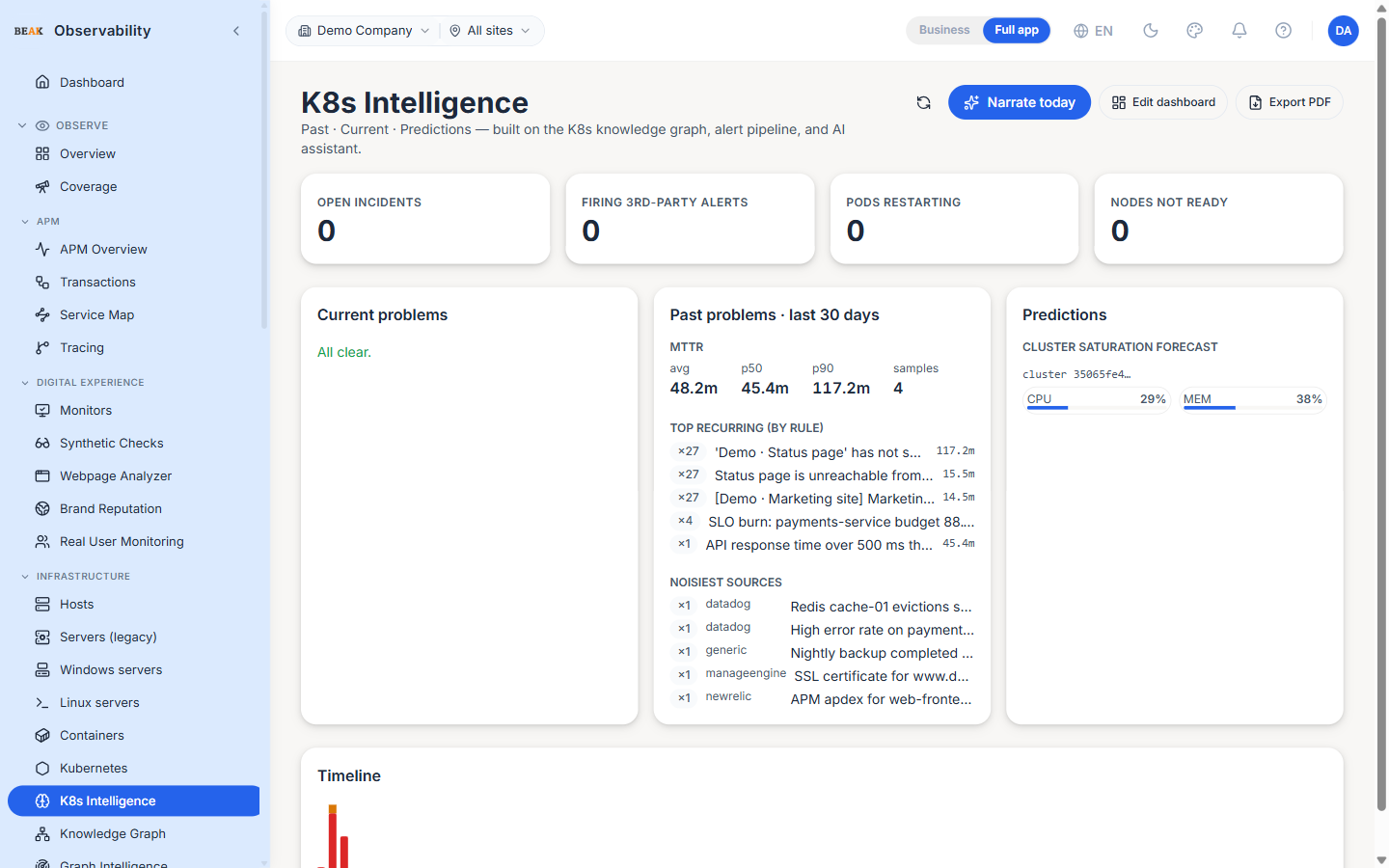
Headline Counters
Four tenant-wide counters sit at the top:
- Open incidents — Rule-engine incidents scoped to Kubernetes targets
- Firing 3rd-party alerts — Ingested alerts (Datadog, Splunk, etc.) tagged to a Kubernetes target and still in firing state
- Pods restarting — At-risk pods restarting more than the configured threshold in the last hour
- Nodes not Ready — Nodes whose status is anything other than
Ready
Each counter recolours when its bucket is non-zero — red for incidents and node issues, amber for alerts and pod restarts.
Three-Pane Layout
Current problems
Lists every problem currently fired. Four sub-buckets — open incidents, node pressure, ingested alerts, at-risk pods — are merged into one prioritised list. Clicking any row opens the matching detail (incident, alert, pod dashboard).
Past problems (last 30 days)
Aggregate counts and top-offender lists over the lookback window. Useful for retro and capacity review.
Predictions
Forward-looking signals derived from the platform's pattern-recognition layer. Each prediction includes a confidence indicator and the underlying data that informed it.
Blast Radius
Clicking any current problem opens the blast-radius dialog — a depth-3 walk of the knowledge graph from the affected resource, showing every downstream pod, service and endpoint that the problem can plausibly impact. Use this to size the urgency of a triage.
Narrate Today
The Narrate today button asks the AI assistant to summarise the day's Kubernetes activity in prose. The narrative covers the most-impactful incidents, the most-restarted pods, and any nodes that flapped readiness. If the AI provider isn't configured the panel falls back to a raw JSON snapshot.
Best Practices
- Open this page as the first step in K8s incident response — it surfaces the four most useful problem buckets without needing to flip tabs.
- The Past pane is the right place to start a capacity / reliability review; the Current pane is the right place during an active incident.
- Use Blast Radius before paging a wider team — if the downstream surface is one service, keep the loop small.
- The Narrate action is useful for daily / weekly standup notes — the prose can be copy-pasted directly into the team's status channel.
Related Pages
- Kubernetes — Cluster registration and resource inventory
- Knowledge Graph — The graph this page is built on
- Incidents — The unified incident feed