Ingested Incidents
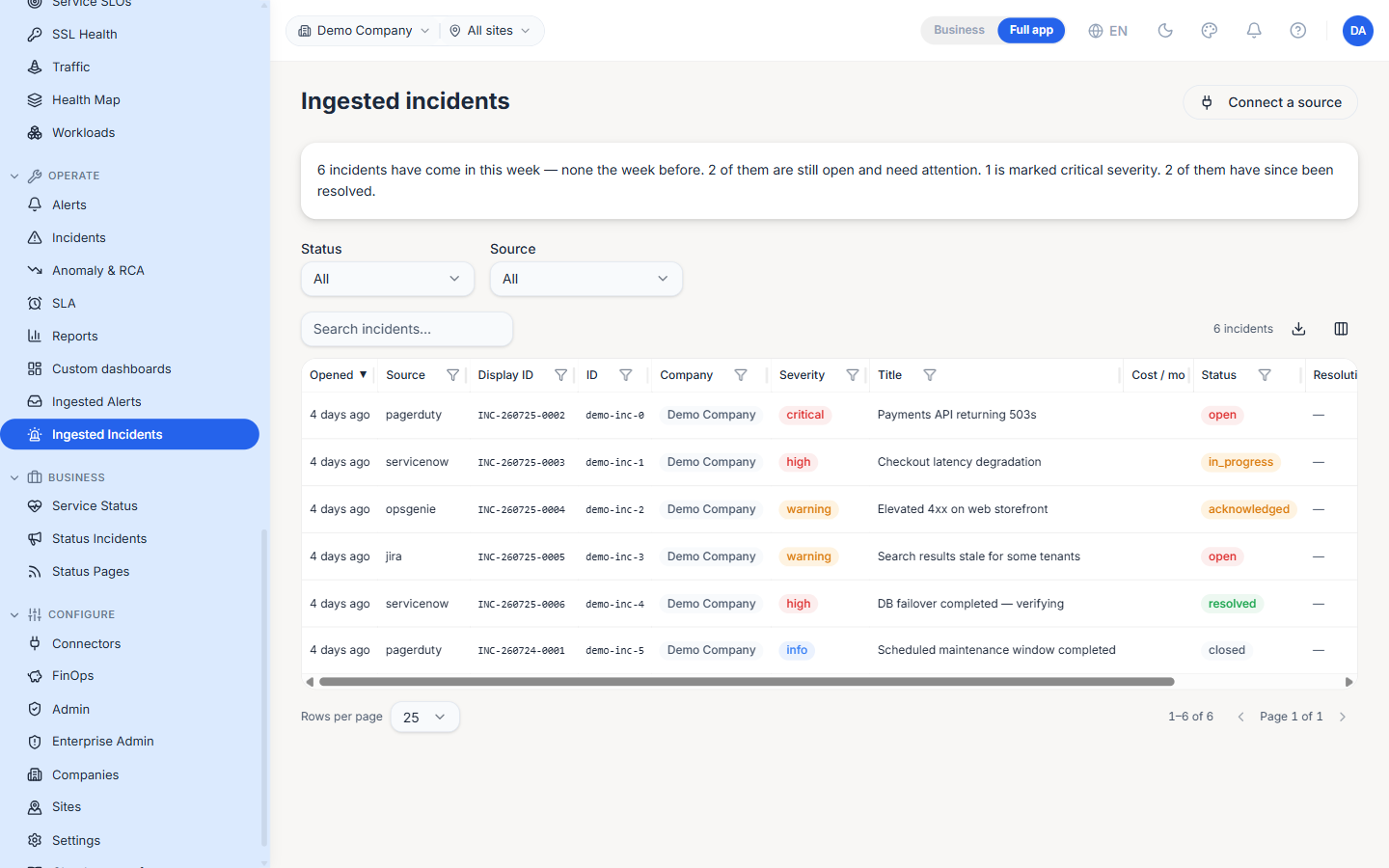
The Ingested Incidents page (/ingested-incidents, under the OPERATE group) is the dedicated feed of incidents pulled into the platform from external ITSM systems — PagerDuty, ServiceNow, Jira, Opsgenie and Statuspage. It is the incident-side companion to Ingested Alerts, and a source-scoped view of the ingested rows that also appear on the unified Incidents page.
Plain-language summary
A banner at the top states the current picture in one sentence — how many incidents arrived this week versus the week before, how many are still open and need attention, how many are critical, and how many have since been resolved. It reads as prose so it works for a status review without decoding the table below.
Filters
- Status — All / open / in_progress / acknowledged / resolved / closed.
- Source — The ITSM provider the incident came from (PagerDuty, ServiceNow, Jira, Opsgenie, Statuspage).
- Search — Free-text over the incident title and payload.
Columns
| Column | Description |
|---|---|
| Opened | Relative time since the incident opened |
| Source | The ITSM provider name |
| Display ID | Human-friendly incident id (INC-…) |
| ID | The upstream system's own identifier |
| Company | The company the incident is attributed to |
| Severity | critical / high / warning / info |
| Title | Incident summary |
| Cost / mo | Estimated monthly cost impact, when the FinOps integration supplies it |
| Status | open / in_progress / acknowledged / resolved / closed |
| Resolution note | Why a resolved incident was closed — empty otherwise |
| Custom | Free-form attributes from the source payload |
| Actions | Row actions, including the link back to the source system |
The table is sorted newest first (by Opened, descending) by default.
Company & site scoping
The feed honours the top-bar scope picker. Picking a company filters via the X-Company-ID header and picking a site adds X-Site-ID; the default All sites sends no site filter, so incidents pushed by an org- or company-scoped key with no site stay visible. An org-scoped ingest key can attribute each incident to the right company and site on the request, so one integration can feed many tenants.
Connect a source
The Connect a source action opens the setup guidance for the incident-ingest endpoint. The API keys are created under Settings → Incident Ingest. Ingested incidents can also be fetched and updated with the same key (an AI agent or integration can pull history and write triage results back), and a webhook channel can subscribe to the incident_ingested event to receive each record as it arrives — see the outbound agent webhooks on the Alerts page.
Note: A resolution note is required whenever an update transitions an incident to
resolved; a blank note is rejected. The note is saved with the incident and shown on the resolved row.
Best Practices
- Keep the scope picker set to a single company in MSP-style deployments — the org-wide view mixes every tenant's ITSM traffic.
- Enable the Cost / mo column when the FinOps integration is configured; it turns an incident list into a quick "what is this outage costing us" scan.
- Route with intent — subscribe a webhook channel to
incident_ingestedso an on-call agent is notified the moment an ITSM incident lands, rather than polling this page.
Related Pages
- Incidents — The unified feed that blends rule-engine, ingested and monitor-down incidents
- Ingested Alerts — The alert-side equivalent of this page
- Settings — Incident-ingest API keys and multi-company / multi-site ingest