Beak M365 License Optimizer — Microsoft 365 License Management & Cost Optimization
Beak M365 License Optimizer is a comprehensive Microsoft 365 license management platform that provides real-time visibility into license utilization, cost trends, and optimization opportunities — enabling organizations to reduce M365 spending by up to 68% through automated downgrade, removal, and reallocation recommendations across multi-tenant environments.
Key Capabilities
Real-Time License Utilization Analytics
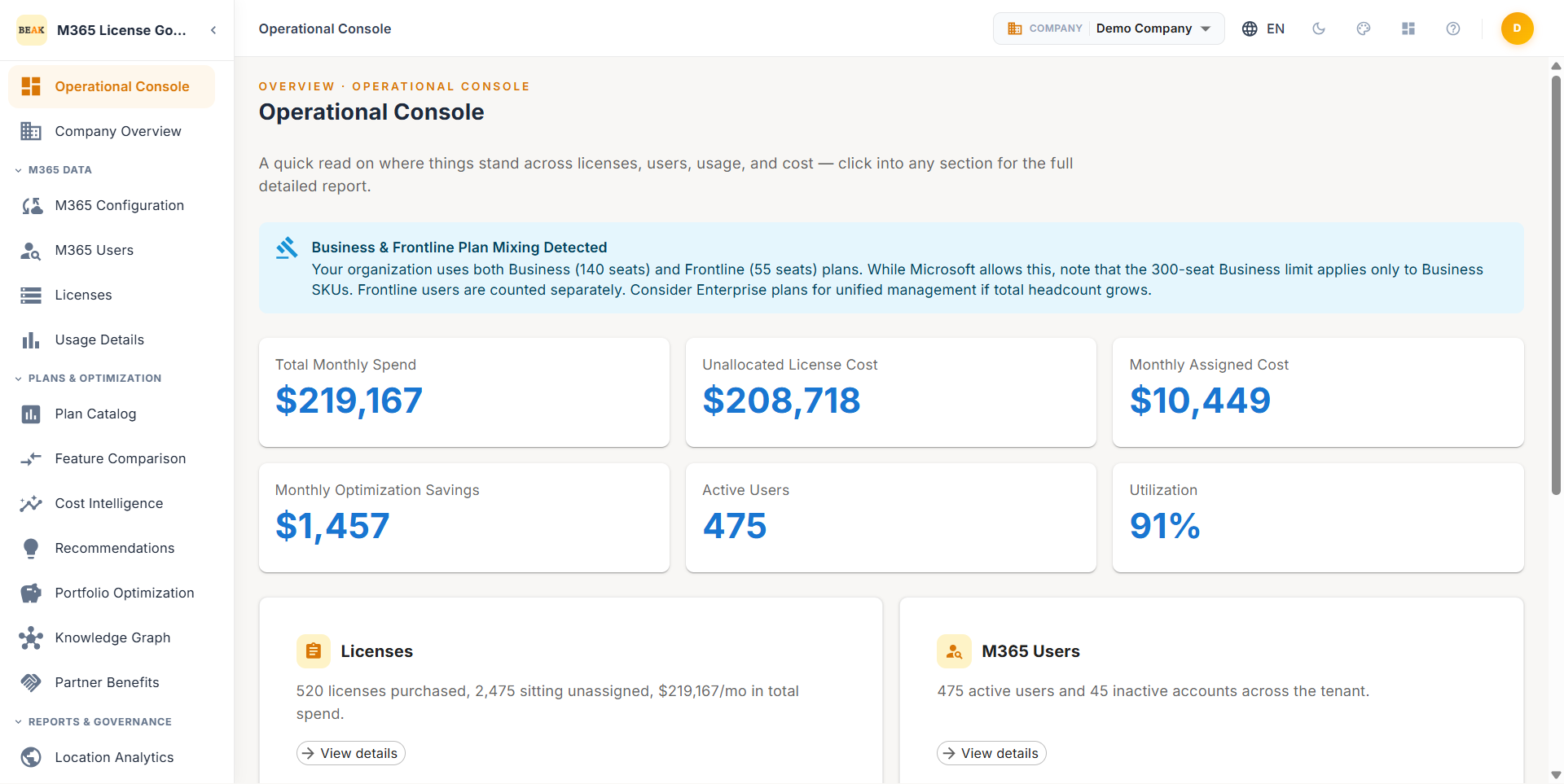
Monitor license allocation, active usage, and idle seats across your entire M365 estate. The dashboard surfaces KPIs including Total Licenses, Active Users, Monthly Spend, Potential Savings, and Utilization percentage — providing immediate clarity on where budget is being consumed.
Automated Optimization Recommendations
AI-driven analysis generates actionable recommendations across three categories — Downgrades, Removals, and Upgrades — with per-user cost impact calculations. Recommendations identify inactive users, over-licensed accounts, and automation mailboxes that can be migrated to lower-cost plans.
License Compliance & Plan Governance
Proactive compliance warnings alert administrators when license counts exceed plan limits — such as Business plan seat caps — before Microsoft enforcement actions occur. Track subscription health, renewal dates, and seat allocation across all active plans.
Cost Trend & Savings Forecasting
Visualize monthly cost trajectories alongside optimized spend projections. The Cost Trend chart compares current spend against the achievable optimized baseline, while the Savings Breakdown quantifies the contribution of each recommendation category.
Multi-Tenant & Multi-Company Support
Manage multiple M365 tenants and organizational entities from a single console. Each tenant maintains independent sync status, user assignments, and optimization profiles while rolling up to consolidated reporting views.
Comprehensive Usage Analytics
Deep-dive into workload-level usage data across Exchange mailboxes, OneDrive storage, and Microsoft Teams activity. Identify which users actively consume the services included in their assigned license to right-size allocations.
Reports & Governance
Generate and schedule reports across 9 report types covering license allocation, cost analysis, optimization impact, and location-based analytics. Reports can be emailed on a recurring schedule or exported on demand.
Plan Catalog & Feature Comparison
Browse the full M365 plan catalog with side-by-side feature comparison to evaluate downgrade and upgrade paths. Includes Microsoft Partner Network (MPN) benefit tracking for eligible organizations.
Dashboard
The Beak M365 License Optimizer Dashboard provides a real-time overview of your Microsoft 365 license estate. Five KPI cards display the key metrics at a glance, followed by optimization insights, cost charts, and savings opportunities.
KPI Cards
- Total Licenses — Total number of M365 licenses allocated across all active subscriptions
- Active Users — Count of users actively consuming licensed services, with inactive user count displayed alongside
- Monthly Spend — Current monthly expenditure across all M365 licenses
- Potential Savings — Estimated monthly savings achievable by implementing all optimization recommendations
- Utilization — Overall license utilization rate across the estate
Dashboard Charts
- License Distribution — Donut chart showing Top 10 SKUs by license count
- Monthly Cost by License — Bar chart breaking down monthly cost per license type
- Cost Trend — Line chart comparing current spend vs. optimized spend over time
- Savings Breakdown — Bar chart quantifying savings by recommendation category (Downgrades, Removals, Upgrades)
For detailed dashboard documentation, see Dashboard.
Navigation Structure
Beak M365 License Optimizer organizes its features into four main sections accessible from the left sidebar.
M365 Data
| Module | Description |
|---|---|
| Dashboard | Real-time KPIs, optimization insights, cost trends, and savings opportunities |
| Company Overview | Manage company entities within the tenant for multi-company governance |
| M365 Configuration | Tenant connection settings and sync configuration |
| M365 Users | M365 user directory with license assignments and activity status |
| Licenses — SKU Summary | Aggregated view of all license SKUs with allocated, consumed, and available counts |
| Licenses — User License Assignments | Per-user license assignment details with source, expiry, and status indicators |
| Licenses — Subscriptions | Active subscription inventory with renewal dates, seat counts, and editable source classification |
| Licenses — License Groups | Group-based license assignment policies managed through Azure AD security groups |
| Usage — Mailbox | Exchange Online mailbox activity and storage metrics |
| Usage — OneDrive | OneDrive for Business storage consumption and sharing activity |
| Usage — Teams | Microsoft Teams usage analytics including calls, meetings, and chat messages |
Plans & Optimization
| Module | Description |
|---|---|
| Plan Catalog | Full Microsoft 365 plan inventory with pricing and feature details |
| Feature Comparison | Side-by-side plan feature comparison for downgrade and upgrade evaluation |
| Recommendations | Actionable optimization recommendations with per-user cost impact |
| Partner Benefits (MPN) | Microsoft Partner Network benefit tracking and eligible license discounts |
Reports & Governance
| Module | Description |
|---|---|
| Location Analytics — Country | License distribution and cost analysis by country |
| Location Analytics — City | License distribution and cost analysis by city |
| Location Analytics — Department | License distribution and cost analysis by department |
| Reports | 9 report types with email scheduling, on-demand export, and recurring delivery |
| Procurement | License procurement planning and purchase order tracking |
| License Allocation | Allocation policy management and seat distribution rules |
| Audit Log | Comprehensive audit trail of all license changes, sync events, and user actions |
Administration
| Module | Description |
|---|---|
| Tenants | Multi-tenant configuration, connection management, and sync scheduling |
| User Management | Platform user accounts, roles, and access provisioning |
| Role Permissions | Role-based access control definitions and permission assignments |
| Sync Status | Real-time sync health monitoring with last sync timestamps and error logging |
| Email Settings | Email delivery configuration for reports, alerts, and notifications |
| Settings | Global platform settings, preferences, and display configuration |
Getting Started
- Connect Your Tenant — Navigate to Administration > Tenants and register your Microsoft 365 tenant using OAuth consent. Grant the required read permissions for user, license, and usage data.
- Run Initial Sync — Trigger a full data sync from Administration > Sync Status. The initial sync imports users, license assignments, subscriptions, and usage data.
- Review the Dashboard — Open the Dashboard to review KPI cards, optimization insights, and cost trends across your license estate.
- Evaluate Recommendations — Navigate to Plans & Optimization > Recommendations to review downgrade, removal, and upgrade suggestions with per-user cost impact.
- Address Compliance Warnings — Resolve any Business License Limit warnings by migrating affected users to Enterprise plans before Microsoft enforcement.
- Schedule Reports — Configure recurring report delivery from Reports & Governance > Reports to maintain ongoing visibility into license spend and optimization progress.
Documentation
- Dashboard — KPI cards, optimization insights, cost trends, and savings opportunities