Beak ELM — Enterprise License Management
Beak ELM is an enterprise license management platform that consolidates every software license across SaaS and on-prem into a single inventory, tracks contracts and renewals, monitors entitlement-vs-consumption compliance, and surfaces optimization recommendations to reclaim unused seats. It pulls live data from the Microsoft 365 (M365Lite) integration, the BeakITSM CMDB, RMM endpoint software inventory, and 100+ vendor connectors to keep the inventory current without manual upkeep.
Key Capabilities
Centralized License Inventory
Every license — SaaS subscription, perpetual install, or named-user agreement — lives in a single License Inventory. Each record carries vendor, data source, assigned and active seat counts, utilization %, status, compliance flag, per-seat and total monthly cost. CSV import / export and 100+ connectors keep the inventory in sync without manual re-entry.
Endpoint Software Inventory & Devices
The RMM (Endpoint Management) connector — or a direct export upload — feeds an install-level Endpoint Inventory: every software title on every managed endpoint, classified by last-usage recency into reclaim buckets, with drill-downs by application, user, and device. The Devices page lists the endpoint system details behind those installs.
Contracts & Renewal Tracking
The Contracts module tracks every signed agreement — subscription, enterprise agreement, perpetual — with start, end, and renewal dates, total and annual value, payment terms, and auto-renew flag. An order-form import registers signed agreements without re-keying terms, and upcoming renewals surface as alerts so procurement isn't caught off-guard.
Compliance Posture
The Compliance Dashboard flags every license as Compliant, Over Licensed, or Under Licensed and produces a single tenant compliance %. A risk score per license drives the Audit Readiness metric and Active Alerts list, so audit prep is continuous rather than reactive.
License Optimization
The License Optimization page splits recommendations by data source — a contract-based endpoint-software surface, Microsoft 365 subscription optimization synced from M365Lite, and Smartsheet seat optimization. Thresholds for unused licenses, inactive users, duplicate tools, tier mismatch, and growth anomalies are tunable in Global Settings.
Software Classification & Savings
Software Classification auto-classifies every unique installed title as paid, free, or open source and assigns a USD market price, turning raw discovery into a priced estate; approving a title generates a draft contract for the active company. The Savings Engine ranks installed-software savings by confidence-weighted annual value, and Cost Optimization runs ten disjoint statistical models over connector spend.
Cost Management
Cost Management rolls license costs into YTD / MTD spend, with views by Vendor, Category, Department, and a forecast band. Spend trend over recent months is visible from the cost module's Overview tab.
Alerts & Notifications
A rules-based alert engine watches for expiring licenses, compliance gaps, spend growth, inactive users, and low utilization. Active alerts are tagged critical, warning, or info; thresholds per rule are tunable from the Settings tab. Notification History records every delivery.
Reports & Exports
Thirteen report dashboards — from License Summary, Compliance Reporting, and Vendor Spend through to Claude Executive Brief, Device-Level Visibility, and Executive Reporting — render visual KPIs, charts, and exportable tables, gated per report by role. The Report Center under Global Settings exposes additional one-off Excel downloads.
Connectors & Integrations
110 available connectors cover SaaS vendors (Adobe, Atlassian, AWS, Datadog, GitHub, HubSpot, Microsoft, Okta, Salesforce, Slack, Snowflake, Zoom), AI providers (Anthropic, Azure OpenAI, Cohere, Google Gemini, Hugging Face, OpenAI), and categories from Identity & Security to HRIS. The CMDB integration pulls software CIs and license data from BeakITSM; the Microsoft 365 integration imports subscriptions, user assignments, and usage from M365Lite; a FinOps connection feeds cost recommendations.
Multi-Tenant, Multi-Company
A tenant can host many companies. The company switcher in the top bar scopes every page to a single company; admins can manage tenants, companies, users, roles, and SSO from Global Settings. Users carry per-company access alongside their role.
Navigation Structure
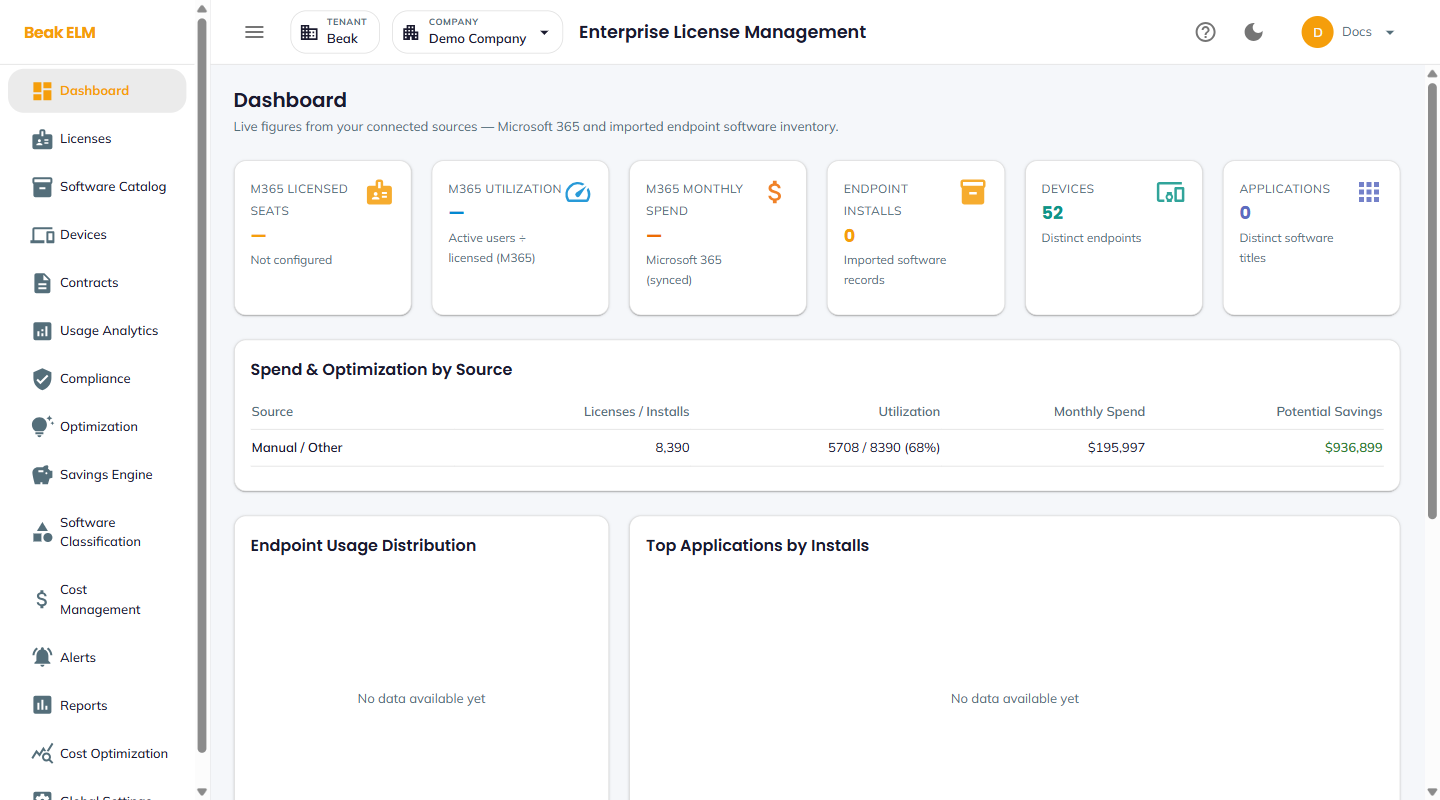
Beak ELM organizes its features into a single left-hand sidebar with twelve sections.
| Module | Description |
|---|---|
| Dashboard | Live KPIs from connected sources — M365, endpoint inventory, spend by source |
| Licenses | License inventory with assignment, activity, compliance, and monthly cost |
| Software Catalog | Catalog of installed and approved software products |
| Devices | Endpoint system details from RMM or import |
| Contracts | Contract register with renewal dates and annual value |
| Usage Analytics | License, endpoint software, and Microsoft 365 usage |
| Compliance | Compliance posture, audit readiness, expiring-license alerts |
| Optimization | Savings recommendations by data source |
| Cost Management | YTD / MTD spend, vendor / category / department, forecast |
| Alerts | Active alerts, alert rules, notification history, thresholds |
| Reports | Nine dashboard reports with Excel export |
| Global Settings | Platform configuration, integrations, IAM, branding |
The install-level Endpoint Inventory view lives under Usage Analytics → Endpoint Software.
Productivity Model
Every license in Beak ELM carries six dimensions that drive every other module:
- Assigned — Number of seats / installs currently assigned to users
- Active — Number of assigned seats with recent activity
- Utilization —
Active / Assignedas a percentage - Compliance —
Compliant,Over Licensed, orUnder Licensed - Monthly Cost — Per-seat cost and total monthly cost computed from unit cost × billing period
- Status —
Active,Expired, or pending — drives whether the license counts toward live spend
Compliance % on the compliance dashboard is a weighted aggregate of these per-license values across the active inventory.
Data Model
ELM correlates activity across these primary entities:
- Licenses — Purchased software entitlements with type, metric, and lifecycle
- Software Products — Catalog of vendor / publisher products (SaaS, IaaS, On-Prem)
- Endpoint Installs & Devices — Install records and the endpoints they sit on, from RMM discovery
- Contracts — Signed agreements that govern one or more licenses
- Vendors / Publishers — The supplier organization (Microsoft, Adobe, Salesforce, etc.)
- Users — Employees who consume license seats; sourced from Azure AD, M365, or local
- Departments — Organizational rollup for usage and cost distribution
- Recommendations — Optimization actions with type, savings, and status
- Alerts — Rule-driven notifications with severity and resolution state
- Connectors — External integrations (SaaS APIs, CMDB, M365, RMM, FinOps) that feed data
- Tenants & Companies — Multi-tenant container for licensed-customer scope
Getting Started
- Configure tenant identity — Set platform name, tagline, and branding in Global Settings → Branding.
- Connect data sources — Enable the CMDB, Microsoft 365, and FinOps integrations, configure SSO / OAuth, and set up Azure AD Sync for user provisioning.
- Configure connectors — Pick from the 109 available Connectors for vendor-side license and usage data, including the RMM connector for endpoint inventory.
- Tune optimization thresholds — Adjust unused-license %, inactive-user days, duplicate overlap, and tier utilization in Optimization Thresholds.
- Import licenses and contracts — Use
Import CSVon the Licenses page, then add Contracts (orImport Order Form) to bind licenses to agreements. - Load endpoint inventory — Import an RMM export on Endpoint Inventory and device details on Devices if the RMM connector isn't wired up yet.
- Review compliance and alerts — Run
Recalculate Complianceon Compliance andRun Alert Checkon Alerts to see initial gaps. - Roll out to users — Add Users with per-company access, assign Roles, then point them at the Dashboard and Reports.
Key Metrics
| Metric | Value |
|---|---|
| Available connectors | 109 |
| Default unused-license threshold | 10% |
| Default inactive-user days | 90 |
| Default duplicate overlap | 50% |
| Default tier utilization threshold | 20% |
| Default redundancy Jaccard score | 0.7 |
| Default growth-anomaly std-devs | 2 |
| Built-in roles | Tenant Admin, Tenant Viewer (+ custom roles) |
| Backend | FastAPI + PostgreSQL |
| Platform version | 1.0.0 |
Access & Product Entitlement
Beak ELM is a Beak platform product — access is governed by your identity in Beak IAM (BEAKIAM). When you sign in through the unified login, your token carries the set of products your assigned role grants. To open ELM, that set must include the elm product entitlement; otherwise the request is rejected with 403 — Not entitled to product 'elm'.
- Product entitlements come from your role's product list in Beak IAM (see Roles & Permissions). If you receive a 403, ask a tenant admin to add the ELM product to your role.
- While a tenant is still on legacy tokens (before the Keycloak pass-through cutover), tokens carry no
productsclaim and the gate fails open — existing logins are unaffected until pass-through is enabled. - Operators can disable the gate per environment with
REQUIRE_PRODUCT_ENTITLEMENT=false(defaulttrue). This is an escape hatch, not a normal setting.
Documentation
- Dashboard — Live KPIs from connected sources
- Licenses — License inventory
- Software Catalog — Approved product catalog
- Devices — Endpoint system details
- Endpoint Inventory — Install-level endpoint software and usage
- Contracts — Contract register
- Usage Analytics — License / endpoint / M365 usage
- Compliance — Compliance dashboard and audit readiness
- Optimization — Savings recommendations
- Cost Management — Spend by vendor, category, department
- Alerts — Alert rules, thresholds, and notification history
- Reports — Nine dashboard reports with Excel export
- General Settings — Login security, ingest toggles, platform overview
- Optimization Thresholds — Tune the optimization engine
- Integrations — CMDB, Microsoft 365, and FinOps sync
- Connectors — 109 vendor connectors
- Software Cost Catalog — Per-seat cost overrides
- SSO / OAuth — Microsoft and Google SSO
- Azure AD Sync — User provisioning from Entra
- Employee Directory — Synced employee records
- User Management — Users, roles, and company access
- Roles & Permissions — Role permission matrix
- Tenants & Companies — Multi-tenant management
- Branding — Platform identity and login page
- Email Settings — SMTP / Microsoft 365 delivery
- Email Templates — Notification templates
- Scheduled Reports — Report Center for one-off Excel exports
- Audit Log — System activity log
- Demo Data — Reload the demo company dataset