AI Analysis & Historic Data Analysis
Beak Observability can carry two analyses on every alert and incident, written by your external recommendation agent — either pushed in with the alert/incident or written back afterwards through a dedicated callback endpoint. Beak never generates them itself. Each is optional, each is independent of the other, and each accepts a structured JSON object or a plain string.
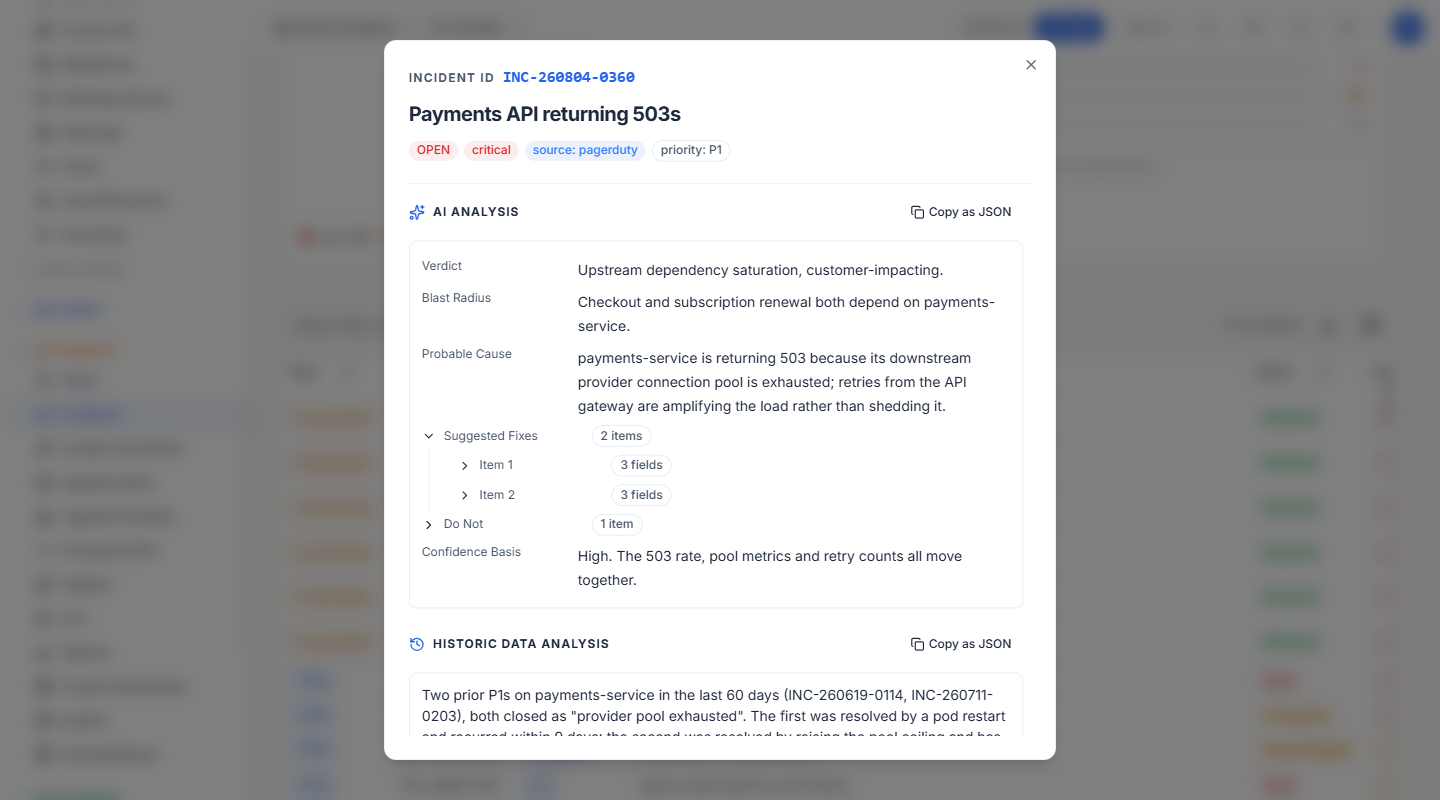
The two fields
- AI analysis (
ai_analysis) — The agent's reading of the alert or incident as it stands now: probable cause, and what to do about it. - Historic data analysis (
historic_data_analysis) — The agent's comparison of this signal against past and already-resolved data: has this happened before, and what fixed it.
Either field accepts two shapes, on every endpoint:
- A JSON object or array — A structured answer with its own keys, nested as deeply as you like.
- A plain string — Free text.
You can mix them in one call: one field structured, the other a string.
Note: These are distinct from Probable cause, the auto-RCA narrative Beak's own generator writes on ingested incidents.
Where they appear
Both analyses appear in the row-detail dialog on two pages, which between them cover all four alert and incident surfaces. Open any row to see them.
| Page | Surfaces covered |
|---|---|
| Alerts | Rule-fired and ingested alerts |
| Incidents | Promoted and ingested / ITSM incidents |
The standalone Ingested Alerts and Ingested Incidents pages have their own lighter detail dialogs and do not show the analyses — open the row from Alerts or Incidents instead.
Each analysis is its own section, and a section stays hidden until its field has content.
- A structured analysis — Presented the same way as custom data: one row per key, the key humanised into a label, values formatted by type (dates, links, yes/no), and nested objects and arrays collapsed behind a chevron you can expand.
- A plain string — Shown as text, with a Show more / Show less toggle when it is long enough to bury the rest of the dialog.
Copy as JSON puts the field on the clipboard as raw JSON, in the same form you would send it in a request body — the field keyed by its own name:
{
  "ai_analysis": {
    "suggested_fixes": [ { "recency": "Resolved 2026-07-09.", "recommendation": "…" } ],
    "comparison_summary": "Same symptom, different host."
  }
}
Note: A section appears whenever its field holds a value, whether the company's recommendation source is the AI agent or Beak's built-in engine. The Get AI recommendation button is shown only for companies configured to use the agent, since that is the only case where a request can succeed.
Requesting an analysis from the UI
On an alert or incident whose company uses the AI agent, Get AI recommendation fires the outbound webhook and returns immediately. The dialog then shows an agent is analysing state and polls until the agent calls back. That state is stored server-side, so it survives a page reload; it stops after five minutes and offers Request again if no callback arrives.
One request produces both analyses — there is no separate trigger for the historic comparison.
Supplying them at ingest time
Both are optional top-level keys on the ingest payload, for any provider:
POST /api/v1/ingest/alerts/{provider}
POST /api/v1/ingest/incidents/{provider}
{
  "alert_id": "cpu-web-01",
  "summary": "CPU above 95% for 12 minutes",
  "severity": "critical",
  "ai_analysis": {
    "suggested_fixes": [
      { "recency": "Resolved 2026-07-09.", "recommendation": "Raise the pool ceiling and redeploy." }
    ],
    "confidence_basis": "Moderate — same symptom, different host.",
    "source_alert_ids": ["AL-260709-0003"]
  },
  "historic_data_analysis": "3 similar alerts in 90 days, all resolved by scaling the pool."
}
Required scope: ingest:alerts or ingest:incidents. The response echoes both fields back as stored, so you can confirm what Beak kept.
A re-ingest that omits an analysis keeps the stored one, so a recurring signal never loses the agent's earlier write.
Writing them back (the agent callback)
Three endpoints, one per surface, each accepting the UUID or the display id (AL-… / INC-…):
| Surface | Endpoint |
|---|---|
| Alerts (rule-fired or ingested) | PUT /api/v1/alerts/{origin}/{id}/ai-analysis — origin is rule or external |
| Promoted incidents | PUT /api/v1/promoted-incidents/{id}/ai-analysis |
| Ingested / ITSM incidents | PUT /api/v1/incident-ingest/incidents/{id}/ai-analysis |
All three take the same body. Send either field or both, each as an object or a string:
{
  "ai_analysis": {
    "suggested_fixes": [
      { "recency": "Resolved 2026-07-09.", "recommendation": "Verify disk space and run the standard cleanup." }
    ],
    "source_alert_ids": ["AL-260709-0003"],
    "comparison_summary": "Same symptom, different host."
  },
  "historic_data_analysis": "No prior occurrences of this signature on this service."
}
Rules for the body:
- At least one field is required — An empty body is rejected with
422rather than accepted as a silent no-op. - A field you omit is left untouched — Writing one analysis never blanks the other, and there is deliberately no way to clear an analysis through this endpoint.
- Each field is capped at 20,000 characters — Measured on the stored value, so for a structured analysis, on its serialised JSON.
Note: Authenticate these by-id endpoints with the
X-API-Keyheader. Passing the key as a?key=query parameter or asAuthorization: Bearer beak_…is rejected before the request reaches the route.
Reading them back
Both fields are returned on the alert and incident read endpoints — GET /api/v1/alerts/{origin}/{id}, GET /api/v1/promoted-incidents, GET /api/v1/ingest/alerts, GET /api/v1/incident-ingest/incidents and their by-id forms.
Note: Both fields are stored as text, so a structured analysis comes back as a JSON string, not as a nested object — parse it (
JSON.parseor your language's equivalent) to read it. What you get back is the canonical serialisation of what you sent, so it round-trips exactly.
{
  "id": "…", "status": "firing",
  "ai_analysis": "{\"suggested_fixes\": [{\"recency\": \"Resolved 2026-07-09.\"}]}",
  "historic_data_analysis": "3 similar alerts in 90 days, all resolved by scaling the pool."
}
API-key scopes
Create keys under Settings → API keys, ticking only the scopes the agent needs.
| Scope | Grants |
|---|---|
Write AI analysis (alerts:write_ai_analysis) | Write both analyses onto any alert — rule-fired or ingested — and nothing else. |
Write AI analysis (incidents:write_ai_analysis) | Write both analyses onto any incident — promoted or ingested — and nothing else. |
ingest:alerts / ingest:incidents | Supply the fields on the ingest POST. |
alerts:read / alerts:read_internal, incidents:read / incidents:read_internal | Read them back. |
The two write scopes are deliberately narrow:
- A key holding only
alerts:write_ai_analysis— Cannot change status, severity, triage notes or resolution. A leaked or misbehaving agent key can only ever write the analysis fields. - A broad key with
alerts:write— Cannot reach the analysis endpoint, and sending the analysis fields to the general update endpoint has no effect; they are not writable there. - One scope per entity type — An agent that analyses promoted and ingested incidents needs one scope, not two.
Field reference
| Field | Type | Notes |
|---|---|---|
ai_analysis | JSON object, array, or string; nullable | Max 20,000 characters, measured once serialised. |
historic_data_analysis | JSON object, array, or string; nullable | Max 20,000 characters, measured once serialised. |
ai_analysis_requested_at | Timestamp, nullable | Stamped when Get AI recommendation dispatches the webhook. Drives the analysing state and covers both analyses — one request produces both, so there is no second timestamp. |
Best Practices
- Send structured JSON when the answer has parts — Keys like
suggested_fixes,comparison_summaryandsource_alert_idsbecome labelled, expandable rows an operator can scan. A single wall of text cannot be navigated. - Keep key names stable — Labels are derived from your keys, so renaming a key changes what operators see.
- Reference the alerts you compared against — Put their display ids in the payload (for example
source_alert_ids) so an operator can trace the agent's reasoning back to real records. - Scope the agent's key to the analysis fields only — Use
alerts:write_ai_analysis/incidents:write_ai_analysisrather than a broad write key, so the agent can never alter status or resolution. - Send only the field you refreshed — Omitted fields are preserved, so a partial update is safe and cheaper than resending both.
- Watch the 20,000-character ceiling on structured payloads — Serialisation adds quoting and punctuation, so an object is larger than the text it contains.
Related Pages
- Alerts — The unified alert feed, where both analyses appear on rule-fired and ingested rows.
- Ingested Alerts — The ingested-alert feed and the alert-ingest API.
- Incidents — Promoted incidents.
- Ingested Incidents — Ingested / ITSM incidents.
- Settings — API keys and scopes.