License Optimization
The License Optimization page is the savings surface for Beak ELM, split into tabs by data source — Endpoint Software, Microsoft 365, and Smartsheet. Each tab surfaces reclaim and right-sizing recommendations for its source, tuned by the thresholds in Optimization Thresholds.
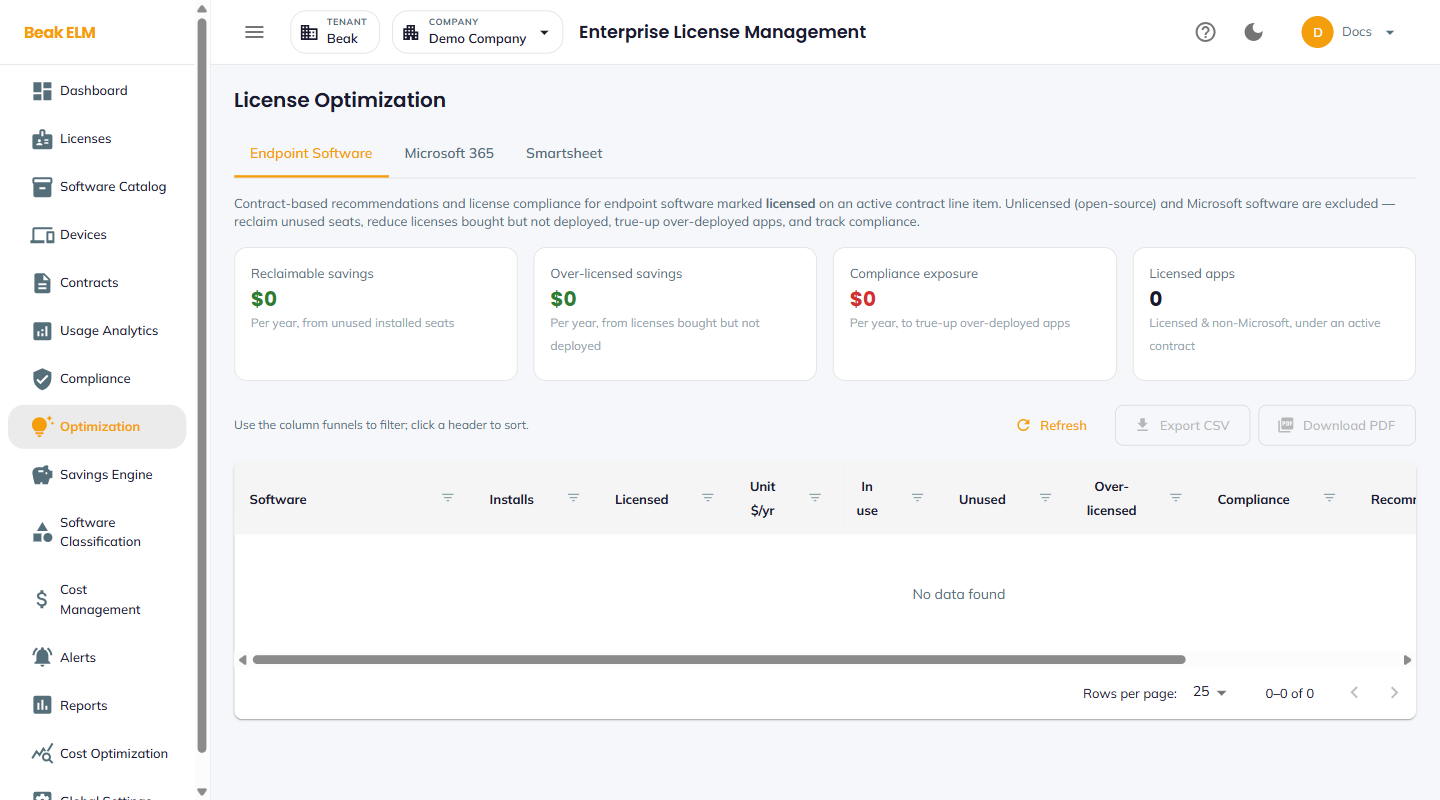
Endpoint Software
The default tab. It produces contract-based recommendations and license compliance for endpoint software marked licensed on an active contract line item. Unlicensed (open-source) and Microsoft software are excluded, so the tab reports on software you actually pay for: reclaim unused seats, reduce licenses bought but not deployed, true up over-deployed apps, and track compliance.
Titles reach this tab through Software Classification — a title classified as paid and approved becomes a contract line item the tab can measure against.
KPI Tiles
- Reclaimable savings — Per year, from unused installed seats
- Over-licensed savings — Per year, from licenses bought but not deployed
- Compliance exposure — Per year, to true up over-deployed apps
- Licensed apps — Licensed and non-Microsoft titles under an active contract
Recommendations Table
| Column | Description |
|---|---|
| Software | Title the recommendation applies to |
| Installs | Discovered installs across endpoints |
| Licensed | Seats licensed on the contract line item |
| Unit $/yr | Annual unit cost |
| In use | Installs with recorded usage |
| Unused | Licensed seats with no usage — the reclaim candidate |
| Over-licensed | Licensed seats beyond what is deployed |
| Compliance | Compliance position for the title |
| Recommendation | The suggested action |
Use the funnel icon in each column header to filter, and click a header to sort. Refresh re-runs the calculation; Export CSV and Download PDF export the recommendations, following the filters currently applied on screen.
Note: The tab is empty until endpoint software is both imported and classified onto an active contract. An empty table with a populated Endpoint Inventory usually means classification or contract binding, not discovery, is the gap.
Microsoft 365
License optimization recommendations for Microsoft 365 subscriptions, synced from the M365Lite service — unused seats, inactive users, and tier-mismatch opportunities across M365 SKUs.
The tab requires the Microsoft 365 integration to be fully configured, including the SSO Signing Secret — set it under Global Settings → Integrations → Microsoft 365 (M365Lite) and use the same value on the M365Lite side. Until then the tab shows a configuration prompt.
Smartsheet
Seat and usage optimization for Smartsheet, driven by the Smartsheet connector. The tab requires that connector to be configured for the active company — until then it reports Smartsheet connector is not configured for this company. Connectors are scoped per company, so configure it for each company you want the tab to cover. See Connectors.
Recommendation Types
The optimization engine produces several classes of recommendation, each tunable from Optimization Thresholds:
- Unused License — Seats with utilization below the
Unused License Threshold % - Inactive User — User account with no activity beyond
Inactive User Days - Tier Mismatch — User assigned to a higher-cost SKU than their usage warrants (driven by
Tier Utilization %) - Duplicate Tool — Multiple tools serving the same function (driven by
Duplicate Overlap %andRedundancy Jaccard Score) - Growth Anomaly — Sudden license-count growth above
Growth Anomaly Std Devs
Best Practices
- Classify and approve paid titles in Software Classification before working the
Endpoint Softwaretab — an unclassified estate produces an empty recommendation table regardless of how much inventory has been imported. - Configure the Microsoft 365 integration early — M365 subscriptions are typically the largest optimization opportunity in the portfolio.
- Tune Optimization Thresholds to your organization's tolerance for waste vs noise before acting on the queue — defaults are a starting point, not a policy.
- Treat
Compliance exposureas the urgent number andReclaimable savingsas the planned one — the first is money you may owe at audit, the second is money you can choose to stop spending. - Filter before exporting:
Export CSVandDownload PDFfollow the on-screen view, so a filtered table gives a distributable list rather than the full estate.
Related Pages
- Licenses — License records the recommendations target
- Software Classification — Classifies and prices the titles this tab reports on
- Savings Engine — Confidence-ranked savings across installed software
- Usage Analytics — Underlying usage that drives the recommendations
- Endpoint Inventory — Install-level reclaim signals
- Optimization Thresholds — Tune the engine