Connectors
The Connectors tab is the marketplace of vendor-specific data sources. ELM ships with 110 available connectors spanning SaaS vendors (Adobe, Atlassian, AWS, Datadog, GitHub, HubSpot, Microsoft, Okta, Salesforce, Slack, Snowflake, Zoom), AI providers (Anthropic Claude, Azure OpenAI, Cohere, Google Gemini, Hugging Face, OpenAI), and categories like Identity & Security, HRIS, Cloud Infrastructure, DevOps, Project Management, and Collaboration. Each connector pulls usage, assignment, and billing data into the ELM inventory without manual upkeep. Connectors are scoped per-company — switch the company in the header dropdown to manage another company's connectors.
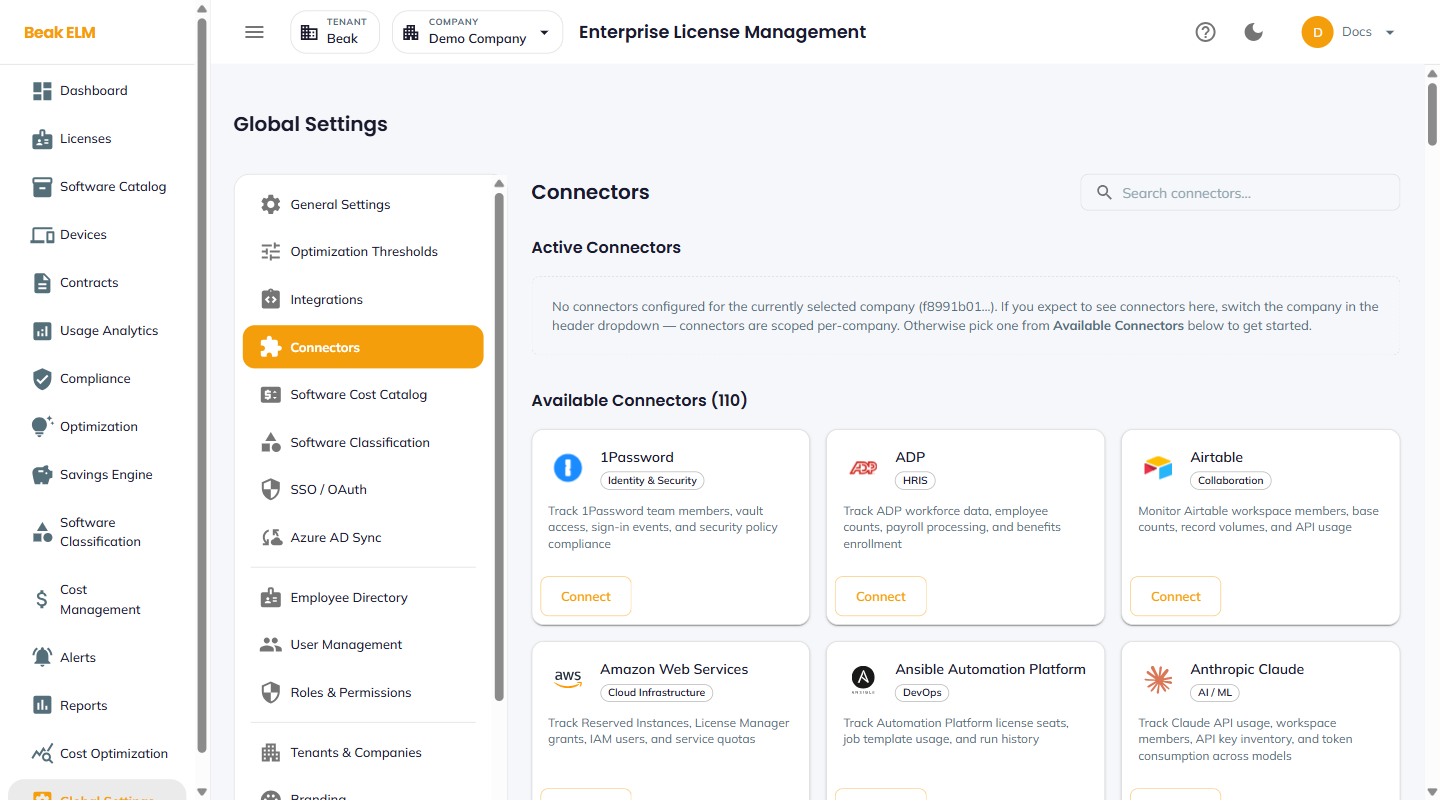
Active Connectors
The top section lists every connector currently configured for the active company. Each card shows:
- Name and provider key — e.g.
Anthropic Claude/anthropic_claude - Status chip —
connected(green) ordisconnected(red) - Last sync — Timestamp of the most recent successful sync
- Auth method — e.g.
REST · api_key - Actions —
Configure,Sync Now,Dashboard
The Dashboard action opens a connector-specific status panel with sync history and error details.
Available Connectors
A grid of every connector available for activation, organized by category (AI / ML, Identity & Security, HRIS, Cloud Infrastructure, DevOps, Collaboration, Project Management, etc.). Each card shows the provider name, category chip, and a one-line description of what the connector tracks. The Connect button opens the auth flow — typically an API key or OAuth handshake.
Examples:
- 1Password — Track 1Password team members, vault access, sign-in events, and security policy compliance
- ADP — Track ADP workforce data, employee counts, payroll processing, and benefits enrollment
- Amazon Web Services — Track Reserved Instances, License Manager grants, IAM users, and service quotas
- Anthropic Claude — Track Claude API usage, workspace members, API key inventory, and token consumption across models
- Ansible Automation Platform — Track Automation Platform license seats, job template usage, and run history
- Airtable — Monitor Airtable workspace members, base counts, record volumes, and API usage
Best Practices
- Connect the highest-spend vendors first — every active connector replaces a manual CSV refresh and keeps the inventory current automatically.
- Pair an AI provider connector (Anthropic, OpenAI) with the
Tier Mismatchrecommendation in Optimization to spot users assigned to expensive models who'd be fine on cheaper ones. - A connector card showing
disconnectedfor more than 24 hours often means an expired API key — re-authenticate before the data lag affects compliance metrics. - Use the
Dashboardaction on a slow-syncing connector to inspect rate-limit and error context before opening a support ticket.
Related Pages
- Integrations — CMDB and M365 source-of-truth integrations
- Software Cost Catalog — Per-seat cost overrides for products surfaced by connectors