Reports
The Reports page is the visual reporting surface for Beak ELM. It opens as a chooser: a card grid of thirteen reports, each of which opens its own dashboard of KPIs, charts, and data tables that you can export.
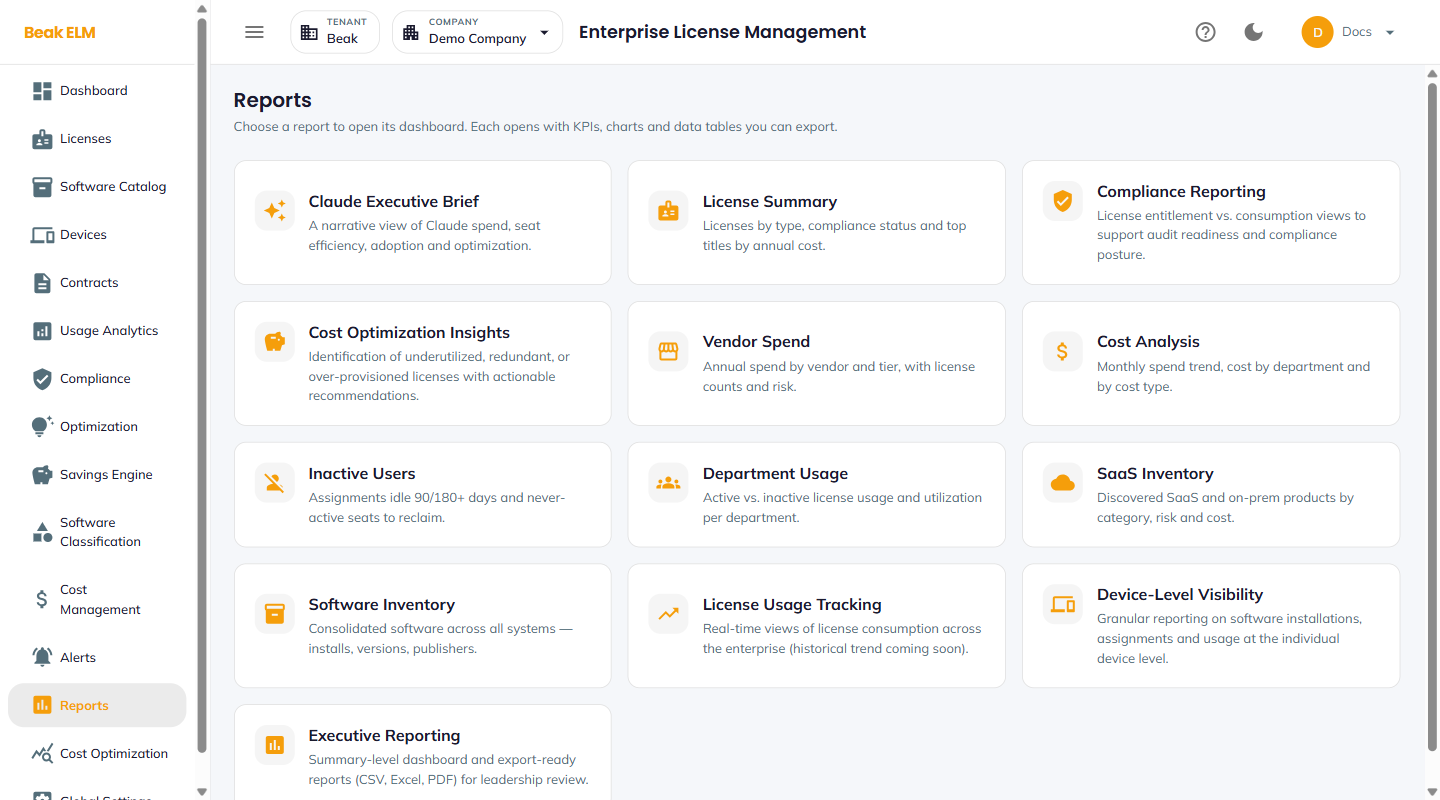
Choosing a Report
Every card carries the report name and a one-line description of what it covers. Selecting a card opens that report's dashboard; the export actions live inside the report rather than on the chooser.
Which reports a user can open is governed per report by their role — see Roles & Permissions. A user without the permission for a given report does not get its card.
Cost & Spend
- Claude Executive Brief — A narrative view of Claude spend, seat efficiency, adoption, and optimization, built over the Anthropic connector
- Cost Optimization Insights — Underutilized, redundant, and over-provisioned licenses with actionable recommendations
- Vendor Spend — Annual spend by vendor and tier, with license counts and risk
- Cost Analysis — Monthly spend trend, cost by department, and cost by type
License & Compliance
- License Summary — Licenses by type, compliance status, and top titles by annual cost
- Compliance Reporting — Entitlement vs consumption views supporting audit readiness and compliance posture
- License Usage Tracking — Real-time views of license consumption across the enterprise; the card notes that its historical trend is still to come
- Inactive Users — Assignments idle 90 / 180+ days and never-active seats to reclaim
Inventory & Usage
- Department Usage — Active vs inactive license usage and utilization per department
- SaaS Inventory — Discovered SaaS and on-prem products by category, risk, and cost
- Software Inventory — Consolidated software across all systems, with installs, versions, and publishers
- Device-Level Visibility — Granular reporting on installations, assignments, and usage at the individual device level
Executive
- Executive Reporting — Summary-level dashboard with export-ready CSV, Excel, and PDF output for leadership review
Best Practices
- Use
Compliance Reportingas the monthly evidence pack for your audit team — the export format works well in a compliance evidence package. - Pair
Inactive UserswithDepartment Usagefor quarterly chargeback and reclaim reviews — together they answer "who is not using what" by department. - Pair
Vendor Spendwith the renewal calendar in Contracts when planning the next budget cycle. - Grant report permissions deliberately in Roles & Permissions — several reports expose per-user and per-device detail that not every role should see.
- The Report Center under Global Settings → Reports hosts one-off Excel downloads (including Contract Renewals and Connector Status) that are not part of this chooser.
Related Pages
- Compliance — Live compliance dashboard
- Optimization — Live recommendation queue
- Cost Optimization — Statistical Claude spend models
- Cost Management — Live spend rollups
- Usage Analytics — Live usage breakdowns
- Scheduled Reports — Report Center Excel downloads
- Roles & Permissions — Per-report access control