Compliance Dashboard
The Compliance Dashboard is the audit-readiness surface for Beak ELM. It rolls every license into a single compliance %, scores audit readiness, breaks open alerts down by severity, and lists every license currently flagged over licensed or under licensed with a quantified gap.
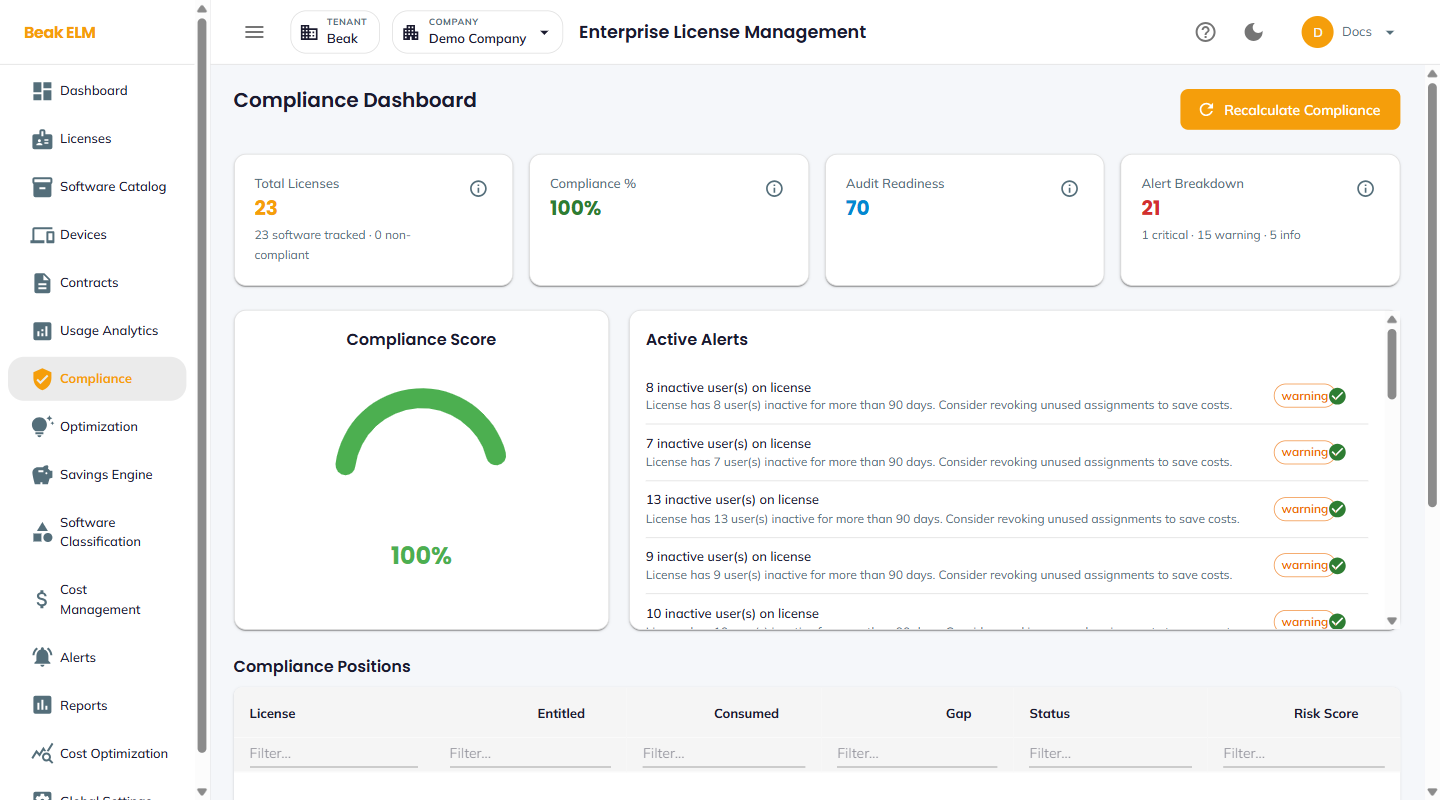
KPI Tiles
- Total Licenses — Distinct license records under the active company
- Compliance % — Share of licenses currently
compliant(vsover licensedorunder licensed) - Audit Readiness — Composite score combining compliance, contract freshness, and alert status
- Alert Breakdown — Counts of
0 Critical/0 Warning/0 Infoopen alerts
The Recalculate Compliance button in the top right re-runs the compliance engine across the inventory — use it after a bulk license edit, contract change, or connector sync.
Compliance Score
A radial gauge centered on the page showing the live compliance % at the active moment. The dial color is consistent with the KPI tile so a quick glance signals overall posture.
Active Alerts
A scrollable list of every open compliance-related alert with severity, title, expiry context, and annual cost.
| Field | Description |
|---|---|
| Title | E.g. License expiring in 86 days: GitHub Enterprise Cloud |
| Sub-detail | Expiry date and annual cost (e.g. Expires on 2026-07-19. Annual cost: $71,820.00) |
| Severity tag | info, warning, or critical |
| Resolve action | Green check to mark resolved |
Severity is driven by days-to-expiry — critical for under 30 days, warning 30–60, info over 60. Tune these thresholds in Alert Rules.
Compliance Positions
A table of every license currently flagged non-compliant, with the gap quantified.
| Column | Description |
|---|---|
| License | License name (e.g. Salesforce Enterprise) |
| Entitled | Seats purchased |
| Consumed | Seats currently consumed |
| Gap | Consumed − Entitled — positive means over licensed, negative means under licensed |
| Status | over licensed or under licensed |
| Risk Score | 0–100 — weighted by gap size, contract value, and renewal proximity |
Sort by Risk Score to drive the next round of true-ups or reclaim decisions.
Best Practices
- Run
Recalculate Complianceafter every bulk license import or contract change so the dashboard reflects live state rather than the last scheduled run. - Treat any license with a high
Risk Scoreand an upcomingRenewal Date(visible on Contracts) as the highest-priority cleanup item — it's the cheapest moment to right-size. - Pair
Compliance %on the Dashboard withAudit Readinesshere — a high compliance % alone doesn't guarantee audit readiness if contract documentation is stale. - Resolve
infoalerts proactively rather than letting them age intowarningandcritical— the same alert escalates automatically as the renewal date approaches.
Related Pages
- Licenses — Underlying license records
- Contracts — Renewal dates that drive expiring-license alerts
- Optimization — Reclaim recommendations for
over licensedrows - Alerts — Alert rules and notification delivery