Software Cost Catalog
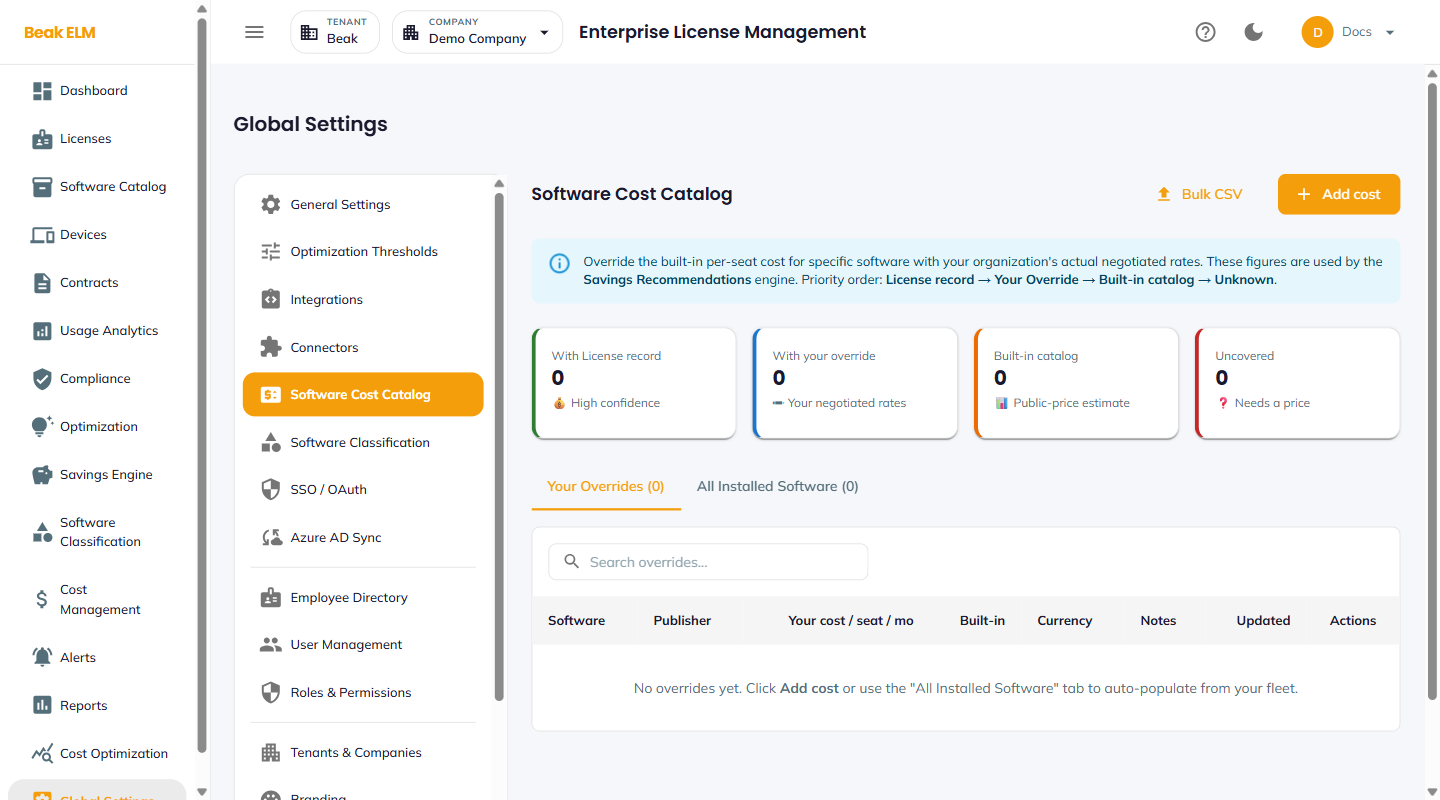
The Software Cost Catalog is where you override the built-in per-seat cost for specific software with your organization's actual negotiated rates. These figures feed the Savings Recommendations engine on the Optimization page so reclaim and right-sizing math reflects what you actually pay, not list price.
Cost Resolution Order
ELM resolves a software cost by walking this priority order until it finds a value:
- License record — Cost on the License record itself (highest confidence)
- Your Override — Cost set on this page (your negotiated rate)
- Built-in catalog — Public-price estimate shipped with ELM
- Unknown — No price available — surfaces as
Uncovered
The higher in the list, the higher the confidence the optimization engine assigns to its recommendations.
Coverage KPIs
Four tiles on the page count software products by which tier of the resolution order they sit in:
- With License record — High-confidence, cost on a license record
- With your override — Your negotiated rates (this page)
- Built-in catalog — Public-price estimate
- Uncovered — Needs a price — Savings Recommendations cannot fire for these products
Tabs
- Your Overrides — Lists every per-seat override you've added — software, publisher, your cost / seat / month, built-in price for comparison, currency, notes, last updated, edit / delete actions
- All Installed Software — Full catalog of software detected in your fleet (from CMDB and connectors); use this tab to see what hasn't been priced yet and click
Add costto override
Actions
- + Add cost — Open a dialog to add a new per-seat override
- Bulk CSV — Import a CSV of overrides for fast initial seeding
- Auto-populate from your fleet — Use the
All Installed Softwaretab to see exactly what's detected and override only what you have negotiated rates for
Best Practices
- Prioritize overrides for the largest-spend software first — accurate negotiated rates on the top 10 vendors typically captures 80% of the savings calculation accuracy.
- Keep
Notespopulated with the contract reference so the next admin understands why an override differs from public price. - Re-import overrides annually after the renewal cycle — your negotiated rates change, but the catalog won't update itself.
- Drive
Uncoveredto zero — every uncovered product is a blind spot for the Savings Recommendations engine.
Related Pages
- License Optimization — Recommendations that consume these costs
- Cost Management — Spend rollups that use the resolved cost
- Connectors — Detect what software is in the fleet