Roles & Permissions
The Roles & Permissions tab manages the role-permission matrix that gates every action in Beak ELM. Each role carries a per-module permission set — one column per role, one checklist per module — and the Create Role button adds custom roles alongside the built-in tenant roles.
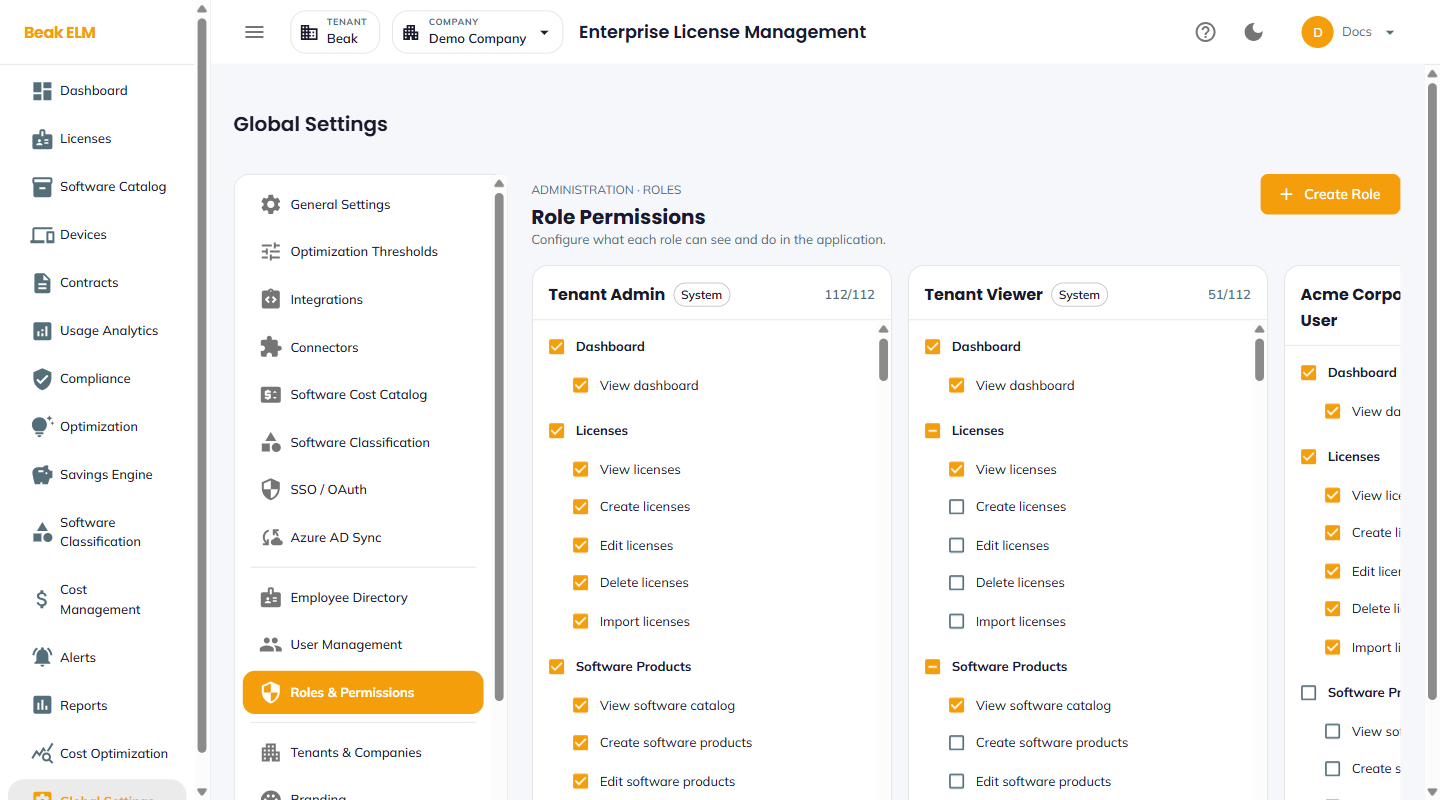
Roles
- Tenant Admin — Full access to every permission across the tenant (e.g.
112/112permissions granted) - Tenant Viewer — Read-only access — view permissions across modules without create / edit / delete
- Custom roles — Created via
Create Rolewith a hand-picked permission set, e.g. a per-customer role in an MSP deployment
Each role card shows its granted-permission count against the total (e.g. 112/112), and built-in roles carry a System chip. Users are bound to a role — and to the companies they can access — in User Management.
Permission Groups
Permissions are grouped by module, mirroring the sidebar. Each group exposes granular view / create / edit / delete / import-style actions:
| Module | Example permissions |
|---|---|
| Dashboard | View dashboard |
| Licenses | View, create, edit, delete, import licenses |
| Software Products | View catalog, create / edit / delete products, import software inventory |
| Devices | View devices, import device details, delete devices |
| Contracts | View, create, edit, delete, import contracts |
| Usage Analytics | View License Usage / Endpoint Software / Microsoft 365 / Smartsheet tabs |
| Compliance | View compliance, recalculate compliance, resolve compliance alerts |
| Optimization | View each optimization sub-menu separately, run optimization, apply recommendations |
| Cost Management | View cost data, create / edit / delete cost records, generate forecasts |
| Alerts | View alerts, manage alert rules, run alert check, resolve alerts |
| Reports | Per-report view permissions — each report on the Reports chooser is gated individually — plus generate reports |
| Global Settings | Per-settings-tab administration permissions |
Best Practices
- Leave
Tenant AdminandTenant Viewerintact and create custom roles for anything in between — a modified built-in role is hard to reason about at upgrade time. - Use
Tenant Viewerfor finance and procurement teams who need to query but not change data — they get read access to every dashboard without edit rights. - Scope custom roles per module rather than per person — e.g. a
Contracts Managerrole with contract permissions only — and combine with per-company access in User Management. - Audit role assignments quarterly via the Users page — privilege creep is the most common RBAC issue.
- Review custom roles after an upgrade that adds modules — new menu permissions are backfilled to custom roles, so confirm the result still matches your intent.
Related Pages
- User Management — Assign roles and company access to users
- SSO / OAuth — Default role for SSO auto-created users
- Audit Log — Per-action authorization audit