Software Classification (Settings)
This tab configures how the nightly engine enriches unknown software titles, whether approvals generate contracts automatically, and which LLM provider it uses. The queue those settings feed is the Software Classification page.
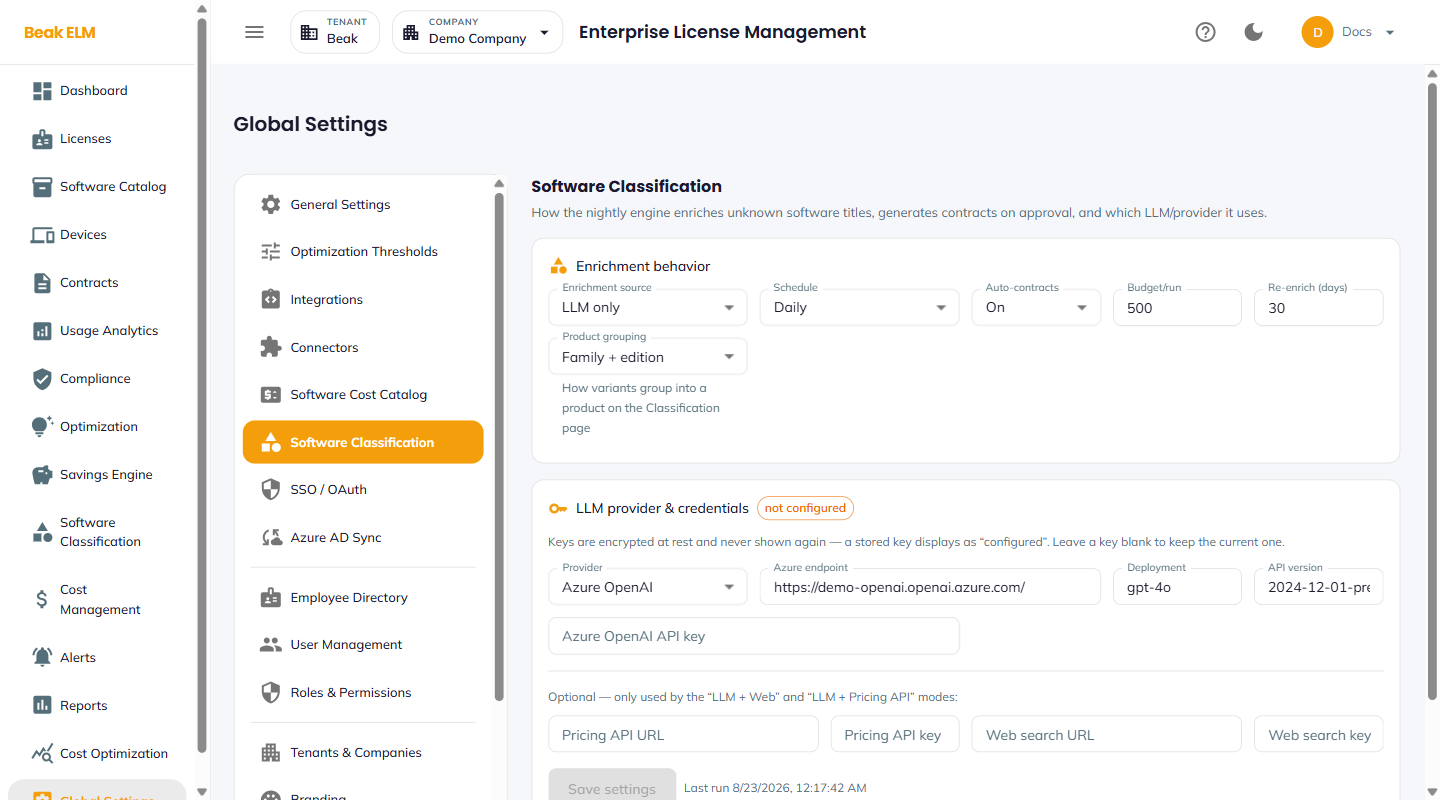
Enrichment Behavior
| Field | Description |
|---|---|
| Enrichment source | Where classifications come from — LLM only, or a combined mode such as LLM + Web or LLM + Pricing API that also consults the optional endpoints below |
| Schedule | How often the engine runs (e.g. Daily) |
| Auto-contracts | When On, approving a title generates its draft contract automatically |
| Budget/run | Maximum number of titles the engine enriches in a single run |
| Re-enrich (days) | How long a classification is trusted before the engine revisits the title |
| Product grouping | How variants roll up into one product on the Classification page (e.g. Family + edition) |
Budget/run is the cost control — each enriched title is an LLM call, so the budget caps what a single scheduled run can spend. Titles beyond the cap wait for the next run rather than failing.
LLM Provider & Credentials
The card carries a status chip — not configured until a key is saved.
| Field | Description |
|---|---|
| Provider | LLM provider backing the engine (e.g. Azure OpenAI) |
| Azure endpoint | Resource endpoint URL for the provider |
| Deployment | Model deployment name (e.g. gpt-4o) |
| API version | Provider API version |
| API key | Provider key — write-only, see the note below |
Four optional fields — Pricing API URL, Pricing API key, Web search URL, and Web search key — are used only by the LLM + Web and LLM + Pricing API enrichment sources. Leave them empty when Enrichment source is LLM only.
Save settings persists the configuration, and the timestamp beside it records the engine's last run.
Note: Keys are encrypted at rest and never shown again — a stored key displays as
configured. Leave a key field blank to keep the current value; typing into it replaces the stored key.
Best Practices
- Configure the provider before the first classification run. Without a key every title stays
Unknown, and the Software Classification page shows a banner rather than a workable queue. - Start with a conservative
Budget/runon a large estate and raise it once you have seen a full run's cost — the setting exists precisely to make that first run bounded. - Leave
Re-enrich (days)long enough that stable titles are not repriced every cycle, but short enough to catch vendor price changes before a renewal. - Turn
Auto-contractsoff if your procurement team wants to create contract records by hand — approvals will still classify the title, just without generating the draft contract.
Related Pages
- Software Classification — The classification queue this tab configures
- Software Cost Catalog — Reference unit costs used to value licenses
- Contracts — Where auto-generated draft contracts land
- Global Settings — All settings tabs