Agent Installation
Agent Installation (page header reads Agent Installation Analytics) is the device fleet dashboard — the place to verify that the SWA agent is healthy across every device. It surfaces high-level fleet counts and a per-device table with hostname, OS, agent version, status, last heartbeat, and last activity timestamps.
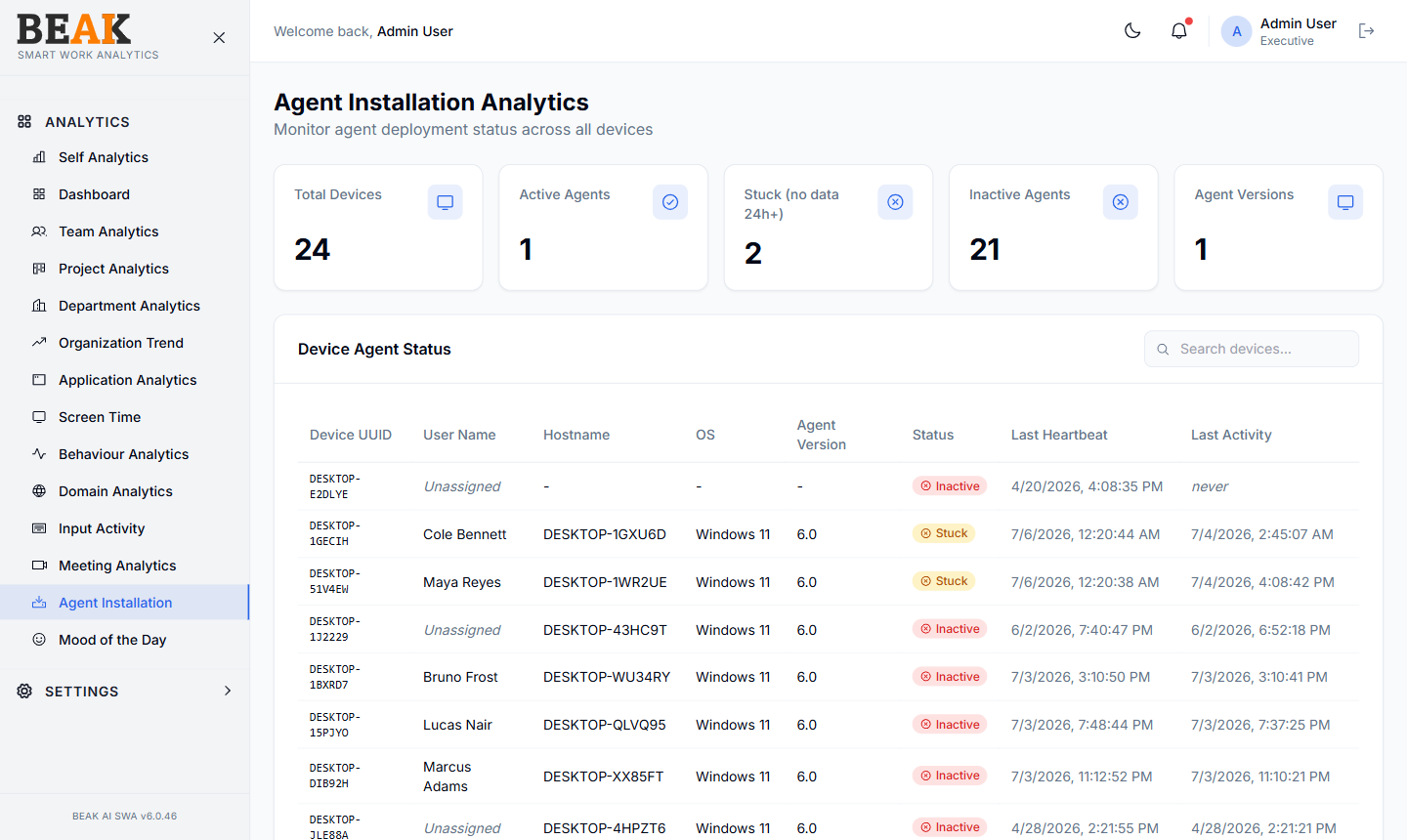
Summary Tiles
- Total Devices — All devices ever registered with SWA
- Active Agents — Devices that have reported in within the configured liveness window
- Stuck (no data 24h+) — Devices that are technically active but have not produced new activity for over 24 hours — usually a sign the agent process is running but blocked
- Inactive Agents — Devices that have stopped reporting beyond the liveness window
- Agent Versions — Distinct agent versions in the fleet (lower is better — uniformity is the goal)
Device Agent Status
A sortable, paginated table:
| Column | Description |
|---|---|
| Device UUID | Stable device identifier (e.g. ILDPILABXP285) |
| User Name | Mapped employee, or Unassigned |
| Hostname | Device hostname |
| OS | Operating system (e.g. Windows 11) |
| Agent Version | Installed agent build (e.g. 6.0) |
| Status | Active / Inactive |
| Last Heartbeat | Timestamp of the last keep-alive ping from the agent process |
| Last Activity | Timestamp of the last actual captured activity (foreground change, keystroke, click) |
Use the search field above the table to find a specific device or user. Click any column header to sort.
Mapping Unassigned Devices
If a device shows Unassigned in the User Name column, its activity will not appear under any user's analytics. Map it via Device Setup or set up an automatic mapping with Connectors.
Best Practices
- Watch
Inactive Agentsdaily — anything more than a single-digit percentage of the fleet warrants investigation. Common causes: device offline for PTO, device reimaged without SWA, or an agent crash. - The
Stuck (no data 24h+)tile is the early-warning signal — a stuck agent will still appear inActive Agentsbecause heartbeats are flowing, but no real activity is being captured. Drill into the device row and compareLast HeartbeatvsLast Activity— a large gap confirms the diagnosis. - Keep
Agent Versionsto one or two versions at most — multiple older versions complicate troubleshooting. - Decommission stale devices via Device Setup →
Blockso they no longer count againstTotal Devices. - A jump in
Total Deviceswithout a matching jump inActive Agentsusually means a deployment finished installing but devices haven't booted yet.
Related Pages
- Device Setup — Map users, deactivate, block
- Connectors — Automatic device-user mapping
- General Settings — Download the latest agent installer