Device Setup
Device Setup is the operational counterpart to Agent Installation. Where the analytics view shows fleet status, this page exposes the actions an admin needs to keep the fleet clean — assigning users to devices, unassigning, deactivating, and blocking.
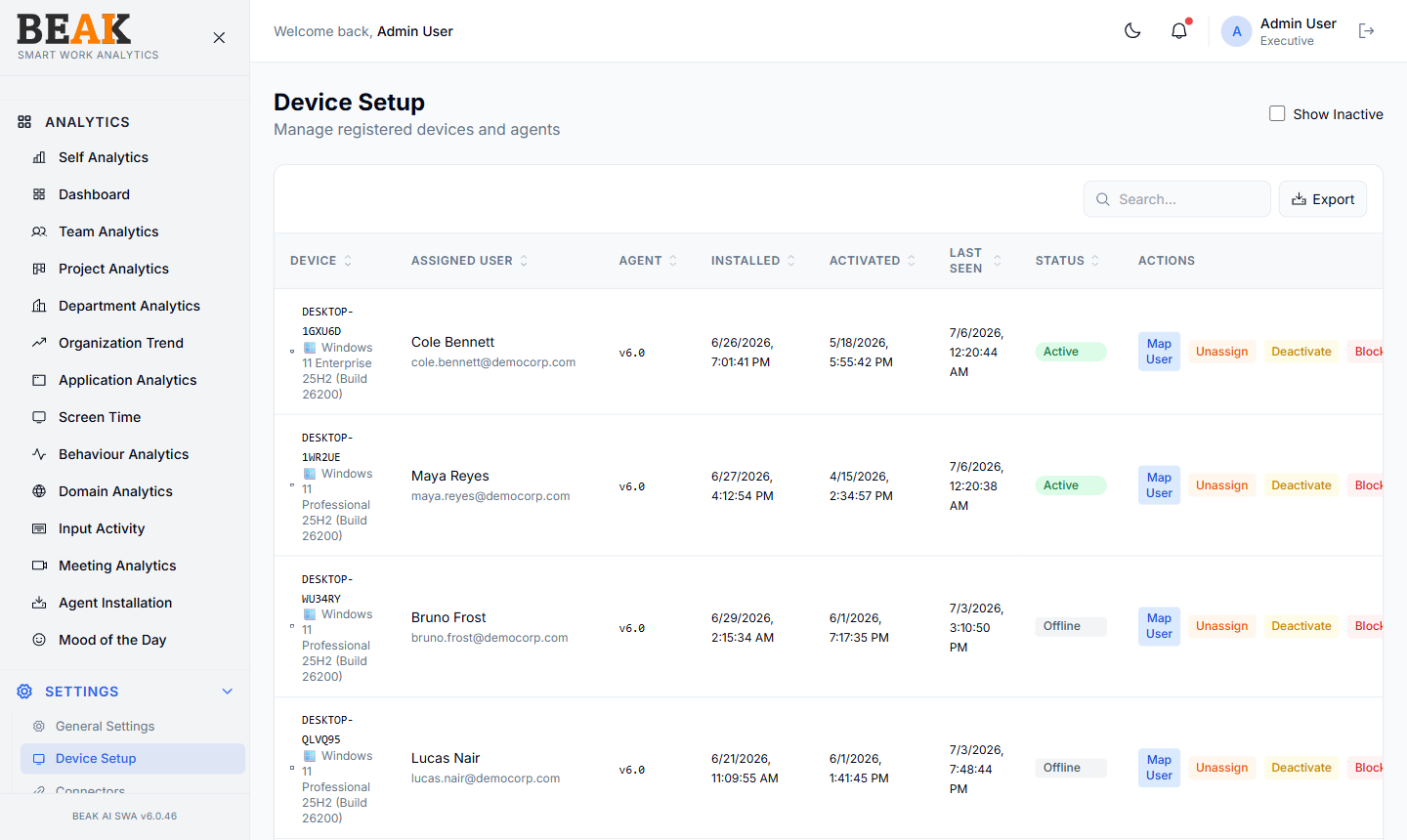
Device Table
A sortable, paginated table:
| Column | Description |
|---|---|
| Device | Hostname and device identifier |
| Assigned User | Currently mapped employee, or empty for unassigned |
| Agent | Installed agent version |
| Installed | Date the agent was first installed |
| Activated | Date the device first reported in |
| Last Seen | Timestamp of the most recent heartbeat |
| Status | Active, Offline, Blocked |
| Actions | Per-device action buttons |
Use the search box above the table to find a specific device by hostname or user. Click any column header to sort.
Actions
Each row exposes the standard fleet-management actions:
- Map User — Assign or change the user for the device. SWA-captured activity will roll up under the mapped user from the next heartbeat onward.
- Unassign — Remove the user mapping. Activity continues to be captured but is not attributed to any user until reassigned.
- Deactivate — Mark the device as offline. The agent on the device will continue to install updates but will stop reporting activity until reactivated. Devices that have simply stopped checking in (e.g. powered off) also surface as
Offlineautomatically. - Block — Permanently stop the device from reporting. Use this for decommissioned, lost, or stolen devices.
The Export button downloads the visible table as CSV.
Mapping Strategy
Most devices map automatically when a Connector is enabled — Microsoft Intune syncs device assignments from enrollment, iPeople HRMS syncs from HR records, and CSV import covers anything ad-hoc. Use this page only for manual edge cases:
- A device assigned to a contractor who isn't in HRMS
- A shared kiosk that's used by multiple users
- An onboarding device whose Intune assignment hasn't synced yet
Best Practices
- Block devices the same day they're decommissioned — leaving them
Activeskews the fleet KPI counts on Agent Installation. - Don't
Unassignto "pause" a device —Deactivateis the right action for that. Unassign is for reassignment. - For high-turnover environments, prefer a Connector over manual mapping — manual mapping is a constant source of stale assignments.
- Audit devices with status
ActivebutLast Seenmore than 14 days ago — these are likely candidates forDeactivateorBlock. Devices already showingOfflinefor an extended period are good candidates forBlock.
Related Pages
- Agent Installation — Fleet status dashboard
- Connectors — Automatic device-user mapping
- Users — User directory
- General Settings — Agent installer download