Software Classification
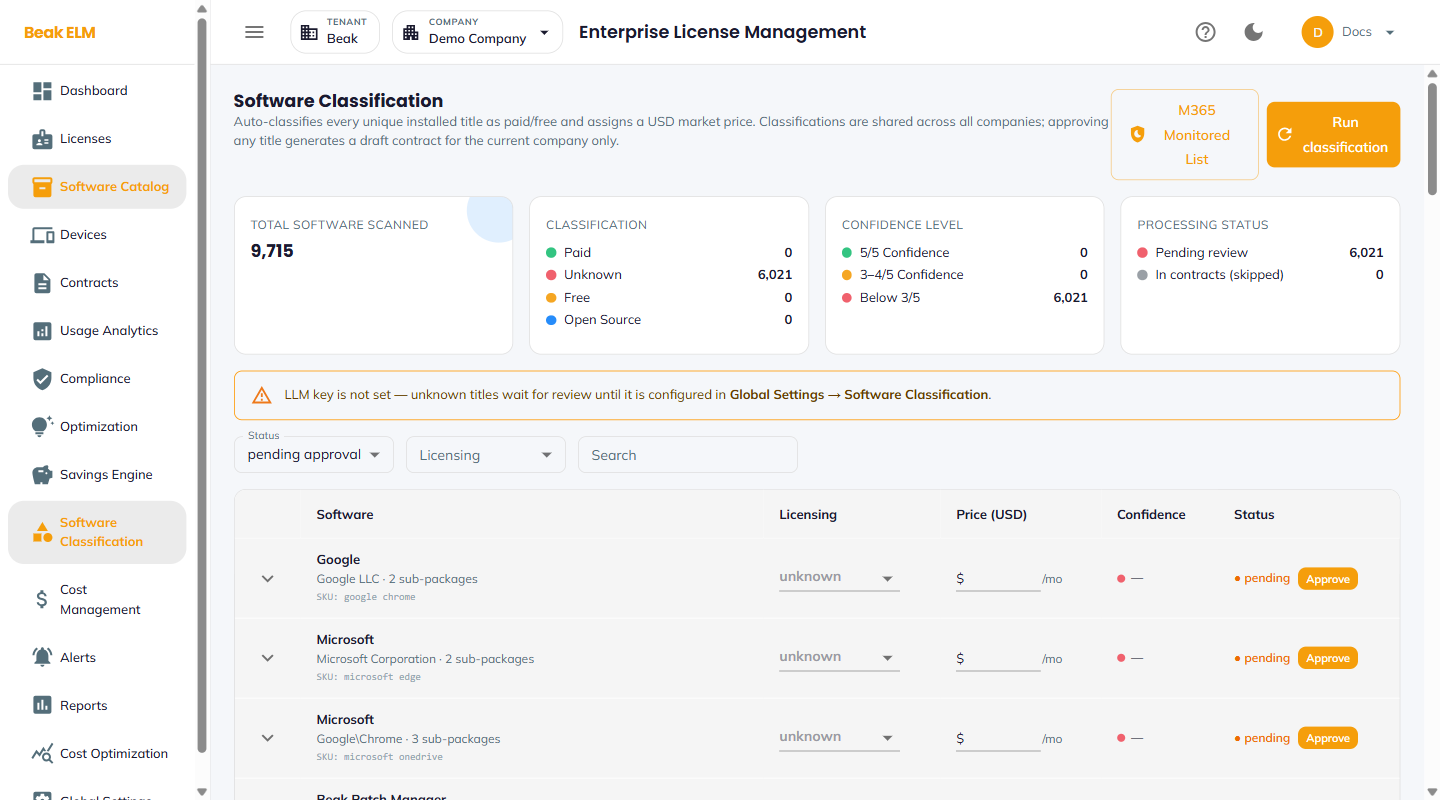
The Software Classification page answers a question the raw inventory cannot: of the thousands of unique titles discovered across your endpoints, which ones actually cost money? An enrichment engine classifies every unique installed title as paid, free, or open source and assigns it a USD market price, so unlicensed noise can be separated from real spend before it reaches Optimization or the Savings Engine.
Classifications are shared across all companies in the tenant — a title classified once is classified for everyone. Approving a title, by contrast, is scoped to the active company: it generates a draft contract for that company only.
Actions
- Run classification — Enriches the titles still awaiting classification. The engine also runs on the schedule set in Global Settings → Software Classification
- M365 Monitored List — Opens the list of Microsoft 365 titles the classifier tracks separately from endpoint-discovered software
KPI Cards
Four cards summarize the state of the classification run.
| Card | Contents |
|---|---|
| Total Software Scanned | Count of unique installed titles the engine has seen |
| Classification | Split across Paid, Unknown, Free, and Open Source |
| Confidence Level | Split across 5/5 Confidence, 3–4/5 Confidence, and Below 3/5 |
| Processing Status | Pending review awaiting approval, and In contracts (skipped) — titles already covered by a contract |
A large Unknown count against a large Below 3/5 count is the signature of an engine that cannot reach its enrichment source — check the LLM provider configuration before treating the numbers as a data problem.
Note: When no LLM key is configured the page shows
LLM key is not set — unknown titles wait for review until it is configured in Global Settings → Software Classification. Titles are still scanned and counted, but they stayUnknownuntil the provider is set up.
Filters
- Status — Narrow to a review state, e.g.
pending approval - Licensing — Narrow to a licensing classification (
paid,free,open source,unknown) - Search — Free-text match on the title
Classification Table
One row per product, expandable to reveal the sub-packages that roll up into it. How variants group into a single product is controlled by the Product grouping setting in Global Settings → Software Classification.
| Column | Description |
|---|---|
| Software | Product name, with the publisher, the number of sub-packages, and the SKU underneath |
| Licensing | Editable classification — paid, free, open source, or unknown |
| Price (USD) | Editable monthly market price per seat |
| Confidence | The engine's confidence in the classification it produced |
| Status | Review state (e.g. pending), with an Approve action |
Licensing and Price (USD) are editable in place — where the engine is unsure, or where you have a negotiated rate that differs from market price, correct the row before approving it.
Approving a Title
Approve accepts the classification for the active company and generates a draft contract from it. This is the bridge between discovery and the commercial record: an approved paid title becomes a contract line item that Optimization → Endpoint Software can then measure installs and compliance against.
Approval does not change the shared classification — it records that this company treats the title as classified and priced that way.
Best Practices
- Configure the LLM provider in Global Settings → Software Classification before the first run, otherwise every title lands in
Unknownand the queue cannot be worked. - Review the
Below 3/5confidence band by hand before approving — low-confidence prices are the ones most likely to skew downstream savings numbers. - Correct
Price (USD)to your negotiated rate rather than the market price where the two differ; every downstream cost and savings figure inherits this value. - Work the
pending approvalqueue after each classification run rather than in a large periodic batch — approvals generate draft contracts, and a backlog of them is harder to reconcile in Contracts.
Related Pages
- Software Classification Settings — Schedule, enrichment source, and LLM provider
- Software Catalog — The curated product catalog licenses bind to
- Contracts — Where approved titles land as draft contracts
- Optimization — Contract-based recommendations for classified titles
- Endpoint Inventory — The install records being classified