VPN Monitoring
VPN Monitoring provides a centralised view of all VPN tunnels in your environment — site-to-site IPsec tunnels, remote access VPN sessions, and CS VPN connections. Rather than checking tunnel status device-by-device, this page aggregates all tunnel data in one place, showing real-time status, latency, packet loss, bandwidth, and cryptographic health so your NOC team can detect tunnel failures and performance degradation the moment they occur.
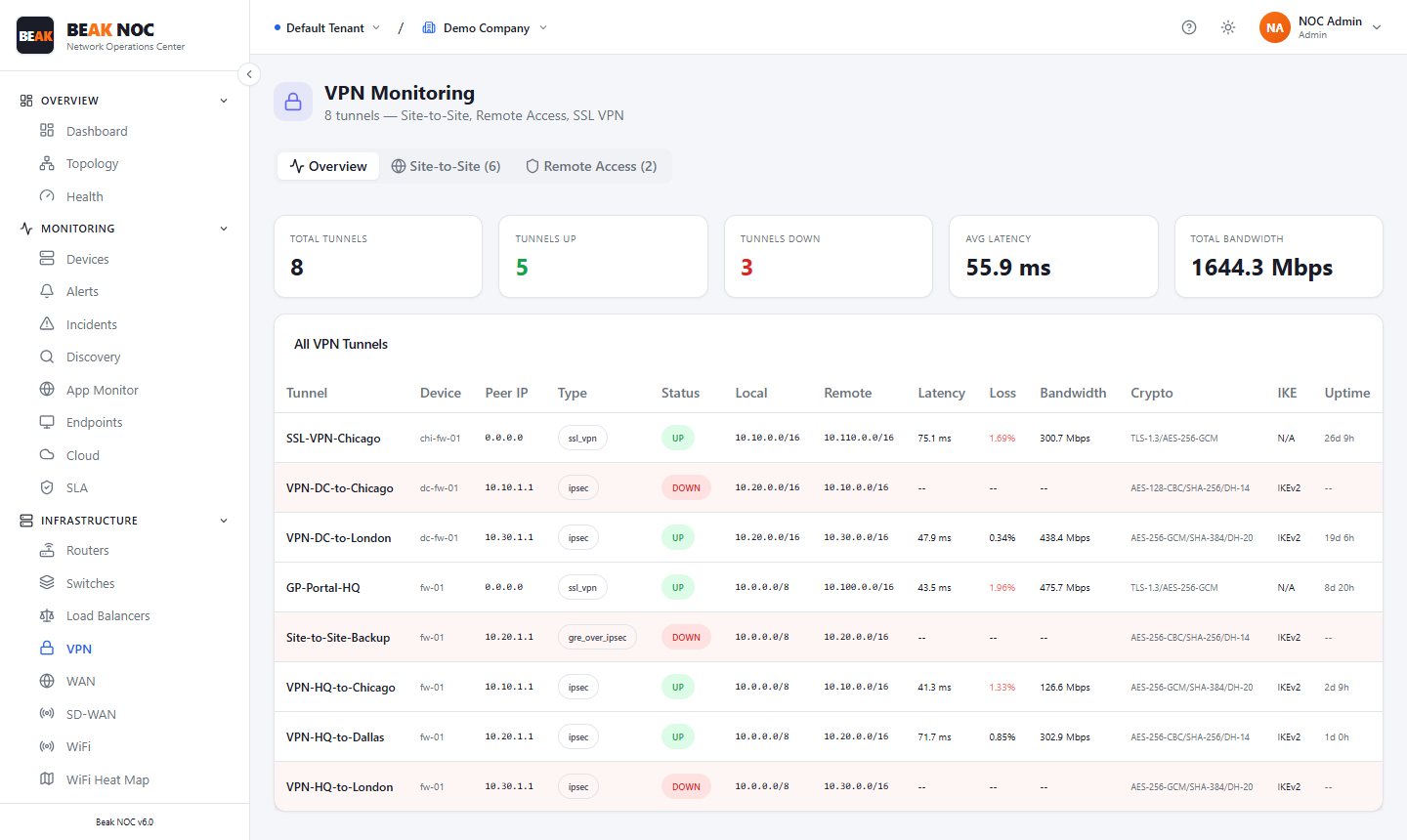
Summary Cards
| Card | Description |
|---|---|
| Total Tunnels | Total count of VPN tunnels across all devices and types |
| Online | Tunnels currently established and passing traffic |
| Down | Tunnels that are not currently established |
| Latency | Average round-trip latency across all online tunnels in milliseconds |
| Bandwidth | Aggregate bandwidth across all active tunnels in Mbps |
Tabs
| Tab | Description |
|---|---|
| Overview | All VPN tunnels with status, performance metrics, and encryption details |
| Site-to-Site | Filtered view showing only site-to-site IPsec tunnels |
| Remote Access | Filtered view showing remote access (client VPN) sessions |
| CS | CS VPN tunnels (cloud or carrier-specific VPN connections) |
| Remote Groups | Remote access VPN user groups, session counts, and group bandwidth |
All VPN Tunnels Table
The main tunnel table lists every configured VPN tunnel with:
| Column | Description |
|---|---|
| Domain | Tunnel name or descriptive label (e.g., VPN-HQ-to-Chicago) |
| Peer IP | Remote peer IP address |
| Type | Tunnel type — site-to-site, remote-access, or cs |
| Status | Online or Offline — colour-coded green/red |
| Local | Local tunnel endpoint (IP or network) |
| Remote | Remote tunnel endpoint (IP or network) |
| Latency | Round-trip latency through the tunnel in milliseconds |
| Loss | Packet loss percentage over the tunnel |
| Bandwidth | Current bandwidth utilisation through the tunnel |
| Crypto | Encryption and authentication algorithms in use (e.g., AES-256-GCM, SHA-256) |
| Options | View tunnel details, packet loss history, or initiate a rekey |
Site-to-Site Tab
Filtered to IPsec site-to-site tunnels only. In addition to the standard columns, shows:
- IKE Version — IKEv1 or IKEv2
- Phase 1 / Phase 2 Status — Whether IKE SA and IPsec SA are established
- SA Lifetime — Time until the security association rekeys
- Rekey Count — How many times this tunnel has rekeyed (useful for debugging stability)
Remote Access Tab
Filtered to active remote access VPN sessions:
| Column | Description |
|---|---|
| User | Username of the connected VPN client |
| Client IP | IP assigned to the VPN client |
| Connected Since | Session start time |
| Bytes In/Out | Data transferred in this session |
| Latency | Tunnel latency for this session |
Remote Groups Tab
Shows VPN user groups with aggregate session data:
- Group Name — VPN user group or profile name
- Active Sessions — Number of users currently connected in this group
- Bandwidth — Aggregate bandwidth consumed by this group
- Peak Users — Maximum concurrent users in the last 24 hours
Best Practices
- Alert immediately on tunnel down events — A site-to-site tunnel going offline means that site loses connectivity to central resources. Set a 0-minute alert threshold for tunnel status changes.
- Watch latency trends, not just instantaneous values — A tunnel with gradually increasing latency (even if still online) may be traversing a degraded WAN path. Use trend data to act before the tunnel drops.
- Monitor packet loss separately from latency — Packet loss above 1% on a VPN tunnel will noticeably degrade TCP performance (retransmissions, slow throughput). Latency can be acceptable while loss is not.
- Review crypto algorithm currency — Tunnels using IKEv1 or weak cipher suites (3DES, SHA-1) should be migrated to IKEv2 with AES-256-GCM and SHA-256 or higher.
- Track remote access peak session counts — If peak concurrent remote users approach the VPN gateway's licensed or capacity limit, users will be unable to connect during busy periods.
Related Pages
- Firewall Module — VPN tunnels aggregated from firewall devices
- Network Devices — VPN gateway devices in the device inventory
- Alerts — Tunnel down and high latency alerts in the alert feed