Config Backup
Config Backup automatically captures and stores device configurations, detects drift when a running configuration changes unexpectedly, and maintains a full version history so you can diff any two snapshots to see exactly what changed. This protects against accidental misconfiguration, supports change management audits, and ensures you can restore a known-good configuration when needed.
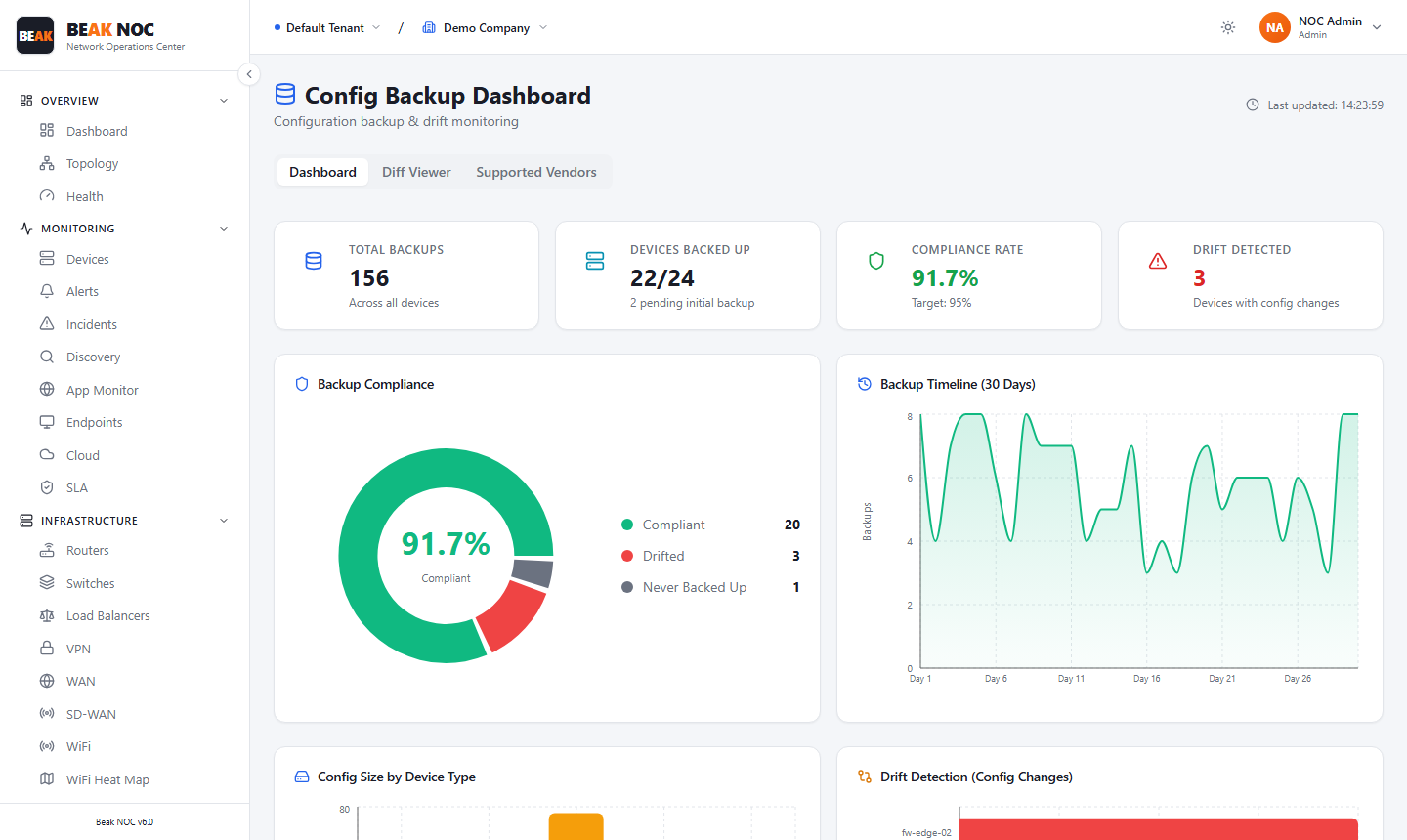
Tabs
| Tab | Description |
|---|---|
| Dashboard | Overview charts — backup compliance, timeline, config size by device type, and drift detection |
| Diff Viewer | Side-by-side comparison of any two configuration versions for a selected device |
| Suppressed Devices | Devices excluded from backup compliance tracking |
Summary Cards
| Card | Description |
|---|---|
| Total Backups | Cumulative count of all backup snapshots stored across all devices |
| Devices Backed Up | Ratio of devices with at least one successful backup (e.g., 22/24 means 22 of 24 devices have been backed up; 2 are pending initial backup) |
| Compliance Rate | Percentage of devices that are Compliant — have a recent backup within the defined backup window. Target shown for comparison (e.g., target 95%) |
| Drift Detected | Count of devices where the current running config has changed since the last backup |
Backup Compliance Chart
A donut chart showing the breakdown of backup compliance status across all devices:
| Status | Color | Description |
|---|---|---|
| Compliant | Green | Device has a current backup within the required interval |
| Drifted | Red | Device's running configuration has changed since the last backup |
| Never Backed Up | Gray | Device has no backup on record |
Backup Timeline (30 Days)
A line chart showing the number of backup jobs completed per day over the last 30 days. Use this to verify that scheduled backup jobs are running consistently and to spot gaps caused by network outages or credential failures.
Config Size by Device Type
A bar chart comparing the average configuration size (in KB) across device types (Router, Switch, Firewall, Server, Load Balancer). Larger configurations are not inherently problematic, but sudden size changes can indicate unauthorized additions.
Drift Detection (Config Changes)
A horizontal bar chart ranking devices by the number of configuration changes detected since their last backup. Devices at the top have changed most frequently. Each bar is color-coded by severity of the change:
- Red — High number of changes or critical configuration sections modified
- Orange — Moderate changes
Use this chart to quickly identify which devices are experiencing the most configuration churn.
Configuration Backups Table
The main table lists all devices with backup data:
| Column | Description |
|---|---|
| Device | Device hostname |
| Type | Device type (Router, Switch, Firewall, etc.) |
| Last Backup | How long ago the most recent backup was taken (e.g., "2h ago") |
| Versions | Number of backup versions stored for this device |
| Size | Size of the most recent backup in KB |
| Status | Compliant (green), Drifted (red), or Never Backed Up (gray) |
| Actions | Backup — trigger a manual backup now; Diff — compare the last two versions to see what changed |
Triggering a Manual Backup
Click the Backup action in any device row to immediately capture the current running configuration outside of the regular schedule. The new backup appears at the top of the version history for that device.
Viewing Configuration Diff
Click Diff on any device row to open a side-by-side comparison of the two most recent configuration versions. Changed lines are highlighted so you can see exactly what was added, removed, or modified. This is the primary tool for investigating unexpected drift.
Scheduling Backups
Backup jobs are scheduled as part of the Discovery credential setup. Devices that have SSH credentials configured can have their configurations retrieved automatically. Ensure credentials are valid and that devices are reachable by the NOC collector to maintain consistent backups.
Related Pages
- Compliance — Configuration rules evaluated against backup data
- Discovery — SSH credentials used to retrieve configurations
- Devices — Device inventory with backup status indicators