Compliance Dashboard
The Compliance Dashboard measures how well your network device configurations adhere to your defined policy rules. Every device is scored against a set of compliance checks — covering security settings, configuration standards, and hardening requirements — and devices that fail critical rules are immediately surfaced for remediation.
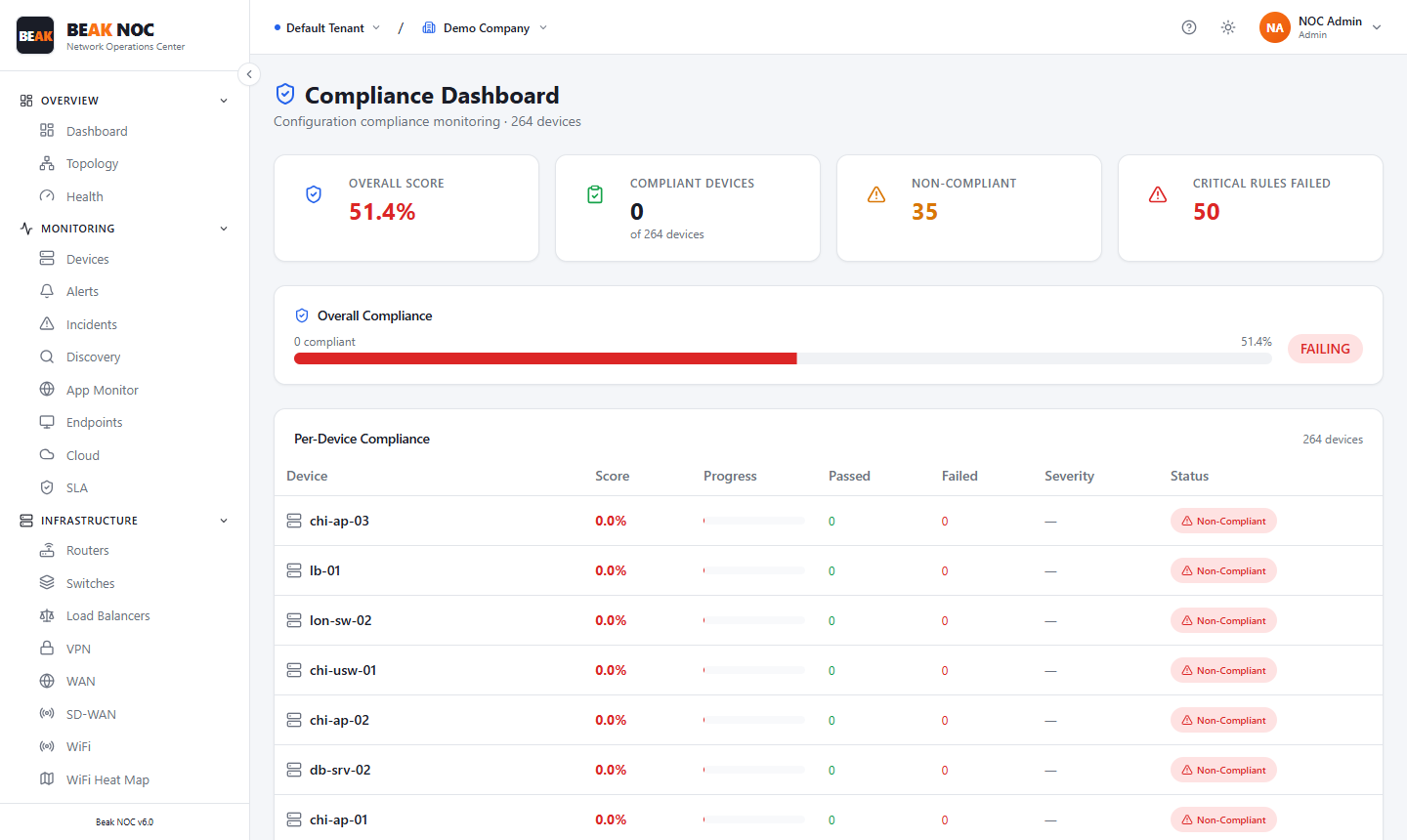
Summary Cards
| Card | Description |
|---|---|
| Overall Score | Aggregate compliance percentage across all devices and all rules |
| Compliant Devices | Count of devices that pass all compliance checks out of the total monitored |
| Non-Compliant | Count of devices with at least one failed compliance check |
| Critical Rules Failed | Count of devices that have failed a rule classified as critical severity |
A colored status badge (green PASSING / red FAILING) next to the Overall Compliance bar provides an immediate pass/fail verdict.
Overall Compliance Bar
A progress bar showing the current aggregate compliance percentage. The bar color reflects the overall status:
- Green — Compliance is above the passing threshold
- Orange — Compliance is below target but not critical
- Red — Compliance has failed — critical rules are being violated
Per-Device Compliance Table
The Per-Device Compliance table shows the compliance status for each individual device:
| Column | Description |
|---|---|
| Device | Device hostname |
| Score | Individual compliance score as a percentage |
| Progress | Visual bar representing the score |
| Passed | Number of compliance checks that passed |
| Failed | Number of compliance checks that failed |
| Severity | Highest severity of any failing check (Critical, High, Medium, Low) |
| Status | Overall pass/fail status for this device |
Click on any device row to drill into which specific rules passed or failed, along with remediation guidance for each failure.
Compliance Rules
Compliance rules define what a correctly-configured device should look like. Each rule specifies:
- A check to perform (e.g., "SSH version 2 must be enabled", "Telnet must be disabled", "SNMP v1 must not be in use")
- A severity level (Critical, High, Medium, Low)
- The device types the rule applies to
Rules are evaluated automatically after each Config Backup or Discovery scan when fresh device data is available.
Relationship with Config Backup
Compliance evaluation depends on having current device configurations. Ensure that:
- Config Backup is configured and running for all devices you want to assess.
- Backup jobs are scheduled frequently enough to reflect recent changes.
Devices without a recent backup will show stale or missing compliance data.
Related Pages
- Config Backup — Provides the configuration data that compliance rules evaluate
- Security — Compliance score contributes to the overall security posture score
- Devices — Device inventory for correlating compliance status