Agent Governance
Every AI agent has a cryptographic identity in Beak IAM. Running that agent unattended — triggered by a webhook, an incoming email, or a schedule, with nobody watching — is a separate, higher-privilege decision. Agent Governance is where a human makes that decision: it lists every agent identity in your tenant and lets an authorized person grant, review, suspend, or revoke the autonomy grant that authorizes unattended operation.
Agents get their identity two ways. Agents you build in Beak register automatically when they're created. An agent Beak didn't create — one running on Amazon Bedrock, Microsoft Copilot Studio, Salesforce Agentforce, an A2A peer, or a script you host yourself — gets one by enrolling (see Enrolling an external agent).
Either way the result is the same identity, and autonomy is never automatic — an agent can do nothing unattended until a person grants it explicitly. This is deliberate: an unattended run has no human in the loop at the moment it acts, so the grant is the accountability. Where an agent came from is recorded as provenance; it does not change how much the agent is trusted.
Why grants matter
When an agent is invoked on a channel (webhook, mail, schedule), Beak issues it a short-lived credential for that run. If the agent's identity has no active autonomy grant, that issuance is refused and the run fails closed — the safe default. A newly created channel-active agent therefore does nothing until someone grants it autonomy.
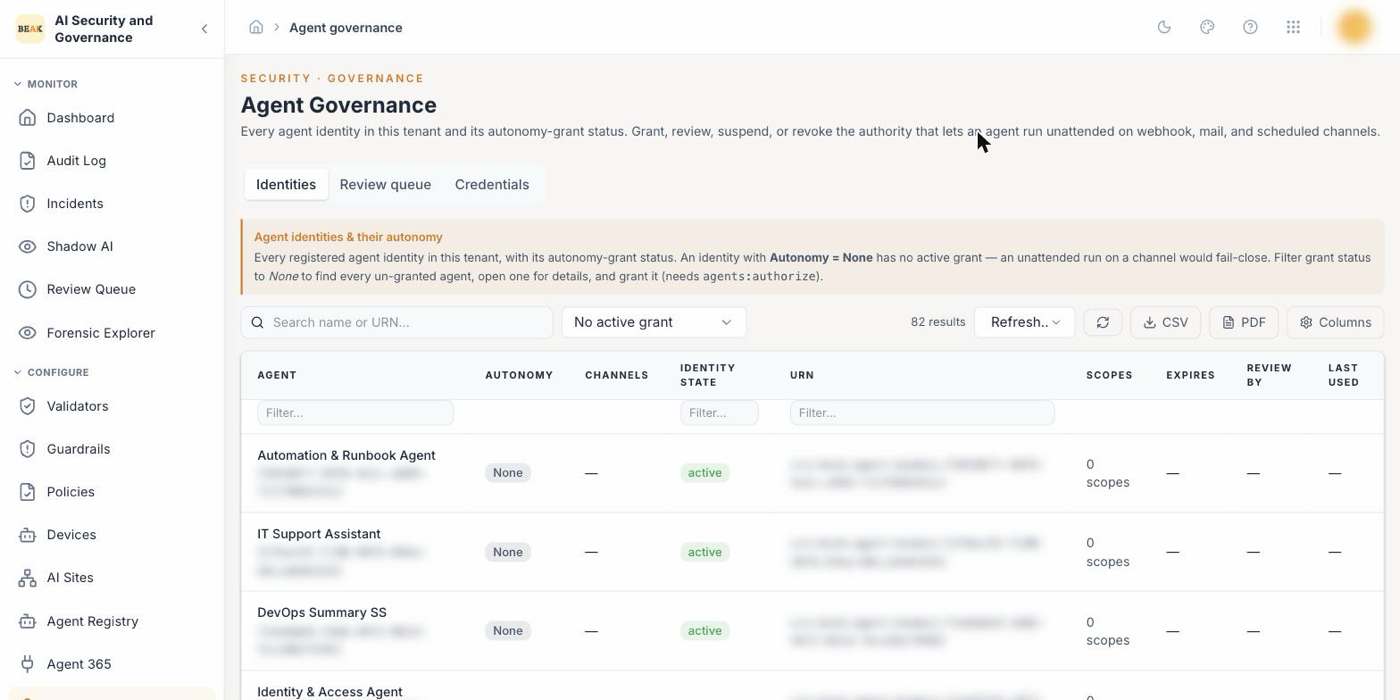
The Identities tab surfaces exactly this: filter Autonomy to None to find every agent that would fail-close on an unattended run, and grant the ones that should run.
The Identities tab
Lists every agent identity in your tenant with its autonomy status:
| Column | Meaning |
|---|---|
| Autonomy | Autonomous (active grant, in window), Review due (active but past its review date), Expired (grant window closed — unattended runs are refused), or None (no grant — fail-closes). |
| Channels | The initiators the grant allows: webhook, mail, schedule, a2a_peer, ambient, sub_agent. |
| Identity state | The identity itself: pending / active / suspended / revoked. |
| Scopes, Expires, Review by, Last used | The agent's granted scopes, and the active grant's window. |
Search (by name or URN) and the grant-status filter run against the whole tenant, not just the loaded page; export (CSV/PDF) reflects the applied filters. Click any row for detail and actions.
Setting an agent's scopes
An agent's scopes are what it is allowed to do. They are separate from autonomy, which is whether it may do those things unattended, and they come first: an autonomy ceiling can only be drawn from the scopes the agent already holds.
Most agents arrive with none. An agent created in Beak AI Studio, or discovered on another platform, is registered as a principal with no authority at all — that is deliberate, because identity is not authority. Until you scope it, Grant autonomy is blocked.
Open the identity and choose Edit scopes. This opens Agent authorization — the same dialog the Agent Registry opens — with the agent's tool access shown alongside the ceiling, so it is clear which of the two a change affects. The scopes described here are the credential ceiling section; they are not what tool authorization checks.
The dialog shows the two layers as numbered stages, each labelled with the moment it is consulted, because they govern different things and are easy to mistake for one setting shown twice:
| Layer | When it applies | Shape | |
|---|---|---|---|
| 1 | Tool access | Checked on every tool call — this is the layer that refuses one | Graded: each level includes the ones before it |
| 2 | Credential ceiling | Applied when a credential is issued; never consulted while a tool call is authorized | An unordered set — pick any combination |
So a scope_insufficient refusal is always layer 1, and widening layer 2 will not lift it.
The scopes you can grant
The dialog lists each scope with what it lets a credential do. Tick the ones the agent needs, or type them into the box — the two stay in step, and the box is what gets saved.
| Scope | What it lets a credential do |
|---|---|
agents:invoke | Act as this agent — run it, and call the tools its tool access allows. The scope nearly every agent needs. |
agents:read | Look up agent definitions, state and history. Does not let the agent act. |
agents:write | Create or modify agent definitions. |
agents:authorize | Grant or change what other agents may do. Administrative — an agent doing ordinary work never needs it. |
mcp:invoke | Call tools exposed through an MCP server. |
mcp:exchange | Trade this credential for a downstream MCP token. Needed only for delegated access on a caller's behalf. |
Most agents need agents:invoke and nothing else. Add mcp:invoke if the agent calls MCP tools.
The box still accepts a scope that is not on the list, because the platform does not keep an allow-list and a new scope has to be introducible. But an unlisted scope is flagged, and the reason is worth understanding: authority is the intersection of the agent's scopes with the caller's, and an empty intersection means no authority rather than unrestricted. A misspelled scope therefore saves without error and authorizes nothing. If you meant a scope on the list, fix the spelling; if you are genuinely adding a new one, the warning is safe to ignore.
Note: Integration modes are not scopes. Values like
gateway.llm,hub.tools,inference.hook,tool.hookandregistry.onlydescribe how an agent is integrated with Beak — which Beak boundary its traffic crosses, and therefore which controls can see it. They are a property of the integration, set by how the agent connects, not an authority you grant. Entering one here grants nothing, and the dialog says so.
For the ceiling:
- Enter scopes separated by spaces or commas, in
resource:actionform. This replaces the current set rather than adding to it, so what you see in the box is exactly what the agent will hold. - The same editor — the same list, the same warnings — appears when you mint an enrolment
token, so scopes chosen the first time an agent is enrolled are chosen with the same guidance
as scopes edited later. The token form starts with
agents:invokeselected, which is what most agents need. - Saving revokes the agent's outstanding credentials. Each credential carries the scopes it was minted with, so leaving them alive would let a wider snapshot outlive the authority it came from. The agent picks up a fresh credential on its next run; nothing needs restarting.
- Clearing every scope is allowed and is a real decision: the agent keeps its identity and can still prove who it is, but it can authorize nothing and cannot hold an autonomy grant.
Setting scopes needs the agents:update permission — the same permission as editing any other
part of an agent record, and distinct from agents:authorize, which gates the autonomy grant.
Once an agent holds scopes, grant autonomy as below; the ceiling is drawn from what you just set.
Granting autonomy
Open an identity and choose Grant autonomy. You are recorded as the accountable grantor. The form asks for:
- Ceiling scopes — the most an unattended run may do. Must be a subset of the agent's own granted scopes; keep it to what the agent actually needs. An agent that holds no scopes has no ceiling to draw from, so it cannot be granted autonomy — the form says so and offers Edit scopes, which is the step described below.
- Channels (allowed initiators) — which triggers may run the agent unattended. A run on a channel the grant doesn't list is refused, even if a grant exists.
- Expires and Review by — the grant's window and the date you commit to re-checking it. Review must be on or before expiry.
- Justification — why this agent may run unattended. Recorded on the grant.
You need the agents:authorize permission to grant, review, suspend, or revoke autonomy —
distinct from agents:read (view) and agents:write (register/edit an identity). You also have to
exist as an active user of the tenant in Beak IAM — which every user who can sign in to the console
already does. You do not need a Beak IAM administrator account; IAM administration is platform
administration and is not tied to any product.
Enrolling an external agent
An agent running outside Beak can become a governed principal in your tenant. It then holds a Beak identity, appears in the Identities tab, and is subject to the same policies, autonomy grants, and audit trail as an agent you built here.
Enrolment is two steps, deliberately split — one is your decision, the other is the agent proving itself.
1. You mint an enrolment token
On the Enrolment tab, choose Enrol an agent. You supply:
| Field | What it does |
|---|---|
| Agent name | How the agent appears in governance, audit, and policy. |
| Owner | The person accountable for this agent. Leave blank to own it yourself. |
| Provenance | Where the agent comes from — external, A2A peer, Hub-installed, or Beak-native. Recorded for correlation; it does not change how the agent is trusted. |
| Source ID | The agent's id in its own platform — a Bedrock agent ARN, a Copilot Studio agent id. Optional, and used to line the agent up across consoles. |
| Scope ceiling | The most this agent's credentials can ever carry. Leave blank for an identity that can prove who it is and authorize nothing. |
| Token valid for | How long you have to use the token. Shorter is safer. |
Everything above is fixed at this point and cannot be changed by the enrolling agent. It supplies nothing except proof that it holds a private key — an agent that could name its own scopes would be granting itself authority.
Warning: The token is shown once. Beak stores only a hash of it, so there is no way to retrieve it later — copy it before closing the dialog. It is also single-use: once an agent enrols with it, it cannot be used again. If you lose it, revoke it and mint another.
2. The agent enrols itself
The agent generates its own Ed25519 keypair, keeps the private half, and presents the token together with a signature proving it holds that key. Beak stores only the public half — no part of Beak ever holds an external agent's private key.
Requires the agents:authorize permission to mint or revoke a token, the same permission as
granting autonomy: deciding that an agent should exist, owned by a named person, is the same class of
decision as authorizing one to run unattended.
What the agent can do immediately after enrolling: nothing
This is the part worth knowing before you start. A freshly enrolled agent can prove who it is and nothing else. Its identity is active, but it holds no authority — a credential request is refused until a human grants it autonomy from the Identities tab.
That is not a limitation to work around; it is the same rule every Beak-native agent lives under. Proving possession of a key establishes who an agent is, not what it may do.
Tracking tokens
The Enrolment tab keeps every token, including used and revoked ones, because "which person authorised this agent to exist, and when" is an audit question. Each row shows its status:
| Status | Meaning |
|---|---|
| Live | Unused and inside its window — an agent can still enrol with it. |
| Consumed | Already used to create an identity. Single-use, so it cannot be used again. The row links to the identity it produced. |
| Revoked | Withdrawn by an operator before it was used. |
| Expired | Its window closed before anyone used it. Mint a new one. |
Revoke is offered only on a live token. If an agent has already enrolled, revoking the token achieves nothing — revoke the identity instead, from the Identities tab.
Managing a grant
From an identity with an active grant:
- Extend review — push out the review date (never past expiry).
- Suspend — pause the grant and invalidate the agent's outstanding autonomous credentials. It stays on record.
- Revoke — the kill switch: end the grant and invalidate every outstanding autonomous credential. Interactive (on-behalf-of a person) sessions are left alone, so revoking unattended authority never signs out people using the agent directly.
The review queue
The Review queue tab lists active grants that are past their review date or due within a window
you choose. Working the queue is what keeps grants honest — a Review by date nobody acts on is a
note, not a control. Open a grant from the queue to extend, suspend, or revoke it.
Where the logic lives
Grants are stored and enforced in Beak IAM, which owns the accountable-human invariant: every
grant names a real, active user of the tenant, resolved by Beak IAM from its own records, never from
what the console asserts. Whether that person may grant is decided by the console's own
agents:authorize permission — the AI Security and Governance console is the operator surface, and
the only service Beak IAM allows to drive these actions.
Best Practices
- Grant the narrowest ceiling that works. The ceiling is the most an unattended run may do — start from the smallest set of scopes the agent's job needs, not the agent's full granted scopes.
- List only the channels the agent actually runs on. A webhook agent shouldn't carry a mail or schedule initiator "just in case" — each listed channel widens what can trigger an unattended run.
- Set a review date you will keep, and work the queue. A
Review bydate nobody acts on is a note, not a control. Use the Review queue tab to re-check grants before they drift. - Suspend to pause, revoke to end. Suspend keeps the grant on record for a temporary hold; revoke is the kill switch. Both invalidate only the agent's autonomous credentials — people using the agent interactively are never signed out.
- Treat "Autonomy: None" on a channel-active agent as an action item. It will fail-close on its next unattended run; grant it deliberately rather than discovering the failure in production.
- Mint enrolment tokens with a short lifetime. The token is the one moment an outsider can create a principal in your tenant. An hour is usually enough to hand it to whoever is deploying the agent; a leaked token that has already expired costs you nothing.
- Name a real owner for every external agent. "Who is accountable for this agent" should have an answer before the agent exists, not after something it did needs explaining.