Compliance Dashboard
The Compliance Dashboard tracks your organization's conformance against the EU AI Act and NIST AI RMF frameworks. It scores each control article and function individually, shows which specific controls are missing, and generates compliance reports for audit and regulatory submission. ISO/IEC 42001 and SOC 2 are scored by the same engine and are available through the API today (see ISO/IEC 42001 Scoring and SOC 2 Scoring); their dashboard cards follow in a later release. For an audit window rather than a single moment, the Period Report reproduces any date range from the evidence recorded daily.
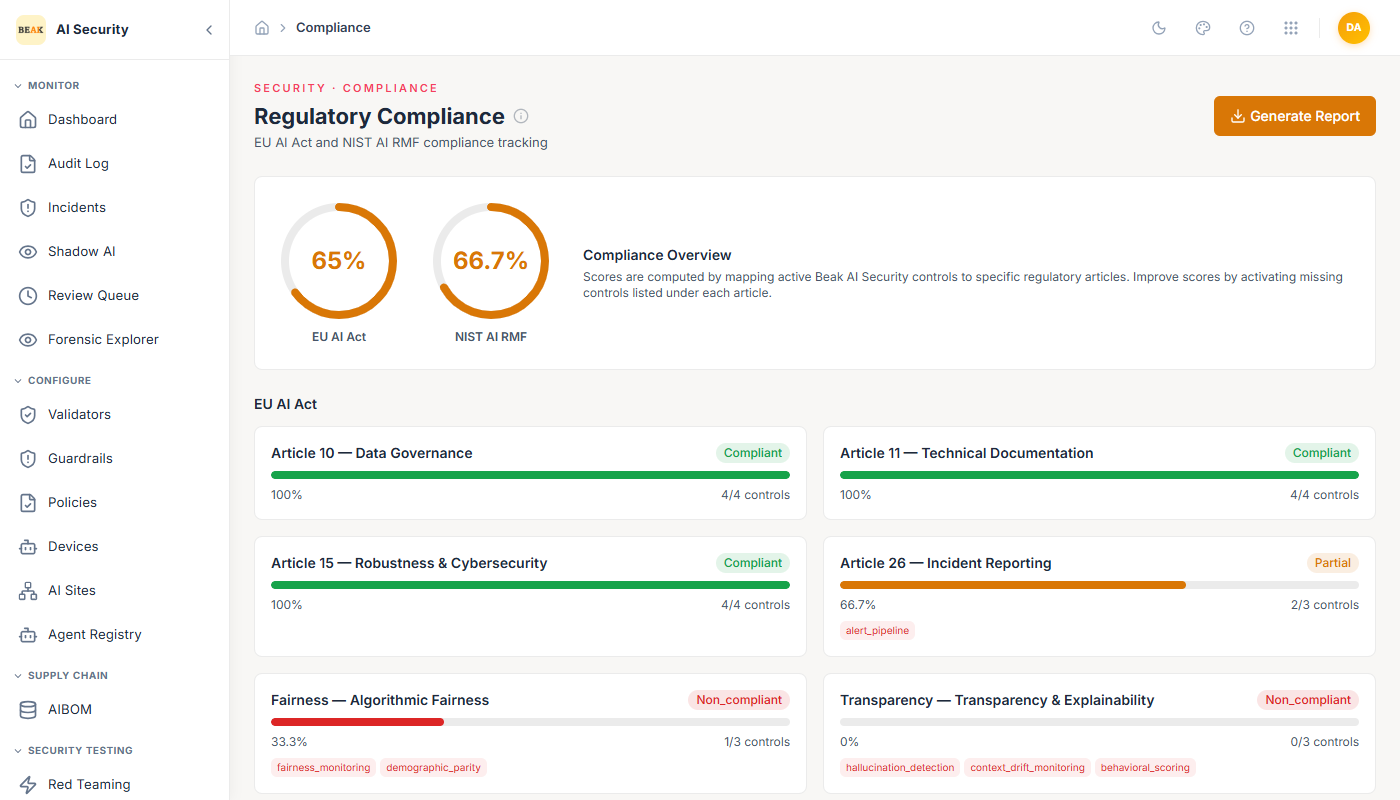
Overall Scores
Two donut gauges at the top of the page show the overall compliance scores:
- EU AI Act — A percentage score based on how many of the required controls have been implemented across all tracked articles.
- NIST AI RMF — A percentage score based on coverage of the four NIST functions: Govern, Map, Measure, and Manage.
Each score is calculated from the underlying per-article and per-function control cards. Improving coverage in any control card raises the corresponding framework score.
EU AI Act Controls
The EU AI Act section shows one card per article being tracked. Each card displays:
- Article name and number — The specific EU AI Act provision.
- Status badge —
Compliant(green),Partial(yellow), orNon-compliant(red). - Score — Percentage of controls implemented (e.g., 75%).
- Control count — How many controls are implemented vs. required (e.g., 3/4).
- Missing controls — Tags showing exactly which controls are not yet in place.
The articles tracked include:
| Article | Status Drivers |
|---|---|
| Article 10 — Data Governance | Data quality controls, dataset documentation |
| Article 11 — Technical Documentation | AIBOM export, technical records |
| Article 15 — Robustness & Cybersecurity | Resilience controls, adversarial testing coverage |
| Article 26 — Incident Reporting | Alert pipeline, incident response records |
| Algorithmic Fairness | Fairness monitoring, demographic parity auditing, bias controls |
| Transparency & Explainability | Hallucination detection, context drift monitoring, behavioral scoring |
NIST AI RMF Controls
The NIST AI RMF section shows one card per framework function. Each card follows the same format as the EU AI Act cards.
| Function | Status Drivers |
|---|---|
| Govern | Organizational policies, roles, and accountability structures |
| Map | AI risk identification, shadow AI discovery, use case mapping |
| Measure | Behavioral scoring, hallucination detection, fairness monitoring |
| Manage | Incident response, model lifecycle controls, remediation processes |
ISO/IEC 42001 Scoring (API)
ISO/IEC 42001 — the AI management system standard — is scored by the same engine as the two
frameworks above and is available today through the API at GET /compliance/iso-42001; it also
appears as iso_42001 in GET /compliance/summary. A dashboard card follows in a later release.
The response has the same shape as the EU AI Act and NIST AI RMF responses, with each clause
emitted under a clause key. The clauses tracked, and the Beak controls that back them:
| Clause | Title | Status Drivers |
|---|---|---|
| Cl. 6.1 | AI risk assessment | Behavioral scoring, completed red team campaigns, ATLAS coverage |
| Cl. 8.2 | AI system impact assessment | Red teaming, fairness monitoring, bias auditing |
| Cl. 9.2 | Internal audit | No Beak control yet — always scores 0 (see below) |
| Cl. 10.2 | Nonconformity and corrective action | Review queue, incident response |
| A.4 | Resources for AI systems | Governed agents in the Agent Registry, AIBOM records, dataset lineage |
| A.5 | AI system life cycle | AIBOM export, AIBOM records |
| A.6 | Data for AI systems | PII redaction, dataset lineage, vector firewall |
| A.9 | Third-party and customer relationships | AIBOM records |
Why Cl. 9.2 scores 0. Beak holds no evidence of an internal audit of your AI management system, so the clause is reported as a gap rather than left out. Leaving it out would make the overall score look higher than it is. The highest ISO/IEC 42001 score reachable today is therefore 90%.
SOC 2 Scoring (API)
SOC 2 is scored against the Security Trust Services Criteria (the Common Criteria) and is
available through the API at GET /compliance/soc2; it also appears as soc2 in
GET /compliance/summary, and the daily Posture History records a SOC 2
snapshot alongside the other frameworks. The response has the same shape as the frameworks above,
with each criterion emitted under a criterion key. A dashboard card follows in a later release.
| Criterion | Title | Status Drivers |
|---|---|---|
| CC3.2 | Risk identification | Completed red team campaigns, ATLAS coverage |
| CC4.1 | Monitoring of controls | Continuous monitoring — the daily evidence recording itself (see below) |
| CC6.1 | Logical access | Role permissions, governed agents in the Agent Registry, active policies |
| CC7.1 | Detection of configuration change | Context drift monitoring |
| CC7.2 | Anomaly monitoring | Behavioral scoring, prompt injection defense, runtime protection |
| CC7.3 | Incident evaluation | Incident response, review queue |
| CC7.4 | Incident response | Alert pipeline, circuit breaker |
- Security criteria only — Availability, Confidentiality, Processing Integrity and Privacy are not scored in this release. The criteria and their weights are engineering's proposal pending product-owner sign-off; they are data in the service and can be revised without a code change.
- CC8.1 (change management) is not scored — Its evidence lives in Azure DevOps and the build pipelines, not in AI Security, so the service does not claim it.
- CC4.1 is proved by the evidence store — The
continuous_monitoringcontrol is active once at least one daily compliance snapshot exists for your tenant. The check runs before the day's snapshot is written, so the very first day records it asinactiveand every later day asactive: the store proves itself by having a history.
Posture History
The scores above are computed live, from the state of your controls at the moment the page loads. An auditor asks a different question — "what was your posture on 1 August, and what proved it?" — so AI Security now records that history automatically.
Once a day, for every tenant and every framework it scores (EU AI Act, NIST AI RMF, ISO/IEC 42001, SOC 2), the service stores a snapshot: the overall score and the full per-article, per-function, per-clause or per-criterion breakdown exactly as the dashboard would have shown it. Behind each snapshot it stores one evidence row per control, recording the outcome of the check:
| Outcome | Meaning |
|---|---|
active | The control's check ran and found the control in place. |
inactive | The check ran and found the control not in place. |
check_failed | The check itself could not run — for example a table that is not yet migrated. This is recorded as its own outcome rather than counted as inactive, because "we could not verify" and "it was off" are different findings. |
The snapshot score is produced by the same scoring engine as the live dashboard, so a snapshot and a live read taken at the same moment agree.
- Immutable snapshots — Once written, a snapshot and its evidence are never edited. They are removed only by the retention purge, after 13 months — one SOC 2 audit window plus a month of margin.
- One snapshot per day — The store allows at most one snapshot per tenant, per framework, per UTC day. A service restart during the day does not record twice.
- On by default — Nothing to enable. Recording starts with this release: the first snapshot is
taken when the service starts, then daily. Platform operators can change the interval with the
COMPLIANCE_CAPTURE_INTERVAL_SECSsetting; a shorter interval cannot produce duplicate history. - Reading the history — The Period Report below reproduces any date range from these snapshots. The dashboard view of the history follows in a later release.
Period Report (API)
An auditor samples a period, not a moment. GET /compliance/report answers for any registered
framework and any date range — from the stored snapshots only. It never recomputes a live
score, so the numbers it returns are the ones recorded on those days and can be reproduced later.
GET /compliance/report?framework=soc2&from=2026-08-01&to=2026-08-31
| Parameter | Required | Meaning |
|---|---|---|
framework | Yes | eu_ai_act, nist_rmf, iso_42001 or soc2 — see GET /compliance/frameworks for the list. An unknown id returns 404. |
from, to | Yes | Inclusive UTC dates (YYYY-MM-DD). from after to returns 400. |
The report requires the compliance:export permission, which the analyst and admin
system roles carry. The viewer role can read today's scores but cannot produce the report.
The response carries:
score—first,last,min,maxandmeanof the daily overall scores in the window, ornullwhen the window holds no snapshot.days_requestedanddays_evidenced— How many days the window spans and how many of them have a snapshot, so a gap in recording is visible rather than averaged away.snapshots— One entry per recorded day, oldest first:captured_on,captured_at,overall_score,active_count,total_controlsand the fullclause_scoresbreakdown as it was scored that day.controls— For every control behind the framework, how many days it was recordedactive,inactiveandcheck_failedacross the window. This is the SOC 2 Type II question — did the control operate throughout the period — answered from evidence.
Note: A window with no snapshot returns
200withscore: nulland the message "no evidence in range". It is deliberately not a score of0: zero reads as failing when it means not measured, and the two must stay distinguishable in an audit.
GET /compliance/frameworks (permission compliance:read) lists every framework the service
scores — its id, display name and the key each clause is emitted under — so a client need
not hardcode the list.
Addressing Missing Controls
Each card's missing control tags tell you specifically what to implement to improve your score. For example:
missing: aibom_export→ Go to AIBOM and export AIBOMs for all registered AI systems.missing: hallucination_detection→ Run the Hallucination Detection tool in Hallucination & Fairness and document the results.missing: fairness_monitoring→ Run the Fairness Audit tool and configure validators of typecompliancethat enforce fairness checks.missing: alert_pipeline→ Configure incident alerting in your notification settings.missing: shadow_ai_discovery→ Register all AI systems in the Agent Registry and AIBOM.
Generating a Compliance Report
Click Generate Report in the top right to produce a compliance report document. The report includes:
- Current scores for both EU AI Act and NIST AI RMF.
- Per-article and per-function control status.
- Missing control inventory.
- Timestamp and evidence references.
Use this report for internal governance reviews, auditor submissions, or regulatory filings.
Best Practices
- Review the Compliance Dashboard after every significant configuration change — adding a new validator, completing a red team campaign, or exporting an AIBOM can all move scores.
- Prioritize
Non-compliantarticles first — these have 0% control coverage and represent the highest regulatory risk. - For EU AI Act high-risk AI systems, target 100% on Article 10 and Article 15 before going to production.
- Generate and archive a compliance report at least quarterly, or before any regulatory review.
- Use missing control tags as an action checklist and assign ownership for each missing control to a specific team member.