Core Features
Beak AI Studio is the design surface for everything that runs in Beak AI: agents, skills, prompts, data sources, credentials, and MCP servers. It is the place where builders compose what an agent knows (data sources), what it can do (skills and MCP tools), how it should think (prompts and models), and where it runs (Agent Runtime). Once published, agents become available to the AI Runtime and to integrated products like Beak Desk and Beak ITSM.
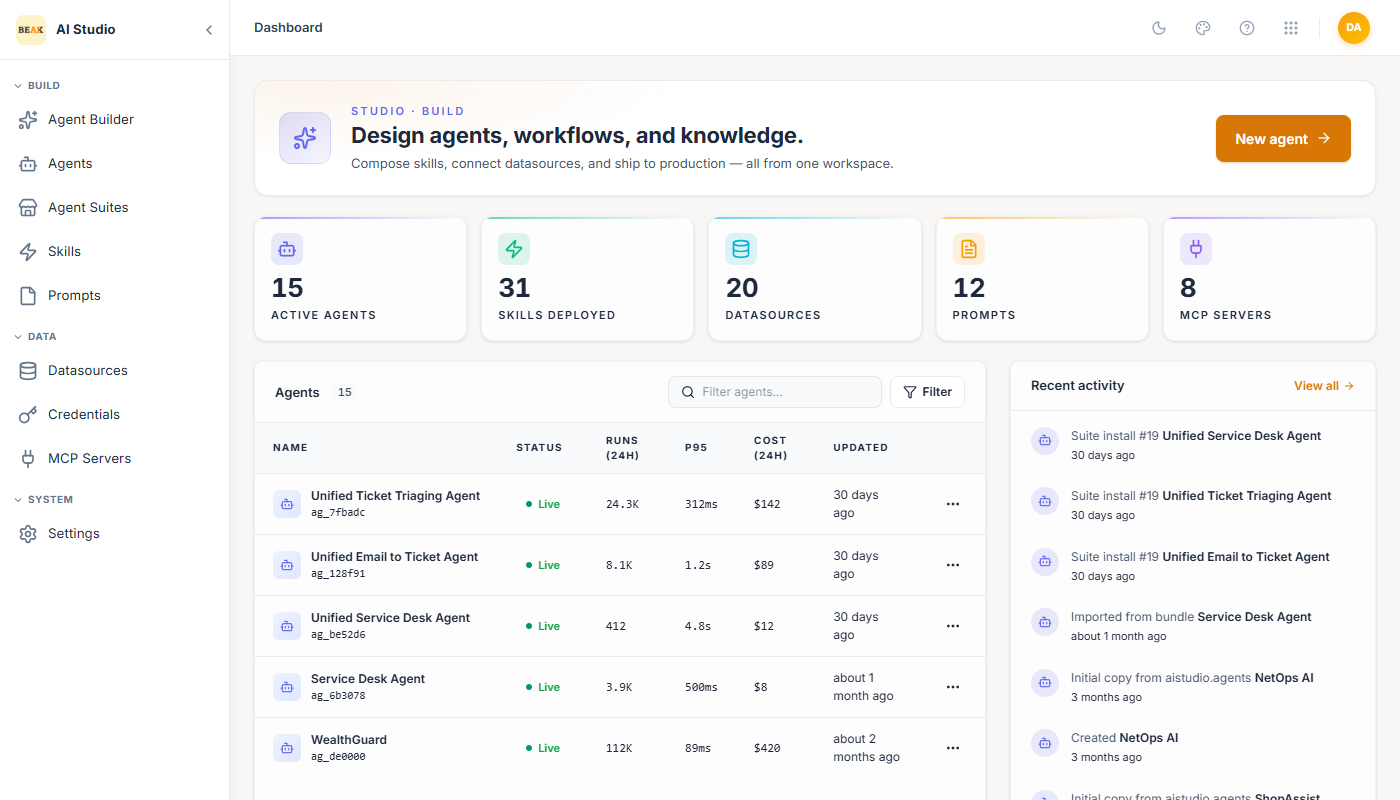
The Studio dashboard summarizes the state of the workspace — active agents, skills, datasources, prompts, and MCP servers — alongside recent agent activity and quick actions to create new objects.
Workspace Layout
The left navigation groups every object in AI Studio into four sections:
- Build —
Agents,Skills,Prompts. The composable units a builder defines. - Data —
Datasources,Credentials,MCP Servers. The connections an agent uses to read knowledge, authenticate to systems, and call external tools. - Test —
Playground. Interactive chat surface for any agent in the workspace. - System —
Settings. Workspace-level connections to the Agent Runtime and AI Gateway.
Every list view in Studio uses the same conventions: search box, status filter (Active / Inactive), type/category filters, a primary action button (Create …), and per-row actions for activate/deactivate, history, and edit.
Agents
Agents are the entry point for users. An agent has an identity (name, description, icon, industry), a system prompt, a model with temperature, and a set of attached Skills, Datasources, Sub-Agents (orchestrators only), and MCP Servers. Two types are supported:
- Assistant — Single-purpose agent that handles a conversation end-to-end using its own skills and data.
- Orchestrator — Coordinator that delegates work to other published agents (sub-agents) in addition to its own skills.
See Creating Agents and Assistant vs Orchestrator for the full walkthrough.
Skills
Skills are the actions an agent can invoke. A skill is registered once and reused across any number of agents. Four skill types are supported:
- Prompt-Based Task Execution — Run a prompt template with an LLM, optionally parsing the output as JSON.
- External API Integration — Call any REST endpoint described by an OpenAPI spec.
- KQL Query Execution — Query a data source using KQL with a defined table schema.
- Code Execution — Run Python or PowerShell, either AI-generated from an instruction or a static snippet you provide.
Each skill defines its inputs (parameters the LLM extracts from the user message), an optional action message, and toggles for Audit, Approval, Requires Authentication, and Include Conversation Context. See Creating Skills.
Prompts
The Prompt library stores reusable prompt templates that can be referenced from agents and skills using the Library tab. Each prompt has a Type (System, User, Assistant, Template), a tag list for organization, and versioned content written in markdown. See Prompts.
Datasources
Datasources expose knowledge, structured data, and SaaS application data to agents through a single retrieval interface. AI Studio supports four datasource categories:
- Database — PostgreSQL, MySQL, SQL Server, MongoDB, Redis, Cassandra, Elasticsearch, OpenSearch, Oracle, Azure Log Analytics.
- System — ServiceNow, Zendesk, ConnectWise Manage, SentinelOne, Azure DevOps, Microsoft Intune, N-Central, Beak RMM, Atlassian Jira, ManageEngine Endpoint Central, ManageEngine ServiceDesk Plus, Microsoft 365, Microsoft Entra, Beak ITSM, NinjaOne, Plumsail, SolarWinds Service Desk, Zoho Desk.
- Files —
Upload Documentsfor direct uploads orSharePoint Documentsfor libraries. - Website —
Public Website,Web Portal, orSharePoint Sitesindexed for retrieval.
See Datasources Overview.
Credentials
Credentials are the secrets an agent uses to call external systems. Categories include API (API Key, Basic, Bearer, Custom Header), Cloud (AWS IAM, Azure AD Service Principal, Azure OpenAI, OpenAI), and OAuth. Credentials are stored centrally and referenced by name from skills, datasources, and MCP servers — they never appear in agent definitions or chat traffic. See Credentials.
MCP Servers
Beak AI Studio is a Model Context Protocol client. Any MCP-compliant server (SSE or Streamable HTTP transport) can be registered once and its tools made available to agents. The Studio validates the server URL, discovers tools, and lets you assign a default credential that agents can override. See MCP Servers.
Playground
The Playground is the test bench. Pick any agent in the workspace, start a thread, and chat with it using the same runtime, model, skills, and datasources that production users would hit. Threads are persisted per agent so iterations on a system prompt or skill change can be compared side-by-side. See Playground.
Settings
Workspace settings configure the two upstream services that AI Studio depends on:
- Agent Runtime — Runtime URL (and optional API key) for the Beak AI Runtime instance that hosts published agents.
- AI Gateway — Gateway URL, optional Project Name and Virtual Key for the Beak AI Gateway instance that lists available LLM models.
Both connections expose Test Connection and Validate & Preview Models actions for verification before save.