Guardrails
Guardrails are named safety boundaries that group related Validators together. Where a validator checks a single condition, a guardrail represents a complete safety theme — such as "Real Estate Compliance" or "Input Safety" — by bundling all the validators relevant to that theme. Guardrails are then attached to Policies to define what gets enforced on which agents.
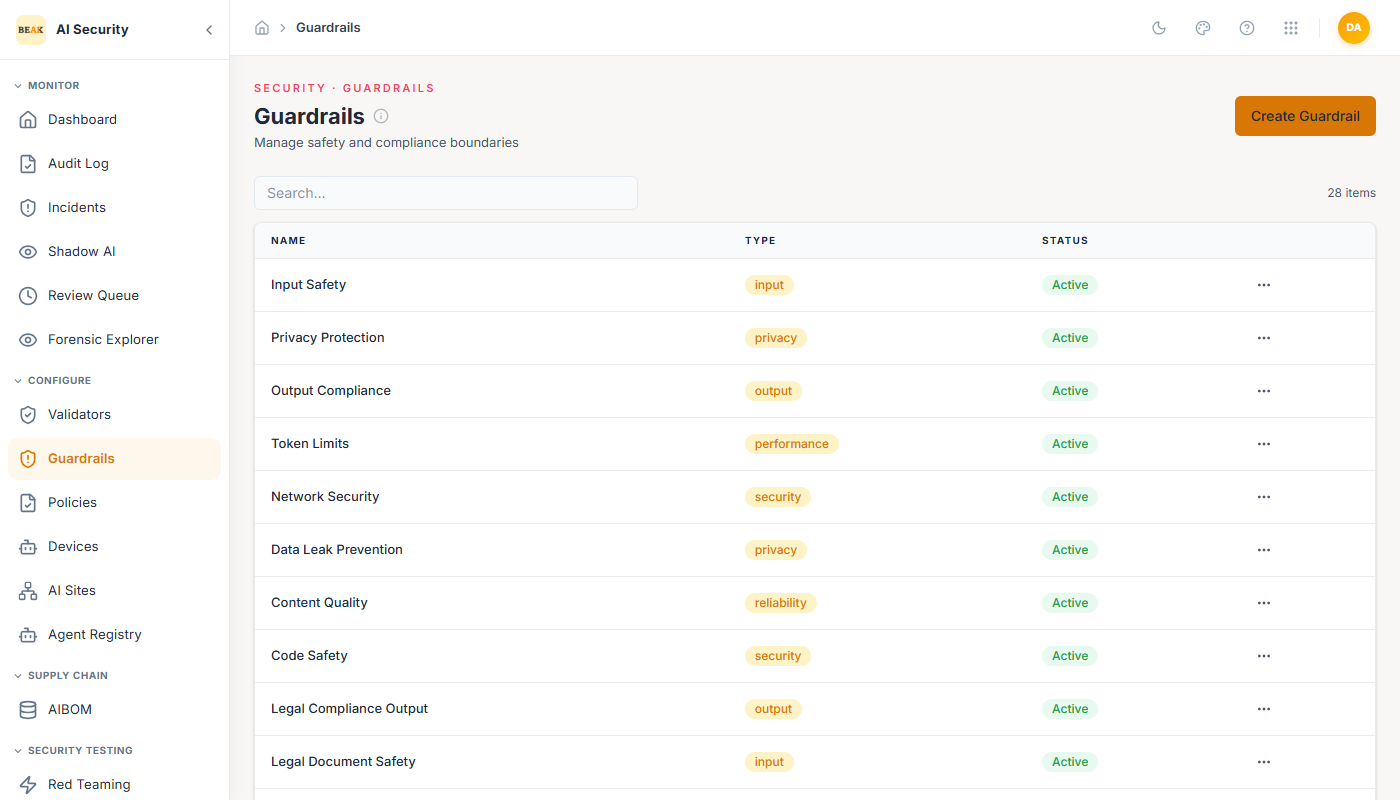
Guardrail List
The Guardrails page lists all configured guardrails with their name, type, and status. The platform ships with 70 pre-built guardrails. Each guardrail has a Type that reflects its safety theme:
compliance— Regulatory and policy rule enforcement (e.g., domain-specific disclaimers, prohibited advice).privacy— PII, secrets, and confidential data protection.fairness— Bias detection and demographic fairness checks.input_safety— Validation of inputs before they reach the AI model (injection, manipulation, adversarial content).output_safety— Validation of AI-generated outputs before they are returned to users.operational— Operational controls such as rate limits, scope restrictions, and capability boundaries.security— Technical security checks including SSRF, credential leakage, and exfiltration patterns.
Creating a Guardrail
Click the Create Guardrail button to open the form. Fill in:
- Name — A descriptive label for the safety boundary this guardrail represents.
- Description — The purpose and coverage of this guardrail.
- Type — The safety theme (see types above).
- Active — Toggle to enable or disable without removing from policies.
- Validators — A multi-select checklist of all available validators. Each validator is shown with its name and type. Select all validators that belong to this guardrail's safety theme. The form shows how many are currently selected.
- Config — A JSON object for any guardrail-level configuration overrides.
Editing a Guardrail
Click any guardrail in the list to open its edit form. The Validators section shows all available validators with checkboxes. Currently selected validators are highlighted. You can add or remove validators from the guardrail at any time — changes propagate immediately to all policies that include this guardrail.
Guardrail Composition
Guardrails are designed to be thematically coherent. A well-designed guardrail bundles validators that all address the same risk area, making it easy to reason about what is and isn't covered when attaching guardrails to policies.
For example, a "Financial Compliance" guardrail might include:
- A
compliancevalidator for regulated advice disclaimers - A
compliancevalidator for banned financial topics - A
privacyvalidator for SSN and account number detection
This grouping means that attaching a single guardrail to a policy provides complete coverage for that risk domain.
Best Practices
- Name guardrails after the safety theme they represent, not after specific validators — the theme name is what appears in policy configuration and compliance views.
- Keep guardrails focused on a single domain. A guardrail covering both fairness and SSRF detection is harder to reason about and maintain.
- When a guardrail is attached to multiple policies, be aware that changes to its validator selection affect all those policies simultaneously.
- Use the Active toggle on individual guardrails (not their validators) to temporarily suspend a full safety theme during rollbacks or testing.