Hallucination & Fairness
The Hallucination & Fairness page provides two interactive reliability tools: a hallucination detector for checking LLM outputs against source documents, and a fairness auditor for detecting demographic disparities in AI decision outcomes. Both tools are designed to be run on-demand as part of quality assurance and compliance workflows.
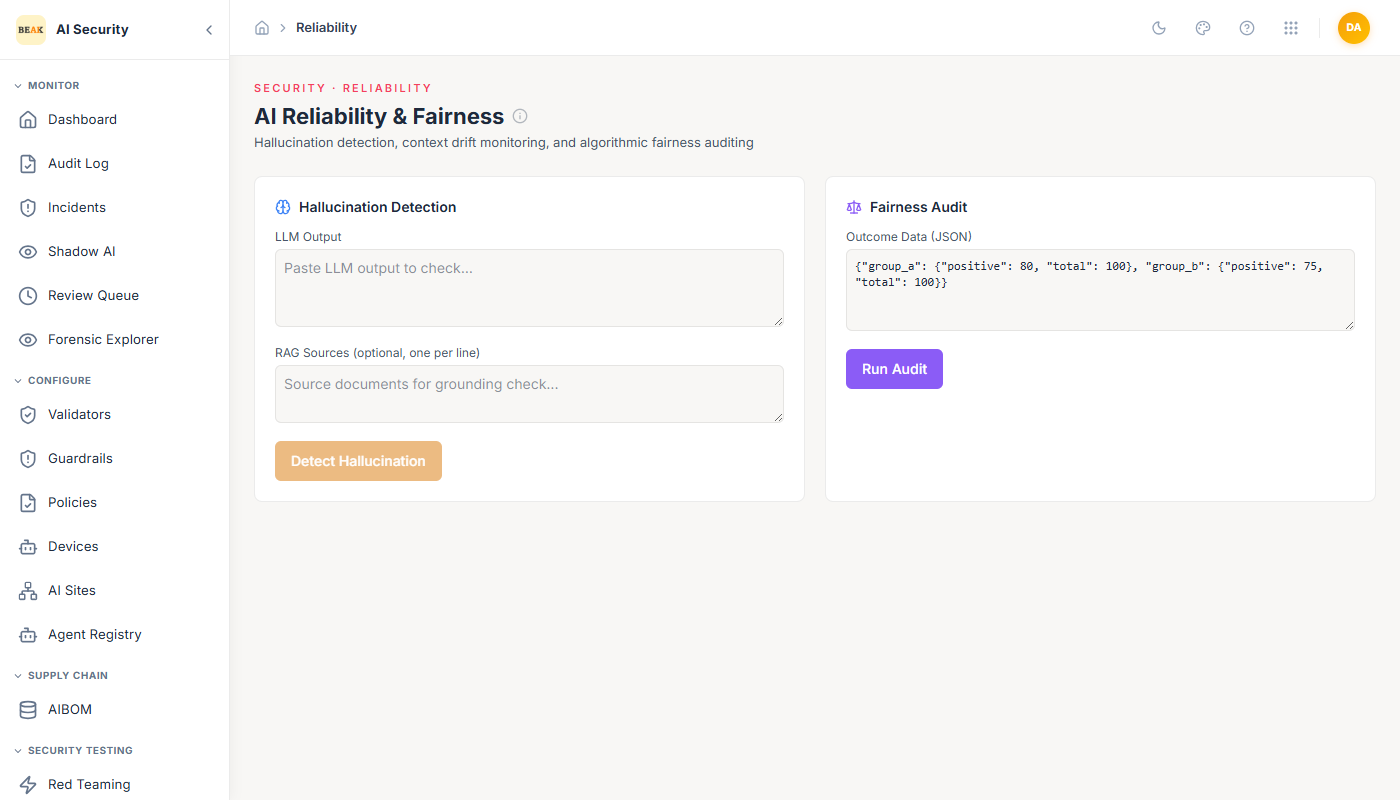
Hallucination Detection
The Hallucination Detection tool checks whether an LLM output is grounded in its source context or contains fabricated information.
How to use it:
- Paste the LLM output you want to check into the LLM Output field.
- Optionally, paste the source documents or RAG context into the RAG Sources field (one document per line). When RAG Sources are provided, the tool performs a grounding check — verifying that the output's claims are supported by the provided sources.
- Click Detect Hallucination.
The tool returns an assessment of whether the output contains hallucinated content. When RAG Sources are provided, the grounding check is more precise — the tool can identify specific claims in the output that lack support in the source material.
Note: Running without RAG Sources performs a general hallucination check based on internal consistency and factual plausibility signals. For highest accuracy, always provide the source documents that the model had access to when generating the output.
Fairness Audit
The Fairness Audit tool checks for demographic disparities in AI decision outcomes. It is designed to detect whether an AI system produces systematically different outcomes for different demographic groups — a key requirement under both the EU AI Act (Algorithmic Fairness) and NIST AI RMF (Measure function).
How to use it:
- Prepare your outcome data as a JSON object mapping demographic group labels to their outcome statistics. The required format is:
{
  "group_a": {"positive": 80, "total": 100},
  "group_b": {"positive": 75, "total": 100}
}
Each group entry must include:
positive— The number of positive outcomes for this group.total— The total number of decisions made for this group.
- Paste the JSON into the Outcome Data field.
- Click Run Audit.
The audit calculates metrics such as demographic parity (whether positive outcome rates are similar across groups) and flags disparities that exceed acceptable thresholds.
Compliance Context
Both tools directly map to compliance requirements tracked on the Compliance Dashboard:
- Hallucination Detection — Addresses the EU AI Act's Transparency & Explainability article and the NIST AI RMF's Measure function (hallucination detection control).
- Fairness Audit — Addresses the EU AI Act's Algorithmic Fairness article (demographic parity and fairness monitoring controls) and the NIST AI RMF's Measure function (fairness monitoring control).
Running these tools and documenting their results is required to move compliance scores from non-compliant to partial or compliant status for the relevant controls.
Best Practices
- Run Hallucination Detection on a representative sample of LLM outputs for each agent before promoting to production, especially for agents used in factual domains (legal, medical, financial).
- For RAG-based agents, always provide the retrieved context documents in the RAG Sources field — grounding checks without source context will miss retrieval-related hallucinations.
- Run Fairness Audits whenever your agent is used to make or influence decisions that affect different demographic groups (hiring, loan approvals, medical triage, benefits eligibility).
- Document audit results with timestamps. The Compliance Dashboard tracks whether these controls have been run — regulators may request evidence of the actual audit outputs.
- Investigate any fairness disparity above 5 percentage points across groups — this is typically the threshold used in EU AI Act guidance for high-risk AI applications.