AIBOM — AI Bill of Materials
The AI Bill of Materials (AIBOM) provides a complete, versioned inventory of every component in an AI system — models, datasets, software dependencies, embeddings, and the MCP servers its agents can call. It brings supply chain visibility to AI, so you know exactly what is inside each AI stack, whether any components have known CVEs, and whether every component has been reviewed and approved.
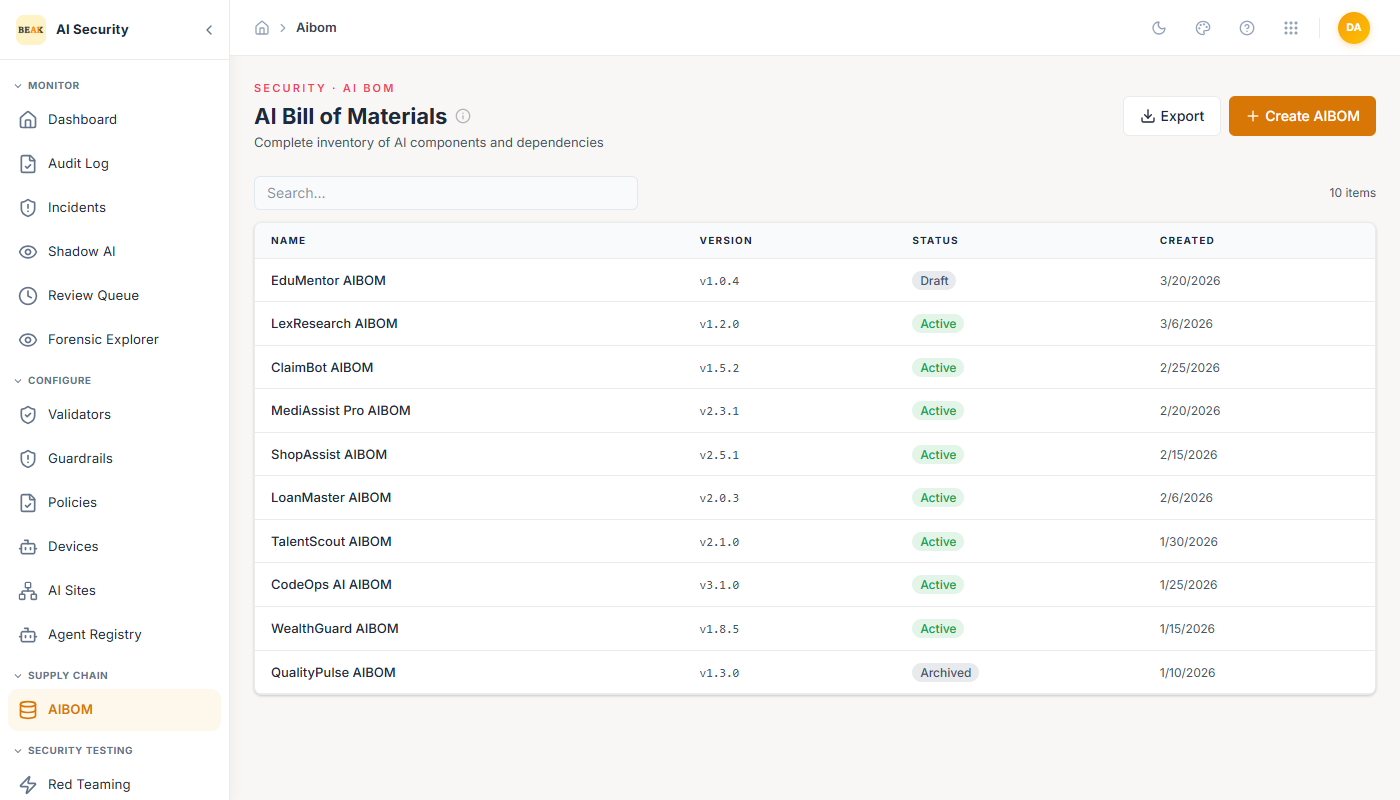
AIBOM List
The AIBOM page lists all registered AI systems, each representing a complete stack. Each entry shows the system name and version. The platform tracks multiple AI stacks simultaneously, giving compliance teams a single inventory of all AI systems in the organization.
AIBOM Detail
Clicking on an AI system opens its detailed AIBOM view. The detail page is organized into tabs:
Models
Lists every AI model used in the system. For each model:
- Model Name — The specific model identifier (e.g.,
Claude 3.5 Sonnet,GPT-4o,Llama 3.1 70B). - Provider — The model's originating organization (e.g., Anthropic, OpenAI, Meta).
- CVE Flag — A visible indicator if a known CVE has been associated with this model version.
- Approval Status — Whether this model has been reviewed and approved for use.
Datasets
Lists every dataset used to train, fine-tune, or ground the AI system. Each dataset entry shows its name, purpose, and approval status.
Dependencies
Lists all software dependencies (e.g., fastapi, langchain, langgraph, pytorch, transformers) with their versions. This is the traditional software Bill of Materials portion of the AIBOM.
MCP Servers
Lists the MCP servers the AI system's agents can call — the tool servers they use to raise a ticket, query a directory, or read a wiki. A bill of materials that covers the models and libraries an agent is built from but not the tool servers it can reach is not a complete account of what is inside that system: the tool server is where the agent acts on the outside world, and it holds the credential it acts with.
Record one the way you record any other component, choosing MCP Server as the component type. To see every MCP server a tenant can reach — with the credential bound to each and what that combination is doing wrong — use MCP Inventory, which reads Beak AI Hub and Beak AI Studio directly rather than relying on anything recorded here by hand.
CVEs
A consolidated list of all known CVEs affecting any component in the system — models, datasets, or dependencies. This tab provides a single-pane view of current vulnerability exposure without requiring you to check each component tab individually.
Scanning and Exporting
Two actions are available from the AIBOM detail page:
- Scan — Triggers a scan of the AI system's components against current CVE databases and updates the CVE tab with any new findings.
- Export — Generates a machine-readable AIBOM export, which can be provided to auditors, regulators, or procurement teams as evidence of supply chain due diligence.
Note: The Compliance Dashboard tracks AIBOM export coverage under Article 11 (Technical Documentation) of the EU AI Act. Ensure AIBOMs are exported and archived for all production AI systems.
Ledger Integration
The Beak AI Security ledger records AIBOM changes as tamper-evident events. The Audit Log shows when AIBOMs were created, modified, or exported, providing a complete history of supply chain changes. On the CIO/Executive Dashboard, the Supply Chain & Integrity widget shows the total AIBOM count and confirms ledger verification status.
Best Practices
- Create an AIBOM entry for every AI system before deploying it to production — retroactive documentation after an incident is difficult and may not satisfy regulatory requirements.
- Run a Scan after any model update or dependency upgrade to check for new CVEs before the change goes live.
- Export AIBOMs on a regular cadence (e.g., quarterly) and store them in your compliance archive alongside other technical documentation.
- For the CVEs tab, prioritize models and dependencies with CVSS scores above 7.0 — these represent high-severity supply chain risks.
- Review approval status for all components when onboarding new models. An unapproved model appearing in a production AIBOM is a compliance gap.
Related Pages
- Compliance Dashboard
- CI/CD Security Gate — Fails a build when the AIBOM is missing or out of date.
- Audit Log
- Agent Registry