Core Features
Note: AI Governance is now part of AI Security & Governance
The Gateway's governance screens no longer ship as a separate web app. They are now the Govern section of the AI Security & Governance console, so security posture and LLM cost/traffic governance live behind one sign-in and one navigation.
- Where it lives now —
https://aigovernance-<env>.beakops.com/aisecurity/, and on the platform and tenant hosts at/aisecurity/.- Existing links keep working. Every
/aigateway/...URL redirects to the matching/aisecurity/...path, preserving the rest of the link — so/aigateway/keys/newlands on/aisecurity/keys/new. The redirects are permanent and are being kept, so bookmarks do not need updating.- Nothing changes about the API or the proxy. The Gateway Manager backend is unchanged and still answers on
/api/aigateway/*; the LiteLLM proxy onaigateway-<env>.beakops.comis untouched.- Access is unchanged too. Governance roles and permissions stay separate from the security ones — being an administrator in AI Security does not grant anything in AI Governance, and vice versa. The Govern section is hidden from users whose tenant is not entitled to it.
Beak AI Gateway is the governance surface for every LLM call made by every agent in the platform. It is the single place where models are registered, API credentials are stored, teams are given budgets and rate limits, virtual keys are issued, and requests are routed, observed, and secured.
Every request from an agent flows through the Gateway's Multi-Provider Router. The router chooses a model for the request based on the team's policy, enforces rate and budget limits, runs any security policies assigned to the team, records the request for observability, and returns the response — all without the agent code knowing which provider ultimately served it.
Workspace Layout
Every governance screen now sits in the Govern section of the AI Security & Governance sidebar:
- Govern —
Models,Model Routing,Spend & Budgets,Virtual Keys,Teams,Gateway Projects,Alerting. Everything the standalone product's Resources and Operations sections used to hold, in one group. The projects entry is labelled Gateway Projects to distinguish it from the security side's own projects. - Overview — the
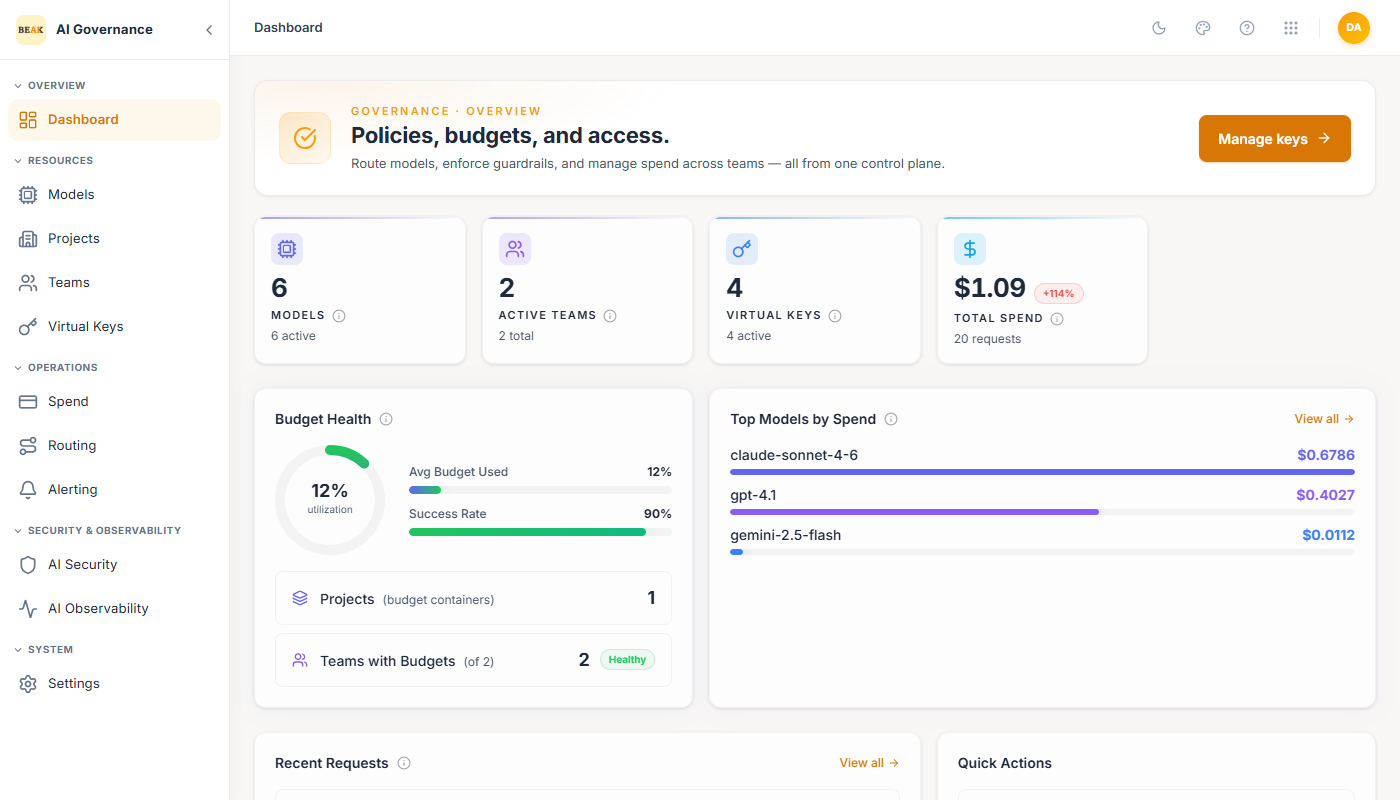
Dashboardgains a Governance persona alongside the existing CIO, Compliance, SecOps and AI Engineer views. It carries the same tiles the Gateway dashboard did: models, active teams, virtual keys, total spend, budget health, top models and recent requests. - Administration —
Users & Rolesis now one screen with a tab per product, because governance and security roles are assigned independently. Each tab appears only if you can read that product's roles. - System —
Settingsgains a Notifications tab holding the tenant-wide SMTP relay that every email alerting channel uses.
The standalone AI Security and AI Observability screens are gone as
pages of their own. They existed only to switch those integrations on per team
and pick a security policy, so both settings now sit directly in the team
editor — including the security-policy dropdown, which no longer has to reach
across to another host to list the available policies. /aigateway/security and
/aigateway/observability redirect to the Teams list.
Dashboard
The Dashboard shows Models, Active Teams, Virtual Keys, and Total Spend as headline tiles, alongside a Budget Health panel, a Top Models by Spend ranking, a Recent Requests feed, and Quick Actions for the most common builder tasks. See Dashboard.
Models
Every LLM the Gateway can call is registered as a model. A model binds a provider (Anthropic, Azure OpenAI, Google Gemini, OpenAI, Groq, Mistral AI, AWS Bedrock, Amazon Nova, Cohere, Perplexity, Together AI, Fireworks AI, DeepSeek, xAI Grok, and Google Vertex AI), a specific provider model id, a type (Chat, Embedding, Completion, Image Generation, Audio Transcription), an optional API base URL, and a reference to one of the stored credentials. See Models.
Provider credentials
Each provider API key is entered directly on the model when it is added — there is no separate credential store. The key (plus any provider-specific fields, such as an Azure OpenAI endpoint or AWS Bedrock access/secret keys) is captured in the Add Model form and stored encrypted. Supported providers match the Models list (OpenAI, Azure OpenAI, Anthropic, Google Gemini, Google Vertex AI, Mistral AI, Cohere, DeepSeek, Groq, Together AI, Fireworks AI, Perplexity, xAI Grok, AWS Bedrock, Amazon Nova). See Models.
Projects
Projects are top-level budget containers. A project groups teams so that multiple teams can share a budget envelope and so finance reporting can roll up across them. See Projects.
Teams
Teams are the primary access-control unit. Each team has a name, an optional project, a budget with a soft and hard ceiling, a billing period, TPM and RPM rate limits, a model allowlist, and toggles for Security and Observability. Virtual keys issued to a team inherit all of these. See Teams.
Virtual Keys
Virtual keys are the API keys agents and applications use to call the Gateway. Each virtual key is bound to a team (or created standalone), carries an optional max budget, and can expire on a configured date. Usage, cost, and status are visible per key. See Virtual Keys.
Spend
Spend is the analytics view over every request that has passed through the Gateway. Filter by date, see aggregate spend / tokens / requests tiles, watch the Daily Spend chart, and drill into the transaction log for per-request detail. See Spend.
Routing
Routing configures how the Gateway chooses a model when more than one is eligible, how long a failing model is excluded from the pool, what fallback models to try, and how many retries to make. See Routing and Load Balancing.
Alerting
Alerting warns you before a budget runs out. Delivery channels cover six providers (Slack, Microsoft Teams, Email, PagerDuty, Webhook, Discord), budget rules fire when spend crosses a percentage of a project, team, virtual key, or tenant budget, and an events log records every delivery attempt and its outcome. See Alerting.
AI Security
AI Security enables Beak AI Security per team and assigns one of 15 pre-built policies — default, privacy, performance, and 12 industry-specific policies covering legal, insurance, education, government, e-commerce, HR, software development, customer service, research, manufacturing, media, and real estate. Assigning a policy narrows validation to the guardrails and validators the policy specifies. See AI Security.
Observability
Observability toggles per-team tracing into Beak AI Observability. When enabled, every LLM request the team makes is streamed as a trace with model, tokens, cost, latency, and agent context. See Observability.
Users & Roles
Users & Roles controls who can use Beak AI Governance and what they may do. Identity itself lives in Beak IAM — a person appears here automatically on first sign-in and is granted a starting role, after which every management action in the Gateway is checked against the permissions their roles carry. The page also exposes an audit trail of authorization changes. See Users & Roles.
Settings
Settings holds the tenant-wide notification infrastructure — the SMTP relay every Email alerting channel sends through, configured once per tenant. See Settings.