Shifts
Shift Management defines the working windows that drive overtime calculations, after-hours flags, and the Work Life Balance chart in Behaviour Analytics. Shifts can be assigned at the department or project level, and SWA resolves them through a precedence chain that ends with a built-in fallback so every employee always has a working window.
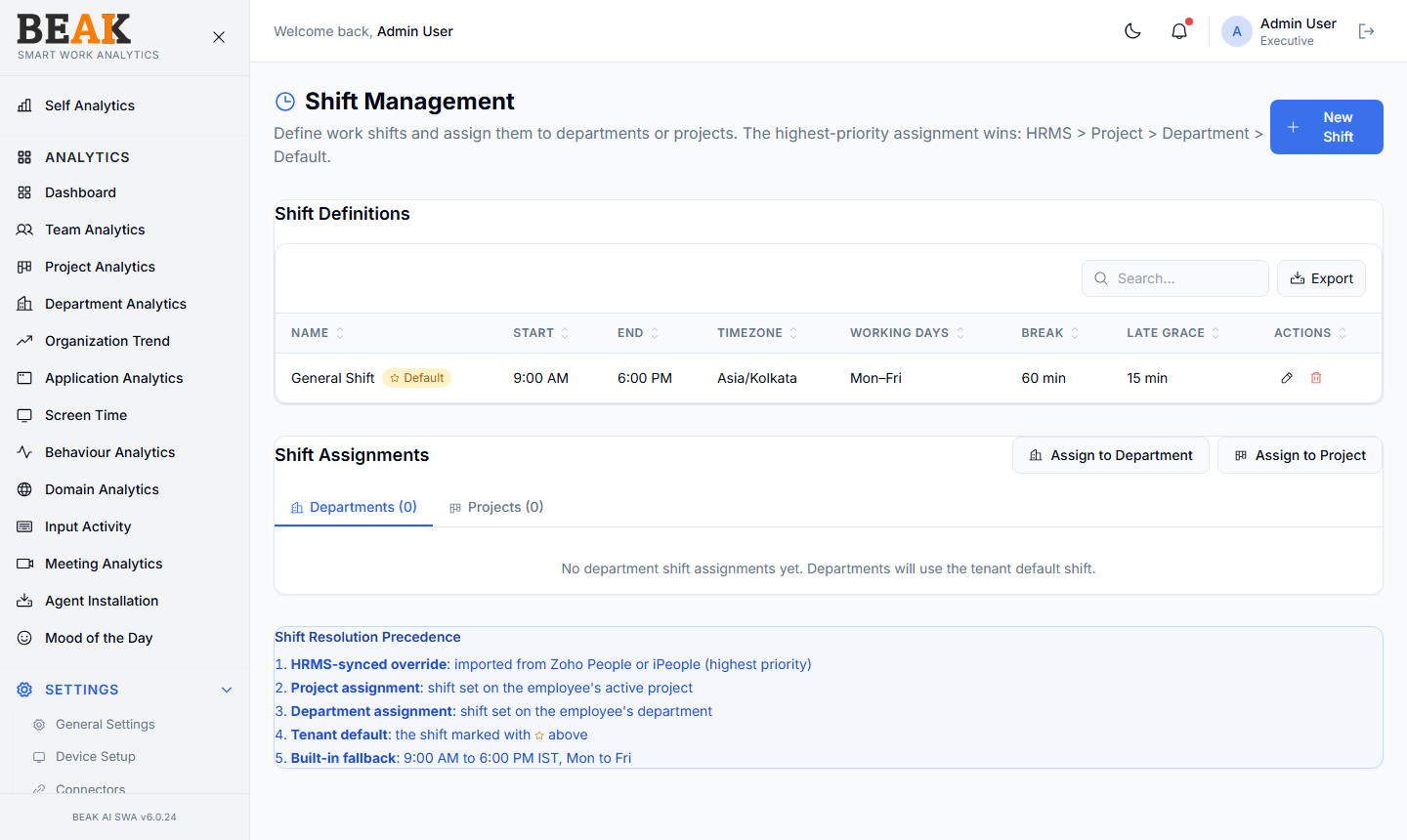
Shift Definitions
A table of every shift defined for the tenant:
| Column | Description |
|---|---|
| Name | Shift display name (e.g. General Shift, Night Shift) |
| Start | Start time (24h or AM/PM) |
| End | End time |
| Timezone | Timezone of the shift |
| Working Days | Days the shift applies (e.g. Mon–Fri) |
| Break | Break window in minutes |
| Late Grace | Allowance after start time before flagging late |
| Actions | Edit, Delete |
A shift may be marked as the Default for the tenant — the default applies to any user not covered by a department or project shift.
The Search field locates a shift by name; Export downloads the table as CSV.
Creating a Shift
Click + New Shift to open the Create Shift modal. Fill in:
- Shift Name — Display name (e.g.
General Shift) - Start Time — Shift start (e.g.
09:00 am) - End Time — Shift end (e.g.
06:00 pm) - Timezone — Defaults to the tenant timezone (e.g.
IST (Asia/Kolkata)) - Break (minutes) — Total break time (default
60) - Late Grace (minutes) — Allowance before flagging late (default
15) - Early Leave Grace (minutes) — Allowance before flagging early leave (default
15)
Save to create the shift. It then becomes available as an assignment target in Shift Assignments.
Shift Assignments
Below the shift table, the Shift Assignments section has two tabs:
- Departments — Assign a shift to one or more departments
- Projects — Assign a shift to one or more projects
Use the Assign to Department and Assign to Project buttons in the section header to add new assignments. Each assignment binds a shift to a scope; when the SWA analytics engine resolves a user's shift, it walks the precedence chain (below) until it finds a match.
Shift Resolution Precedence
When SWA needs to know an employee's working window, it resolves the shift in this order — the first match wins:
- HRMS-synced override — Shift imported from Zoho People or iPeople (highest priority)
- Project assignment — Shift set on the employee's active project
- Department assignment — Shift set on the employee's department
- Tenant default — The shift marked as
Defaultin the shift table - Built-in fallback —
9:00 AM – 6:00 PM IST, Mon–Fri(always available)
This chain guarantees that overtime and after-hours analytics work for every user, even before a tenant has configured anything.
Best Practices
- Set a sensible
Tenant Defaultearly — without one, users without a project or department shift fall through to the built-in fallback, which may not match your timezone. - Use project-level assignments sparingly — they take precedence over department shifts and are easy to forget when a project ends.
- Keep
Late GraceandEarly Leave Gracemodest (10–20 minutes) — too generous and you'll under-count overtime; too strict and morning meetings flag everyone. - For follow-the-sun teams, create one shift per timezone and assign by project rather than department — projects often span timezones, departments often don't.
Related Pages
- Departments — Department directory
- Projects — Project directory
- Behaviour Analytics — Work-life balance and overtime %
- Users — User records (resolves through this chain)