AI Security
Note: This setting moved into the team editor
Since AI Governance became part of the AI Security & Governance console, this is no longer a screen of its own. The capability is unchanged — enabling security per team and choosing its policy now happens directly on the team, in Govern → Teams → <team>, next to the team's budgets and model allowlist.
The security-policy dropdown there is populated locally, because both products are now served from the same origin; it no longer reaches across to another host to list policies.
/aigateway/securityredirects to the Teams list.
AI Security enables Beak AI Security per team in the Gateway. Once enabled, every LLM request the team makes is scanned by the policy's validators and gated by its guardrails before the response returns to the caller. Fifteen policies ship with the platform — a default policy, a privacy policy, a performance policy, and twelve industry-specific policies.
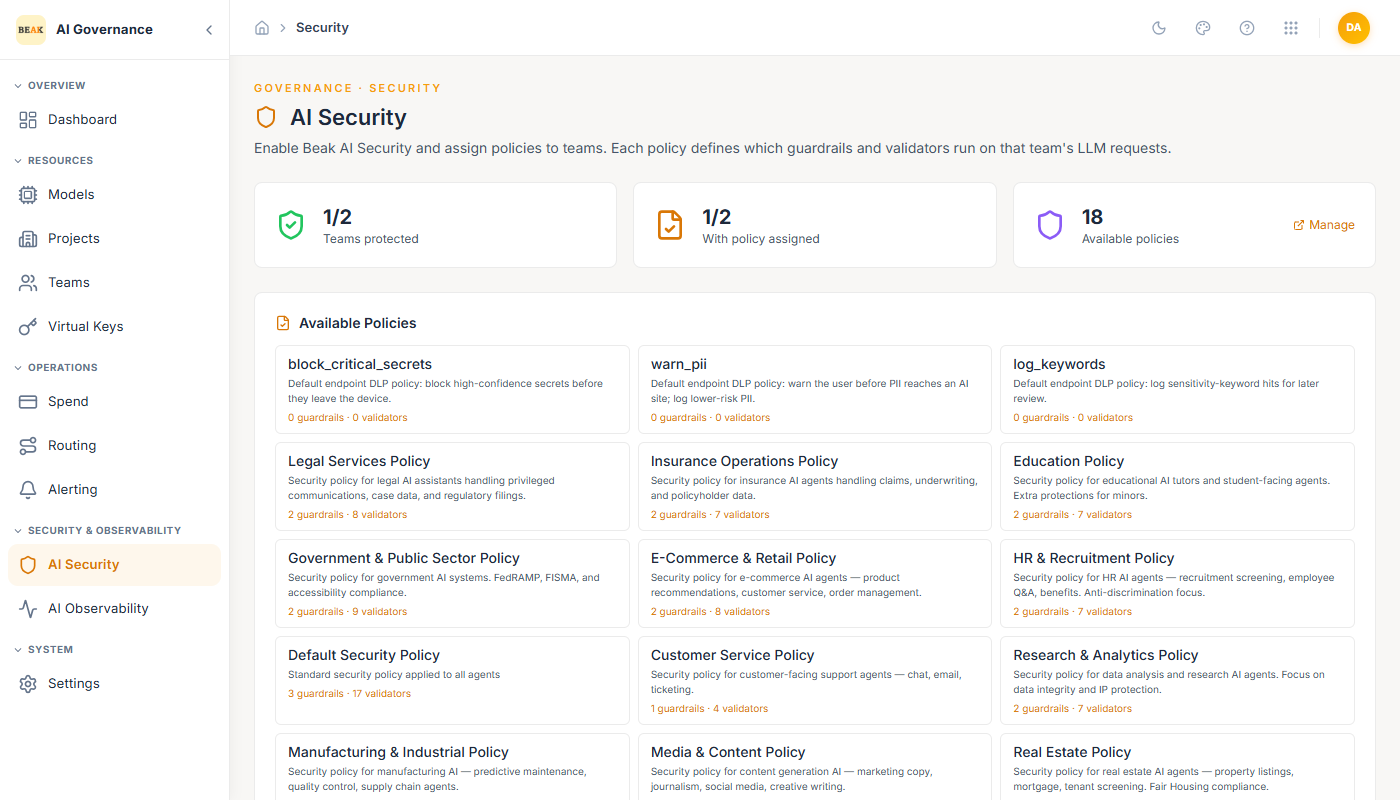
Headline Tiles
- Teams protected —
X / Yteams with Security enabled. - With policy assigned —
X / Yteams that have a specific policy selected (teams with Security on but no policy run in strictest mode). - Available policies — Total count of pre-built policies. The Manage link opens the policy catalog in Beak AI Security.
Available Policies
Each policy is a named bundle of guardrails and validators. The count footer on each card shows N guardrails · M validators — the size of the bundle determines how much scanning each request receives.
The fifteen policies shipped with the Gateway:
- Default Security Policy — Standard policy applied to all agents.
- Privacy Policy — PII detection and compliance enforcement.
- Performance Policy — Token limits and extraction prevention.
- Legal Services Policy — Legal AI assistants handling privileged communications, case data, and regulatory filings.
- Insurance Operations Policy — Insurance AI agents handling claims, underwriting, and policyholder data.
- Education Policy — Educational AI tutors and student-facing agents. Extra protections for minors.
- Government & Public Sector Policy — Government AI systems. FedRAMP, FISMA, and accessibility compliance.
- E-Commerce & Retail Policy — E-commerce AI agents — product recommendations, customer service, order management.
- HR & Recruitment Policy — HR AI agents — recruitment screening, employee Q&A, benefits. Anti-discrimination focus.
- Software Development Policy — AI coding assistants — code generation, code review, DevOps automation.
- Customer Service Policy — Customer-facing support agents — chat, email, ticketing.
- Research & Analytics Policy — Data analysis and research AI agents. Focus on data integrity and IP protection.
- Manufacturing & Industrial Policy — Manufacturing AI — predictive maintenance, quality control, supply chain agents.
- Media & Content Policy — Content generation AI — marketing copy, journalism, social media, creative writing.
- Real Estate Policy — Real estate AI agents — property listings, mortgage, tenant screening. Fair Housing compliance.
Assigning a Policy to a Team
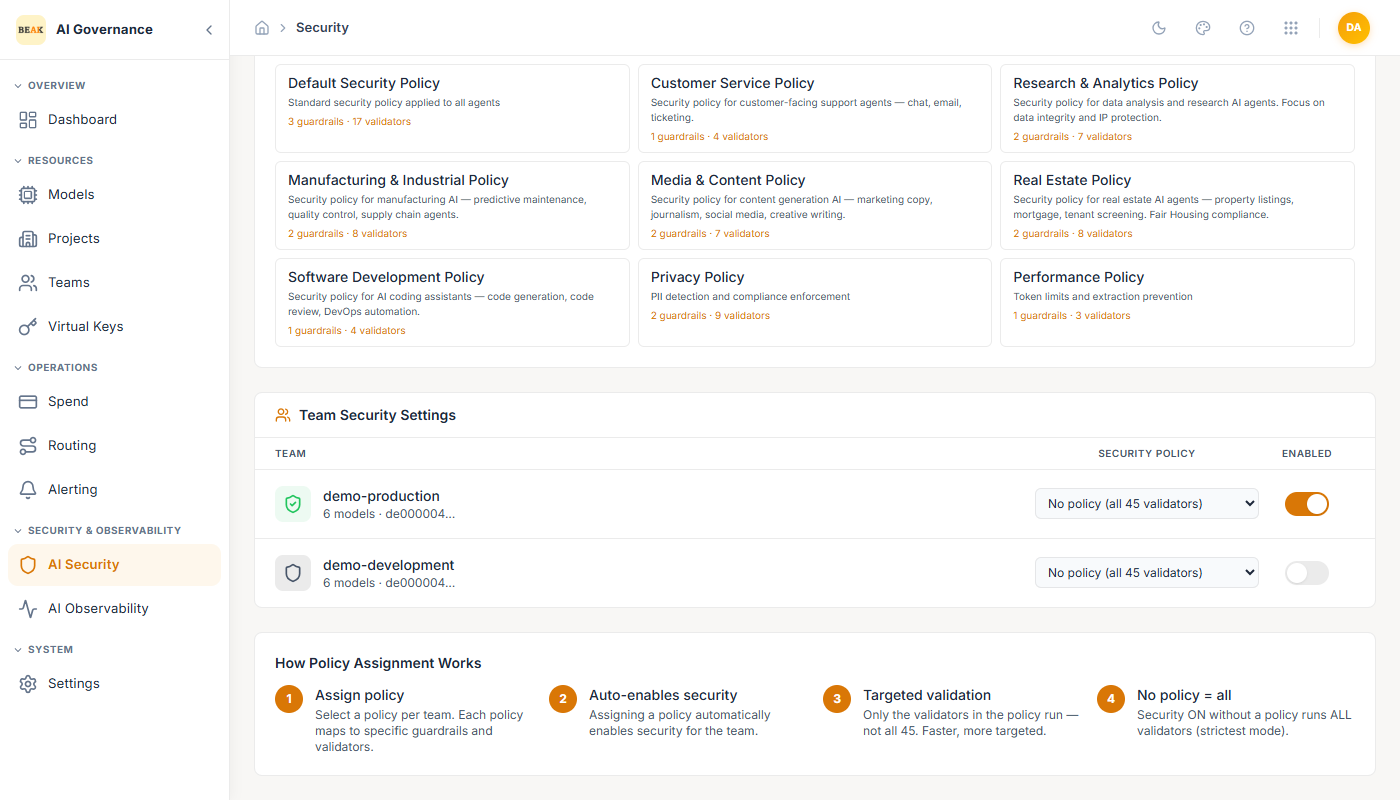
The Team Security Settings table lists every team with a policy dropdown and an enabled toggle:
- Security Policy dropdown — Pick one of the fifteen policies, or leave as
No policy (all 45 validators)to run the full validator set. - Enabled toggle — Turn Security on or off for the team.
Changes take effect on the next request — there is no redeploy step.
How Policy Assignment Works
- Assign policy — Pick a policy per team. Each policy maps to specific guardrails and validators.
- Auto-enables security — Assigning a policy automatically turns on Security for the team.
- Targeted validation — Only the validators in the policy run, not all 45. Faster and more focused than the default mode.
- No policy = all — Security on without a policy runs every validator (strictest mode). Use when a team handles mixed workloads and cannot be pinned to a single domain.
Best Practices
- Assign the most specific policy that fits. The industry policies are tuned for their domain's risk profile and are cheaper than running all 45 validators.
- Leave
No policy = allas the exception, not the rule. It is the slowest and noisiest option. - Keep the policy catalog in sync with your compliance posture. If your tenant adds a SOC 2 requirement, the matching policy (usually Privacy or Default) should surface in the assignment table for every prod team.
- Pair AI Security with Observability. When a validator blocks a request, the corresponding trace explains why — without it, blocked requests look like unexplained 400s.