AI Sites
The AI Sites page sits under the Security · AI Sites eyebrow and is the definitive catalog of every AI web service that the Beak browser extension knows how to detect. Each entry holds the application name, the vendor that publishes it, the host pattern the extension matches against the browser's address bar, and two toggles — Detected (whether the extension actively monitors that site) and Sanctioned (whether your organisation has formally approved its use).
Sanctioned status is the primary signal that shapes the Shadow AI report. Flipping an entry from Unrated to Yes or No immediately reclassifies all usage from that service in the Shadow AI aggregation, giving compliance and security teams a direct lever to surface unapproved AI tool usage across the organisation.
The catalog is populated from two sources. Built-in entries are seeded automatically when the tenant is provisioned and cover the most widely used AI services. Custom entries can be added by your administrator to extend coverage to internal or niche tools not in the default set. Built-in rows cannot be deleted.
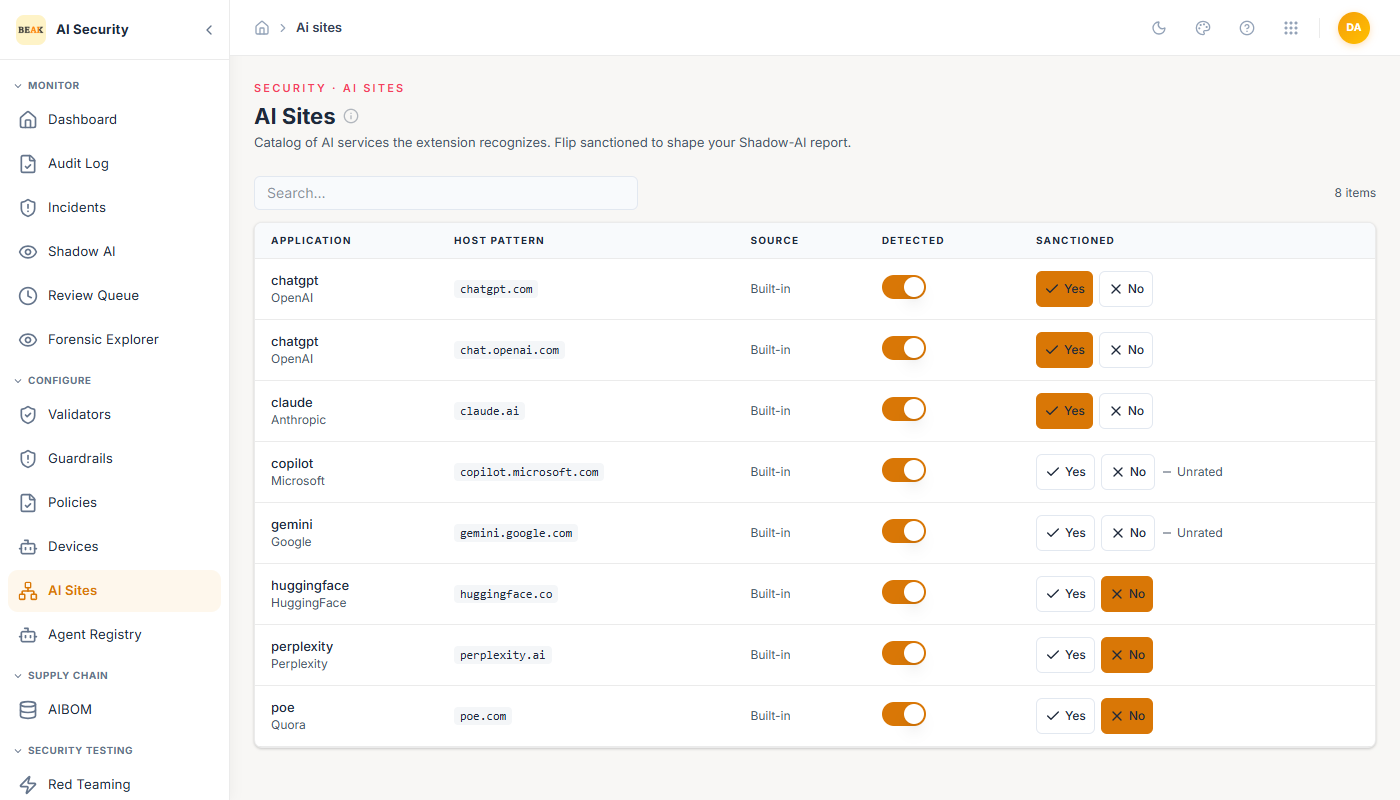
Page Header
The page header carries the AI Sites title, the subtitle "Catalog of AI services the extension recognizes. Flip sanctioned to shape your Shadow-AI report," and a contextual tip describing how host-pattern matching works and the meaning of sanctioned states.
AI Sites Table
The table lists every catalogued AI service. The columns are:
-
Application — The service's display name in bold, with the vendor name shown beneath it in a secondary tone when available.
-
Host pattern — The URL host glob the extension uses to recognise visits to this service, rendered in a monospace code style (for example
chatgpt.comorcopilot.microsoft.com). -
Source — Whether the entry originates from the built-in seed (
Built-in) or was added by a tenant administrator (Custom). -
Detected — A toggle switch controlling whether the extension actively intercepts and scans traffic on this site. When turned off the extension ignores visits to that host; no scan events are recorded and the site does not appear in the Shadow AI report for new activity.
-
Sanctioned — A three-state control with
Yes,No, andUnratedoptions:Yes— Your organisation has explicitly approved this AI service. Usage appears in the Shadow AI report under theSanctionedfilter.No— Your organisation has explicitly prohibited or not approved this AI service. Usage appears under theUnsanctionedfilter and may draw compliance attention.Unrated— No decision has been recorded. Usage appears under theUnratedfilter in the Shadow AI report until a decision is made.
Clicking the active state button a second time returns the entry to
Unrated, allowing decisions to be reversed.
Best Practices
- Rate every active site — Leaving sites as
Unrateddilutes the Shadow AI report's value; work through the catalog and record aYesorNodecision for each service your organisation has evaluated. - Disable detection selectively — Turn off
Detectedfor sites that are universally blocked at the network layer to avoid collecting redundant scan events; keep detection on for sites employees can actually reach. - Add custom entries for internal tools — If your organisation runs self-hosted or proprietary AI services not in the built-in catalog, add them as custom entries so the extension can monitor and report on them alongside commercial services.
- Review after new product launches — When a major new AI service launches publicly, check whether it appears in the catalog and set its sanctioned status before employees begin using it.
- Coordinate with the Shadow AI page — Use the Shadow AI
Unratedfilter to discover services generating scan events that have not yet received a sanctioned decision, then return here to rate them.
Related Pages
- Overview — High-level product overview for Beak AI Security.
- Shadow AI — Aggregated usage report driven by the sanctioned-status values set on this page.
- Devices — Registry of paired browser extensions that generate scan events for the services catalogued here.
- Incidents — Individual DLP scan events recorded against AI sites the extension detects.