Reclaim Opportunities
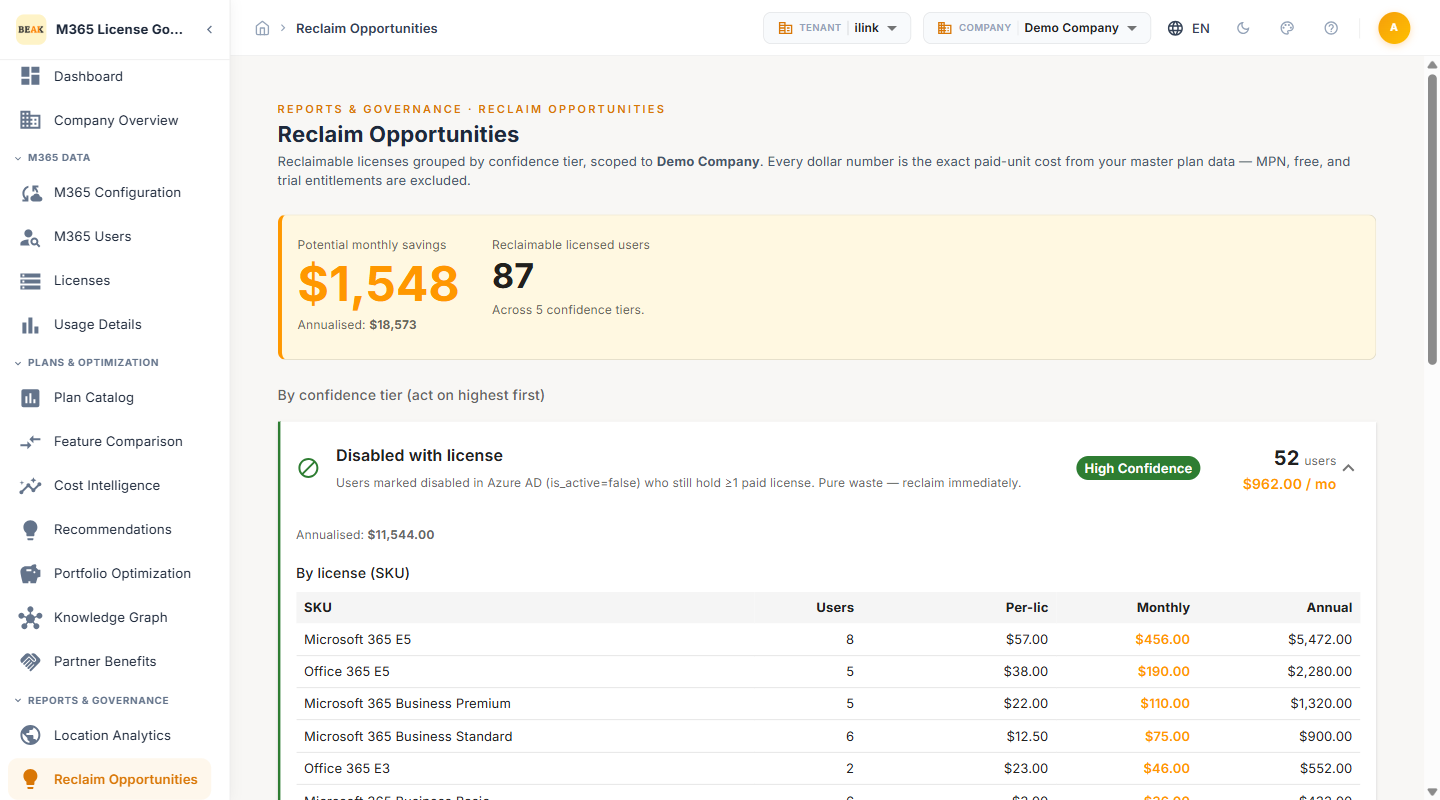
Reclaim Opportunities surfaces paid Microsoft 365 licenses that are almost certainly wasted — assigned to accounts that are disabled, were never activated, or have gone dormant. Every candidate is sorted into one of five confidence tiers, from high-confidence pure waste you can reclaim immediately down to short-term dormancy you should monitor first, so you can act on the safest savings before reviewing the marginal ones.
Headline Metrics
The summary band at the top of the page quantifies the total reclaim opportunity for the selected company:
- Potential monthly savings — Combined monthly cost of every reclaimable license across all five tiers
- Annualised — The monthly figure projected over twelve months
- Reclaimable licensed users — The total count of users holding a license that is a reclaim candidate
- Across 5 confidence tiers — A reminder that the figure blends high-, medium-, and low-confidence candidates; expand each tier to see its individual contribution
Confidence Tiers
Candidates are grouped into five tiers. Each tier card shows its confidence level, the number of users it covers, and the monthly spend tied up in it.
Disabled with license
- Confidence — High
- Definition — Users marked disabled in Azure AD (
is_active=false) who still hold at least one paid license - Action — Pure waste — reclaim immediately. A disabled account cannot use its license under any circumstances
Licensed but never activated
- Confidence — High
- Definition — Active users with at least one license and no recorded activity in any synced service, ever
- Action — Typically ghost or provisioned-but-unused accounts; reclaim after confirming the account is not awaiting onboarding
Dormant 180+ days
- Confidence — High
- Definition — Active users with a license whose last activity was more than 180 days ago
- Action — Very unlikely to need the license; safe to reclaim after a brief check
Inactive 90–180 days
- Confidence — Medium
- Definition — Users whose last activity was between 90 and 180 days ago
- Action — Good candidates to review — may include long-leave or secondment cases, so confirm employment status before reclaiming
Inactive 30–90 days
- Confidence — Low
- Definition — Short-term dormant users whose last activity was between 30 and 90 days ago
- Action — Often seasonal or contracting gaps; monitor before reclaiming rather than acting immediately
Note: Confidence reflects how safely a license can be reclaimed, not how much it saves. A low-confidence tier can still represent meaningful spend — review it, don't ignore it.
Reclaim by SKU
The first table breaks the opportunity down by license SKU, so you can see which products carry the most reclaimable spend:
- SKU — The Microsoft 365 plan name (e.g., Microsoft 365 Business Premium, Microsoft 365 Business Standard, Exchange Online Plan 1)
- Users — The number of reclaim candidates holding that SKU
- Per-lic — The per-license monthly cost
- Monthly — The combined monthly cost of the reclaimable seats for that SKU
- Annual — The annualized cost of those seats
Reclaim by User
The second table lists the individual users behind the opportunity, with the organizational context needed to decide whether to act:
- User — The display name and email of the candidate
- Location — The user's location attribute from Azure AD
- Department — The user's department attribute from Azure AD
- Inactive — How long the account has been inactive, which maps to its confidence tier
- $ / mo — The monthly cost of the license held by that user
Reclaiming Licenses
- Start with the high-confidence tiers — Disabled with license and Licensed but never activated carry the lowest risk and often the highest immediate savings
- Confirm before reclaiming — Use the by-user table's Location and Department context to rule out long-leave, secondment, or onboarding cases
- Cross-reference recommendations — Validate borderline candidates against the Recommendations engine before removing a license
- Return the seat — Once reclaimed, the freed license returns to the pool and becomes available in License Allocation
Best Practices
- Reclaim disabled accounts first — A disabled account holding a paid license is pure waste with no business risk; clear this tier on every review.
- Treat low-confidence tiers as a watch list — Inactive 30–90 day users are frequently seasonal or contracting staff. Monitor them rather than reclaiming prematurely.
- Use SKU breakdown to prioritize — Focus reclaim effort on the SKUs with the highest monthly cost per seat to maximize savings per action.
- Re-run after every sync — Activity windows shift as new usage data arrives; reclaim figures are only as current as the last sync.
- Coordinate with offboarding — Pair reclaim reviews with your HR offboarding process so departed-employee licenses never linger.
Related Pages
- Recommendations — Per-user downgrade, removal, and upgrade suggestions
- License Allocation — Reassign reclaimed seats from the pool
- License Allocation Flow — Visualize how seats flow from total licenses to a recommended action
- Beak M365 License Optimizer Overview — Platform overview and navigation structure