Plan Catalog
The M365 Plan Catalog provides a searchable inventory of all available Microsoft 365 plans and add-ons, including per-user pricing and plan descriptions. Use the catalog to explore licensing options, compare pricing across categories, and save frequently referenced plans for quick access during optimization workflows.
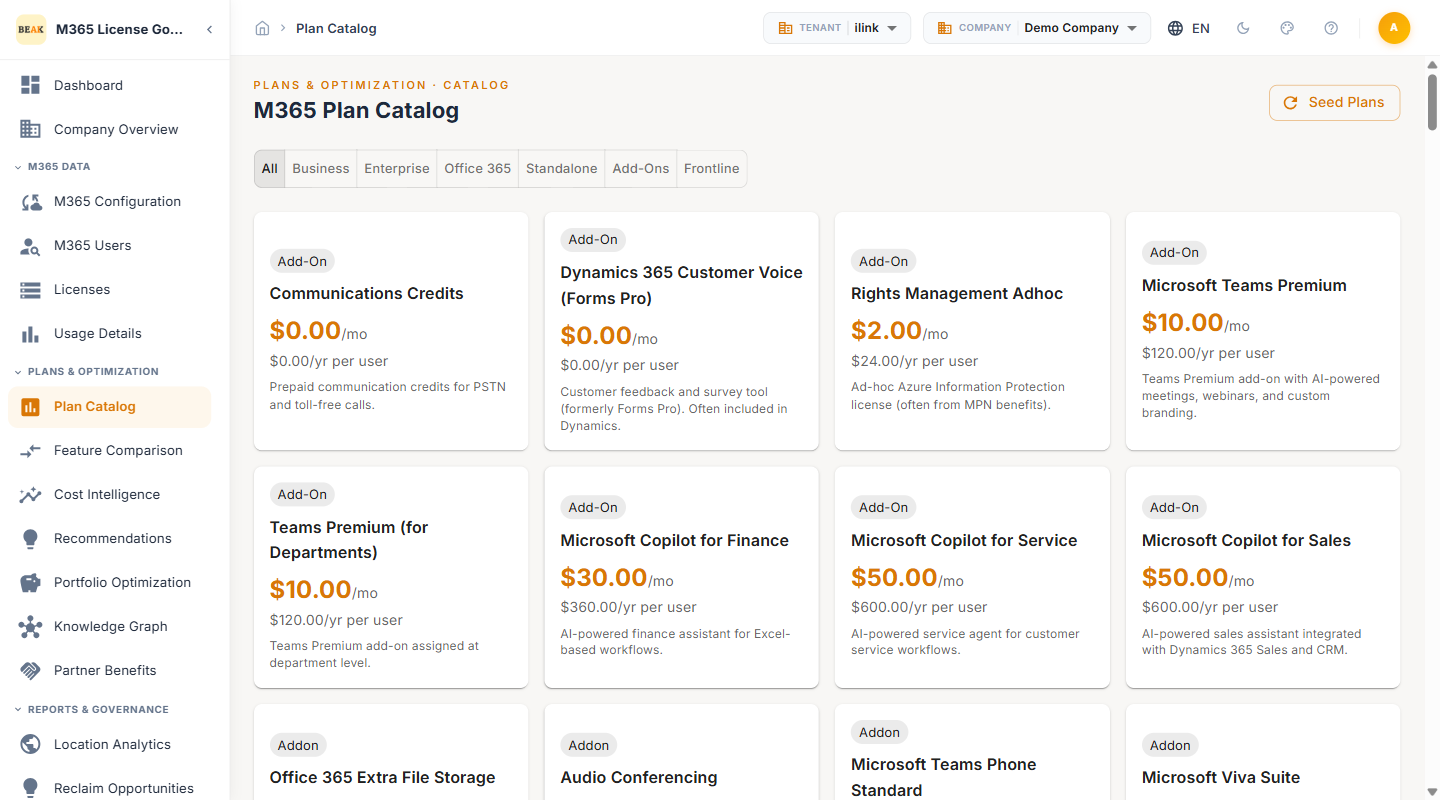
Catalog Interface
The Plan Catalog page displays a header bar with a search field and a Seed Plans button to populate or refresh the plan catalog with the latest Microsoft 365 plan data. Below the header, category tabs allow filtering by plan type, and the main area presents plan cards in a grid layout.
Search
Enter keywords into the search bar to filter plans by name or description. Results update in real time as you type, narrowing the catalog to matching plans across all categories.
Seed Plans
Click the Seed Plans button to import or refresh the catalog with the latest available Microsoft 365 plans and pricing. Use this when new Microsoft plans are released or when plan pricing has been updated.
Category Tabs
The catalog organizes plans into the following category tabs:
- All — Displays every available M365 plan and add-on in the catalog
- Business — Plans designed for small and mid-sized businesses, including Microsoft 365 Business Basic, Business Standard, and Business Premium
- Enterprise — Plans for large organizations, including Microsoft 365 E3, E5, and F-series plans
- Office 365 — Legacy Office 365 plans including Office 365 E1, E3, and E5
- Standalone — Individual service plans such as Exchange Online, SharePoint Online, and Teams Essentials
- Add-Ons — Supplementary licenses that extend functionality on top of base plans, including Copilot add-ons, Teams Phone, and Audio Conferencing
- Frontline — Plans optimized for frontline workers with limited device and app access (F1, F3)
Plan Cards
Each plan is displayed as an individual card containing the following details:
- Plan Name — The official Microsoft 365 plan or add-on name
- Add-On Badge — Displayed on plans classified as add-ons to distinguish them from standalone licenses
- Price Per User/Month — The per-seat monthly cost for the plan (e.g., $10.00/mo)
- Price Per User/Year — The annualized per-seat cost (e.g., $120.00/yr per user)
- Description — A brief summary of the plan's purpose and included capabilities
Available Plans by Category
Each category in the catalog contains a variety of plans at different price points. The following describes what each category covers:
- Business — A variety of plans tailored for small and mid-sized businesses, ranging from entry-level productivity to advanced security and compliance bundles
- Enterprise — A range of enterprise-grade plans covering different tiers of productivity, security, compliance, and analytics capabilities for large organizations
- Office 365 — Legacy Office 365 plans at multiple tiers, retained for organizations on older licensing agreements
- Standalone — Individual service plans covering specific workloads such as Exchange Online, SharePoint Online, and Teams, available separately from full suite plans
- Add-Ons — A broad selection of supplementary licenses that extend base plan capabilities, including Copilot add-ons, telephony, audio conferencing, storage extensions, and compliance tools
- Frontline — Plans designed for frontline and shift workers, offering streamlined access to communication and task management tools at lower price points
Note: The full list of available plans and their current per-user pricing is displayed in the catalog grid. Use the Seed Plans button to ensure the catalog reflects the latest Microsoft plan offerings.
Using the Plan Catalog
- Browse by Category — Select a category tab to narrow the catalog to a specific plan type such as Enterprise or Add-Ons
- Search for a Plan — Use the search bar to locate a specific plan by name or keyword
- Review Pricing — Compare per-user monthly costs across plans to identify cost-effective alternatives
- Save Plans — Bookmark plans for quick reference when evaluating optimization recommendations
- Compare Features — Navigate to Feature Comparison to perform a side-by-side feature analysis of selected plans
Best Practices
- Review add-on costs regularly — Add-on licenses can accumulate significant spend when assigned broadly. Audit add-on assignments against actual usage.
- Use saved plans for recurring evaluations — Bookmark the plans most relevant to your organization to streamline future optimization reviews.
- Cross-reference with recommendations — When the Recommendations module suggests a downgrade, use the Plan Catalog to verify the target plan's pricing and included services before taking action.
- Monitor Copilot plan adoption — Copilot licenses carry premium pricing. Ensure assigned users are actively leveraging Copilot capabilities to justify the cost.
Related Pages
- Feature Comparison — Side-by-side plan feature comparison
- Recommendations — Optimization recommendations with per-user cost impact
- Partner Benefits — Microsoft Partner Network benefit tracking
- Beak M365 License Optimizer Overview — Platform overview and navigation structure