Security Appliances
The Security Appliances page consolidates monitoring for all dedicated security hardware and software appliances across your environment — intrusion detection/prevention systems, web application firewalls, network access control, data loss prevention, email security gateways, secure web gateways, and sandbox solutions. Rather than managing each appliance type separately, this view gives your NOC team a single place to check health, event volume, and alert counts across every security appliance in the fleet.
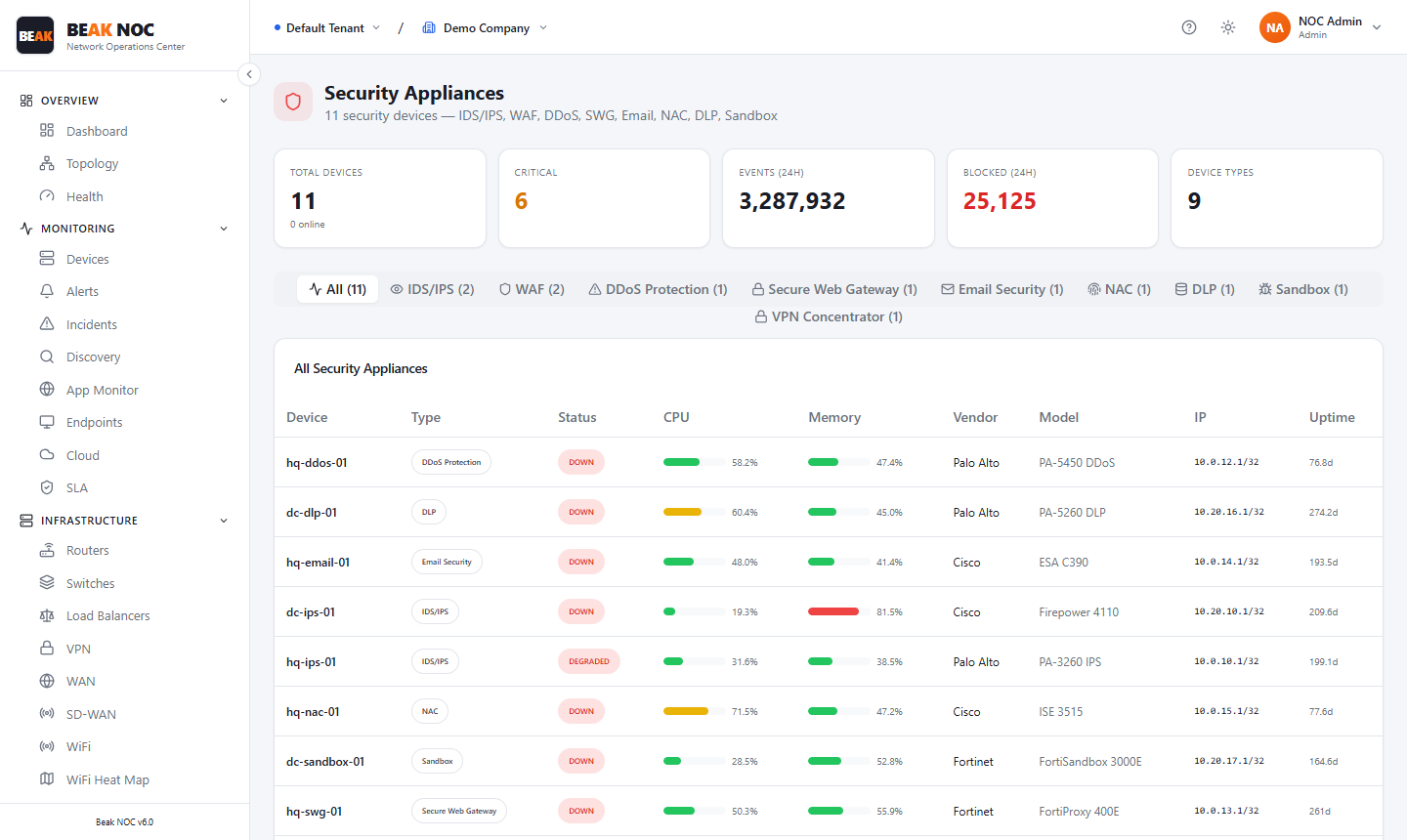
Summary Cards
| Card | Description |
|---|---|
| Security Devices | Total count of security appliances under monitoring |
| Online | Number of appliances currently reachable and reporting |
| Events | Total security events generated across all appliances in the monitoring period |
| Alerts | Total alerts raised by security appliances in the monitoring period |
| Count | Additional summary metric (e.g., active policy violations or blocked connections) |
Device Type Filter
A horizontal filter bar lets you scope the appliance table to a specific device category:
| Filter | Appliance Type |
|---|---|
| All | All security appliances regardless of type |
| IDS/IPS | Intrusion Detection and Prevention Systems |
| WAF | Web Application Firewalls |
| Email security gateways and anti-spam appliances | |
| Web Protection | Secure web gateways and URL filtering appliances |
| Secure Web Gateway | Dedicated SWG devices with SSL inspection |
| Email Security | Advanced email threat protection appliances |
| NAC | Network Access Control systems |
| DLP | Data Loss Prevention appliances |
| Sandboxes | Malware detonation and sandboxing platforms |
The count shown next to each filter indicates how many appliances of that type are monitored.
All Security Appliances Table
The table lists every security appliance with the following columns:
| Column | Description |
|---|---|
| Device | Appliance hostname or display name |
| Type | Appliance category (IDS/IPS, WAF, NAC, etc.) |
| Status | Online or Offline based on last health poll |
| CPU | Current CPU utilisation percentage |
| Memory | Current memory utilisation percentage |
| Vendor | Hardware or software vendor name |
| Model | Specific model or version of the appliance |
| Uptime | Time since the appliance last rebooted |
Click any row to open the device detail view with full event logs, alert history, and configuration metadata.
Best Practices
- Monitor event volume trends — A sudden increase in events on an IDS/IPS may indicate a new attack pattern or a misconfigured rule generating false positives. Investigate before silencing.
- Track sandbox queue depth — If sandboxes are overloaded, malware samples may be delayed or skipped. Ensure sandbox capacity matches your email and web gateway throughput.
- Keep appliances online — Any appliance showing Offline is a blind spot in your security stack. Set alerts for appliance offline events to ensure rapid response.
- Review NAC policy denials — High NAC denial counts may indicate device compliance issues (e.g., missing agents, outdated OS) or attempted unauthorised access.
- Correlate WAF alerts with application errors — Cross-reference WAF event spikes with application performance data to distinguish legitimate attacks from misconfigured WAF rules blocking valid traffic.
Related Pages
- Security Operations Center — Aggregate security posture and threat scoring
- Firewall Module — Firewall-specific monitoring separate from security appliances
- Alerts — Security appliance alerts appear in the unified alert feed
- Compliance — Appliance configuration evaluated against compliance policies