Employees
The Employees directory is a searchable record of everyone in your organization. It gives agents quick access to contact details, reporting relationships, and organizational context when triaging tickets, identifying requesters, or routing work to the right team.
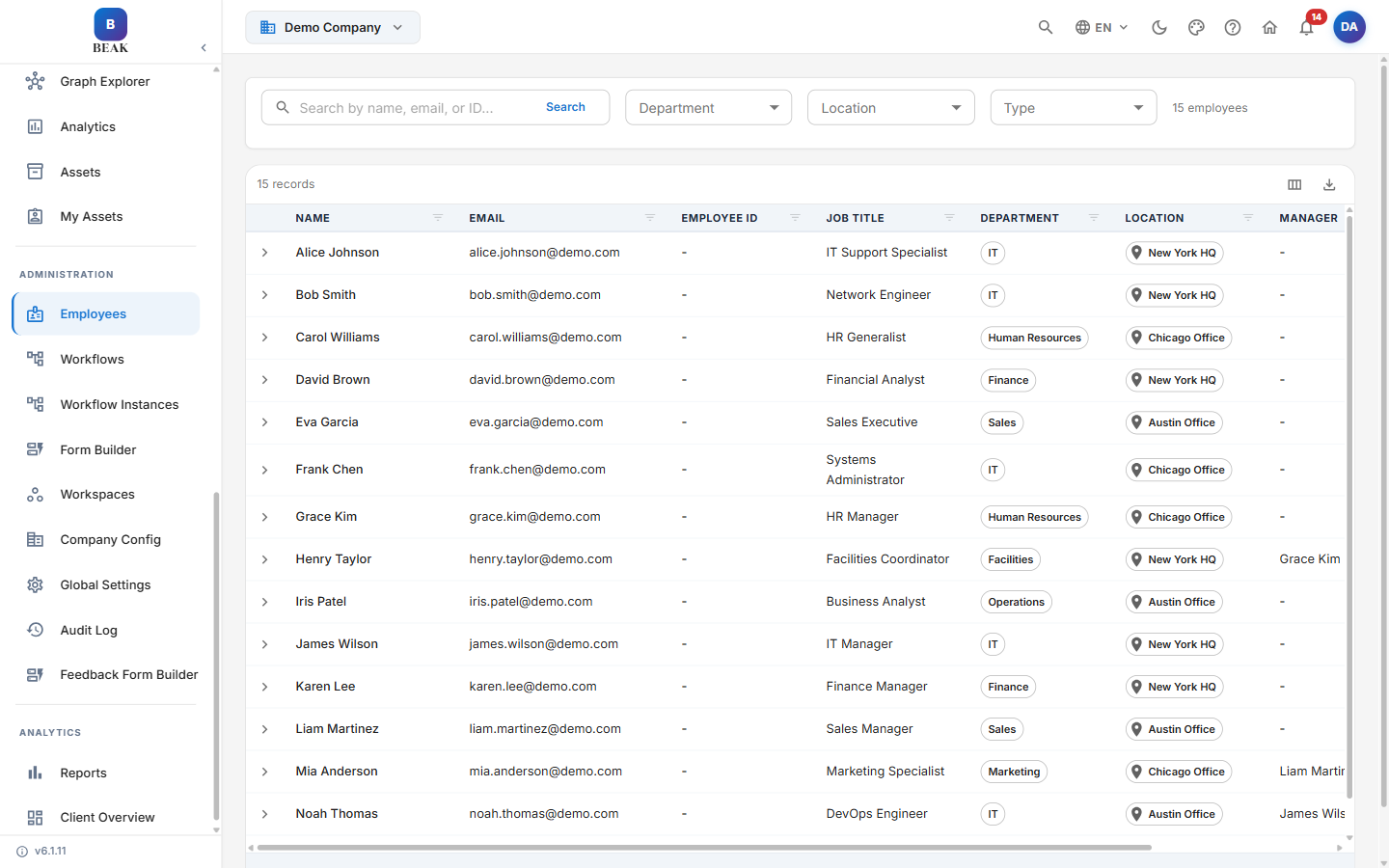
Directory Columns
- Name — The employee's full name.
- Email — Work email address.
- Employee ID — Unique identifier synced from Microsoft Entra ID.
- Job Title — Role or position.
- Department — Organizational department.
- Location — Physical or remote work location.
- Manager — The employee's reporting manager.
- Type — Employment type, such as Permanent or Contract.
Select any row to expand it and view the full employee profile.
Filtering and Search
- Search — Find an employee by name, email, or employee ID.
- Department — Filter the directory to a single department.
- Location — Filter by work location.
- Type — Filter by employment type.
The employee count is shown alongside the filters.
Data Source
Employees are synced from Microsoft Entra ID through Azure AD Sync. When the directory is empty, BEAK ITSM shows the hint "No employees found. Run an Azure AD sync from Settings > Azure AD Sync."
Note: When Azure AD Sync is configured, the directory refreshes automatically on each sync cycle, keeping profiles, departments, and manager relationships current.