Intune Integration – Access Requirements
This guide outlines the required access and permissions to enable integration with Microsoft Intune. These permissions must be added to an existing Azure AD App Registration in the client’s tenant — no new registration is required.
1. Azure AD App Registration Details
Provide the following credentials for the existing Azure AD App Registration that will be used to enable Intune integration:
| Field | Description |
|---|---|
| Tenant ID (Directory ID) | The unique identifier of your Azure AD tenant. |
| Client ID (Application ID) | The application (client) ID of the registered app. |
| Client Secret (Value) | The client secret generated for the app. |
| App Registration Name | The display name of the existing app. |
2. Required Microsoft Intune Permissions
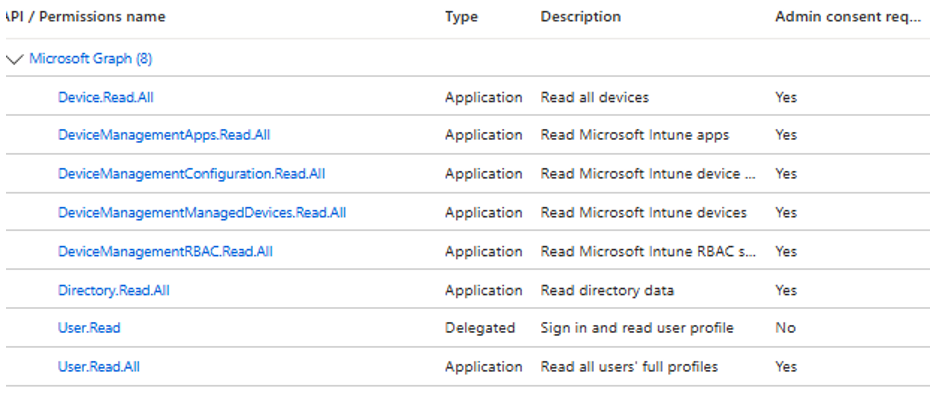
The application must be granted Microsoft Graph API – Application-level permissions to enable secure asset and device synchronization from Microsoft Intune.
Assign the following API permissions to the app:
| Permission | Purpose |
|---|---|
Device.Read.All | Read Intune-managed device inventory |
User.Read.All | Retrieve user details associated with devices |
User.Read | Sign in and read user profile |
Directory.Read.All | Read directory data |
DeviceManagementApps.Read.All | Read Microsoft Intune apps |
DeviceManagementConfiguration.Read.All | Read Intune device configuration and policies |
DeviceManagementManagedDevices.Read.All | Read Intune devices |
DeviceManagementRBAC.Read.All | Read Intune RBAC settings |
⚠️ After assigning permissions, click Grant admin consent.
Once this setup is complete, BEAK will be able to sync asset and device details securely from Microsoft Intune.