Partner Benefits
The Partner Benefits page tracks Microsoft Partner Network (MPN) benefit entitlements and their utilization across your M365 tenant. Monitor MPN license consumption, identify inactive benefits, and ensure your organization is fully leveraging partner-eligible licenses to maximize value from your Microsoft partnership.
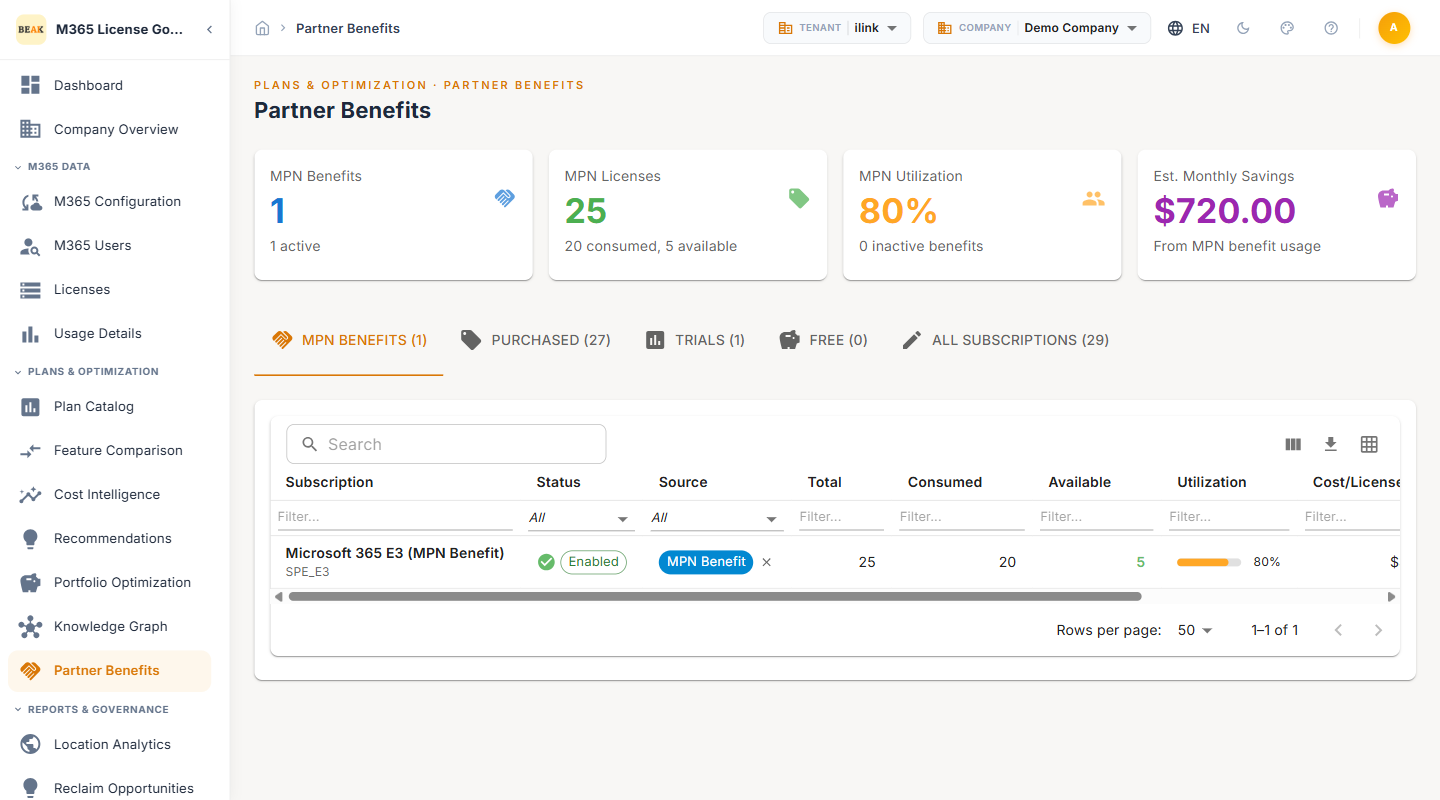
Summary Cards
Three summary cards at the top of the page provide an overview of MPN benefit status and utilization:
- MPN Benefits — Total number of MPN benefit entitlements and the count of currently active benefits
- MPN Licenses — Aggregate license count across all MPN benefits, broken down into consumed and available seats
- MPN Utilization — Overall utilization percentage across all MPN-sourced licenses, with a count of inactive benefits
Subscription Tabs
Below the summary cards, subscription data is organized into five tabs for focused analysis:
- MPN Benefits — Displays only subscriptions sourced from Microsoft Partner Network benefit entitlements
- Purchased — Subscriptions acquired through standard commercial licensing agreements
- Trials — Active trial subscriptions, including evaluation licenses and time-limited plans
- Free — Subscriptions with no associated per-user cost, including developer and community plans
- All Subscriptions — Complete view of every subscription across all sources and types
Each tab displays a count badge indicating the number of subscriptions in that category.
MPN Benefits Table
The MPN Benefits tab presents a table with the following columns:
- Subscription — The name of the MPN benefit subscription (e.g., Dynamics 365 Business Central Partner, Power Automate free)
- Status — The current state of the benefit:
Enabled— The benefit is active and licenses can be assigned to usersLockedOut— The benefit is locked, typically due to expiration or compliance issues, and licenses cannot be assigned
- Source — Displayed as an MPN Benefit badge, confirming the subscription originates from a partner entitlement
- Total — Total number of seats included in the MPN benefit
- Consumed — Number of seats currently assigned to users
- Available — Number of seats remaining for assignment
- Utilization — A visual progress bar showing the percentage of consumed seats relative to total allocation
Purchased Subscriptions
The Purchased tab lists all commercially acquired subscriptions with the same column structure as the MPN Benefits table. Use this view to compare purchased license utilization against MPN-sourced licenses and identify opportunities to shift users from purchased seats to available MPN benefit seats.
Trials and Free Subscriptions
Trials
The Trials tab displays time-limited evaluation subscriptions. Monitor trial expiration dates to plan license conversions or removals before trial periods end.
Free
The Free tab shows subscriptions with no per-user cost, including community-tier plans and developer licenses. These subscriptions still consume administrative overhead and should be reviewed periodically to remove unused assignments.
Monitoring MPN Utilization
Low MPN utilization indicates that partner benefit licenses are going unused, representing unrealized value from your Microsoft partnership. The summary card highlights the overall utilization rate and flags inactive benefits.
Addressing Low Utilization
- Identify available MPN seats — Review the MPN Benefits table to find benefits with high available seat counts
- Cross-reference with purchased licenses — Determine whether users currently assigned purchased licenses could be migrated to MPN benefit seats at no additional cost
- Reactivate locked benefits — For benefits with a
LockedOutstatus, contact your Microsoft Partner account manager to resolve eligibility or compliance issues - Assign available seats — Use the Users module to reassign users from commercial licenses to available MPN benefit seats
Interpreting Subscription Status
| Status | Meaning | Action |
|---|---|---|
Enabled | Benefit is active and seats can be assigned | Assign available seats to reduce purchased license costs |
LockedOut | Benefit is inactive due to expiration or compliance | Contact Microsoft Partner support to investigate and restore access |
Note: A
LockedOutstatus does not automatically remove existing license assignments. Users who were assigned seats before the lockout may retain access temporarily, but new assignments cannot be made until the benefit is restored.
Best Practices
- Maximize MPN seat utilization before purchasing licenses — Always check MPN benefit availability before procuring additional commercial licenses. Available MPN seats represent zero-cost licensing capacity.
- Monitor inactive benefits proactively — A benefit with 0% utilization and
LockedOutstatus may indicate an expired partnership tier or unresolved compliance requirement. Address these promptly to restore access. - Audit trial subscriptions regularly — Trial licenses that expire without conversion can cause service disruption for affected users. Plan trial-to-purchase conversions ahead of expiration dates.
- Use the All Subscriptions tab for full visibility — The consolidated view across MPN, Purchased, Trials, and Free subscriptions provides the most comprehensive picture of your licensing estate.
- Align MPN benefit tracking with renewal cycles — Review MPN benefit entitlements during annual Microsoft Partner renewal to ensure all eligible benefits are activated and assigned.
Related Pages
- Plan Catalog — Full M365 plan inventory with pricing and categories
- Feature Comparison — Side-by-side plan feature comparison
- Recommendations — Optimization recommendations with per-user cost impact
- Beak M365 License Optimizer Overview — Platform overview and navigation structure