Sites
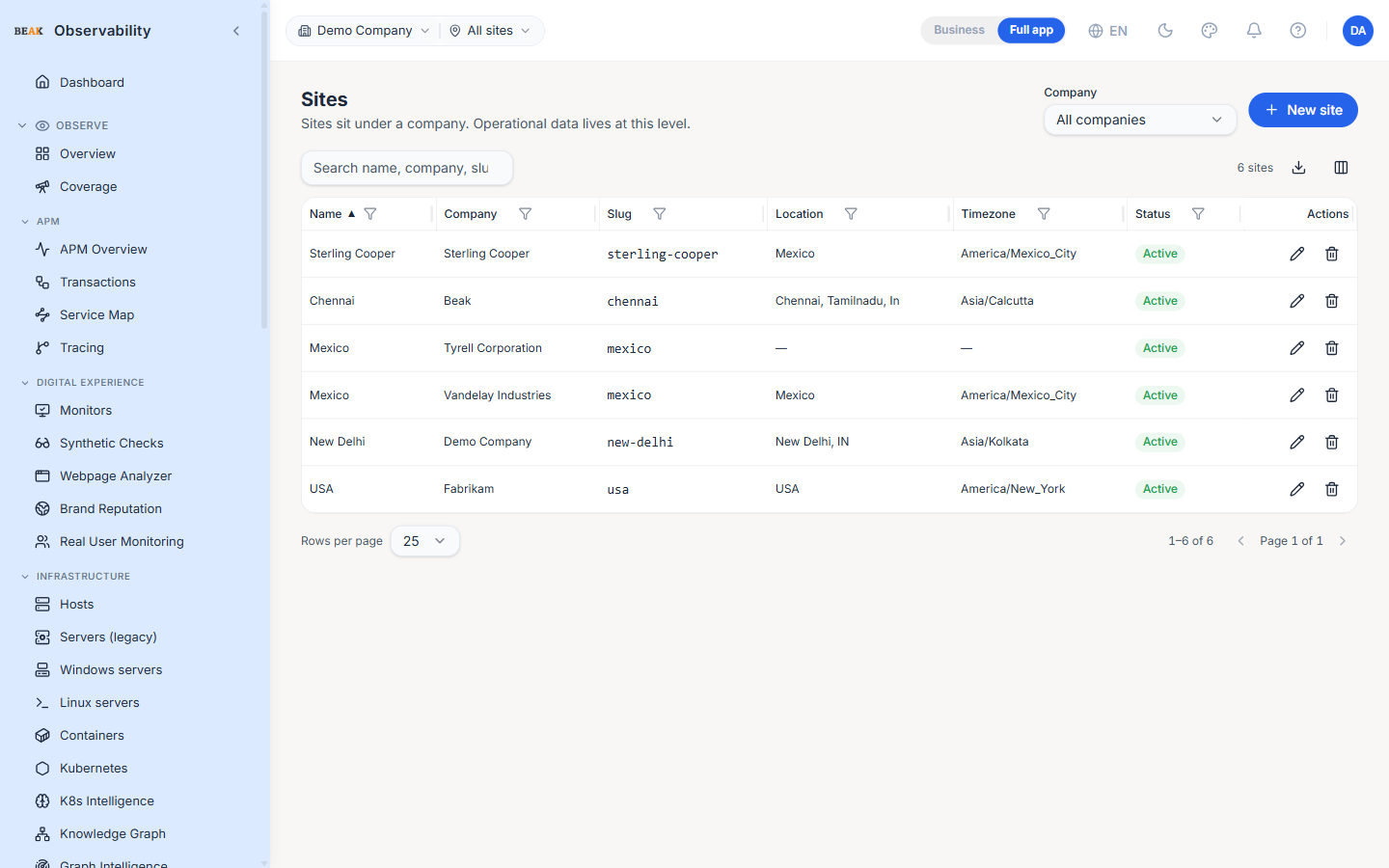
The Sites page is where tenants manage the facility / region catalog. Sites sit under a company; operational data (monitors, hosts, alerts, incidents) is scoped to the site level. A company can have any number of sites.
Columns
- Name — Display name
- Company — Owning company
- Slug — URL-safe identifier; auto-generated from the name on creation
- Location — Free-form location string (city / region / address)
- Timezone — IANA timezone name (e.g.
America/New_York); drives time displays for site-scoped views - Status — Active / Inactive chip
- Actions — Edit and delete
Company Filter
A Company dropdown above the table narrows the list to a single company. All companies (the default) shows every site in the tenant.
Creating a Site
The + New site button opens an editor with these fields:
- Company — Owning company (required; defaults to the company picked in the filter if one is set)
- Name — Display name (required)
- Slug — Optional override; auto-derived when blank
- Location — Free-form location string
- Timezone — Searchable dropdown of IANA timezones (e.g.
America/New_York); type to filter and pick from the list. Because the value is chosen rather than typed, it is always a valid zone - Active — Toggle controlling visibility in the scope picker
If no companies exist yet, the page surfaces an info banner — create a company first under Companies.
Note: Choosing Create site now from the prompt shown after creating a company opens this editor with that company already selected.
Note: The TopBar scope picker's site selector defaults to All sites — no site filter, so records with no assigned site stay visible. Pick a specific site to narrow every scoped page to that location.
Editing
Click the pencil icon to edit a site. Name, Location, Timezone and Active can change after creation; the slug and the owning company are fixed.
Deleting
The trash icon opens a confirmation dialog. Deleting a site is destructive — operational data scoped to the site is cascaded.
Note: Deactivate first if the goal is to remove the site from selectors but keep its history.
Best Practices
- Set the IANA timezone correctly — every chart and table that displays a timestamp respects the site's timezone for the on-call team.
- Use the slug only for internal tooling that needs a stable identifier; the name is what everyone reads.
- Site-level scoping is the right granularity for MSP tenants — companies own the contracts, sites own the data.
- The Company filter is the fastest way to audit a single customer's sites; bookmark the URL with the filter applied for repeat reviews.
Related Pages
- Companies — Sites belong to companies
- Administration — Top-level admin tabs